How to Get an Australian eSIM with Phone Number
Aug 22,2025 | Milo
Table of contents
What to Know Before Getting an Australian eSIM
How to Get and Activate Your Australian eSIM with Phone Number
How to Make Calls with Your Australian Number
FAQs about Australia eSIM with Phone Number
Whether you’re traveling to Australia or planning a long stay, staying connected is essential. An Australian eSIM with phone number allows you to make calls, receive SMS, and access mobile data without swapping physical SIM cards. In this guide, we cover everything you need to know—from device compatibility to activation, local calls, and choosing the best plans.
Travel Smart, Talk Local
Stay connected in Australia with local and international eSIMs – enjoy calls, SMS, and data seamlessly with ByteSIM.
Get Your Australian eSIM Here
What to Know Before Getting an Australian eSIM
Compatible and Unlocked Devices
Before purchasing your Australian eSIM with phone number, it’s important to understand a few key factors that affect usability and convenience. Verifying device compatibility ensures your eSIM will work smoothly on your phone.
- iPhone: You can check by going to Settings > Cellular > Add Cellular Plan—if this option is visible, your device supports eSIM.
- Android: Go to Settings > Network & Internet > Mobile Network > Add Carrier (options may vary by brand and version).
You can also consult a full compatibility list to confirm your device is supported.
It’s also essential that your phone is unlocked to use an Australian eSIM on any carrier. To check, insert a SIM card from a different carrier—if it works, your phone is unlocked. If it shows “SIM Not Supported,” the device is locked. You can request an unlock through your current carrier, following their online instructions or customer support guidance.
Important Device Check Reminder
Due to network upgrades and policy changes in Australia, most Chinese-brand phones may not work on local networks. Before traveling, it is essential to check your device compatibility. You can do this by visiting the official self-check website: AMTA Device Check. To check, enter your 15-digit IMEI number, which you can find by dialing *#06# on your phone.
How to Get and Activate Your Australian eSIM with Phone Number
Activating your Australian eSIM with a phone number is quick and easy. With the Australia Mega Data Plan with Free Calling, you can enjoy high-speed 5G data and unlimited local calls without the hassle of visiting a store. Just follow these simple steps:
1. Choose Your Plan from a Reliable Provider
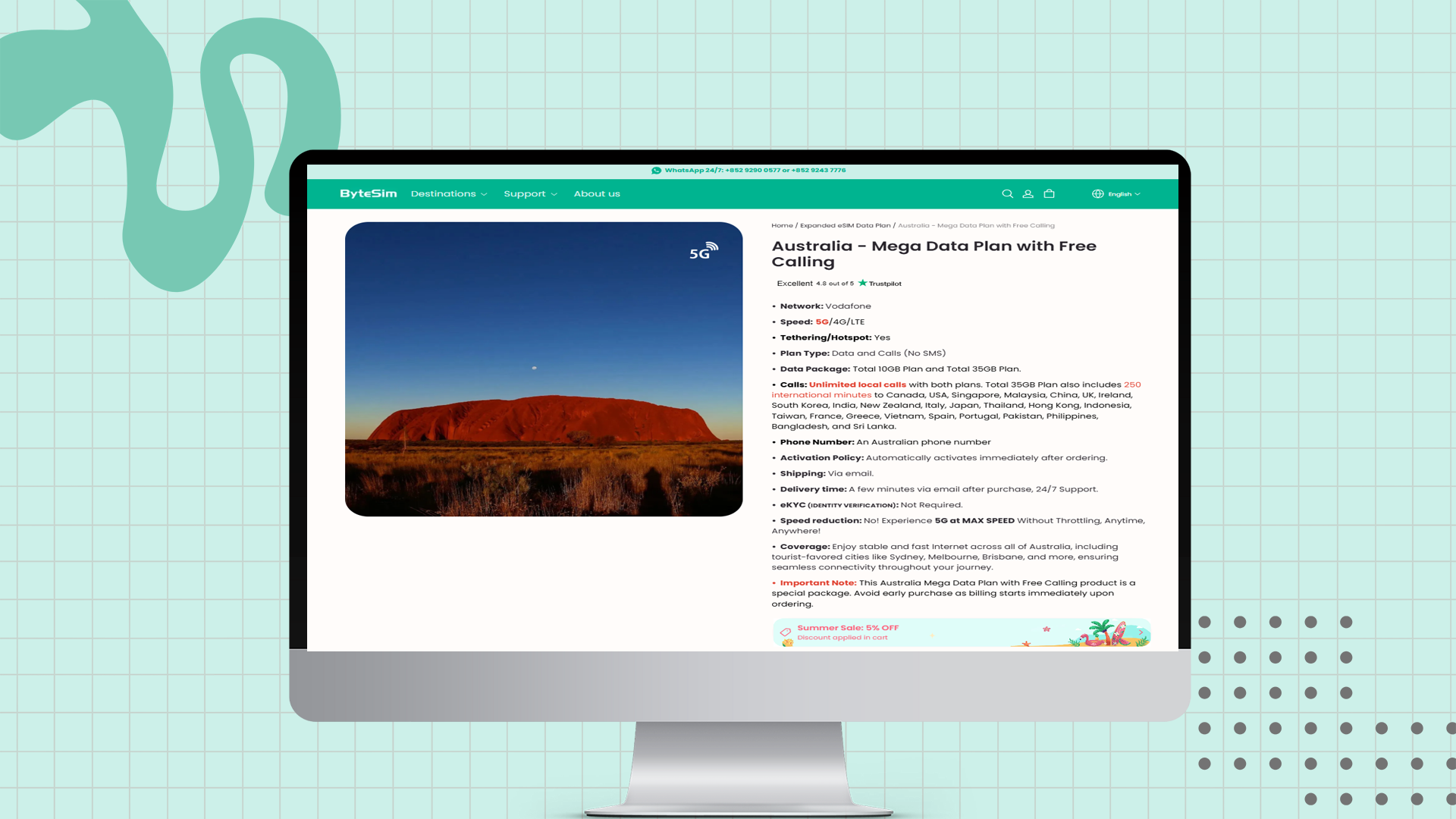
Purchase the plan online from ByteSIM. The Australia Mega Plan runs on Vodafone’s network and includes an Australian phone number for calls. No identity verification (eKYC) is required, and activation starts immediately after purchase. You can select between two flexible packages:
-
10GB Total Data Plan – includes unlimited local calls.
-
35GB Total Data Plan – includes unlimited local calls plus 250 international minutes to destinations such as the USA, Canada, UK, China, Singapore, Japan, India, and more.
Both plans come with an Australian phone number, making it easy to call locally and receive calls during your stay.
Important Note: Billing starts as soon as you order, so avoid buying too early before your travel date.
2. Scan the QR Code to Install Your eSIM
After placing your order, you’ll instantly receive the eSIM details by email—no physical SIM or shipping delays. Since eKYC (identity verification) is not required, the process is fast and stress-free. Once you receive the email, simply:
-
Open your device’s Settings > Cellular / Mobile Data > Add eSIM
-
Scan the QR code and follow the prompts
- The eSIM profile will be installed within seconds.
If you only have one phone with you and can't scan the QR code, you can also try using the SM-DP+ Address and activation code to install the eSIM manually.
3. Activate the Spanish Phone Number
Once installed, your Australian eSIM number is live:
-
Unlimited local calls are included in all plans
-
The 35GB option also provides 250 international minutes to 20+ countries, including the USA, UK, China, Japan, Singapore, India, and more
With coverage across major cities like Sydney, Melbourne, and Brisbane, you’ll stay connected with fast, stable service anywhere in Australia.
Important: SMS messaging is not available with this plan, but calls and data work seamlessly.
How to Make Calls with Your Australian Number

With your Australian eSIM number, staying connected is easy. Although SMS is not supported on this plan, you can still make unlimited local calls and even enjoy international calling minutes (on the 35GB plan). Here’s how it works:
1. Making Local Calls in Australia
Dialing within Australia works exactly like using a local SIM card:
-
To call a mobile or landline number, just dial the number directly.
-
You’ll have unlimited local calls, so you can stay in touch with friends, hotels, rideshare drivers, or customer service without worrying about costs.
-
Your Australian eSIM number will display to recipients, making it convenient for them to call you back.
2. Making International Calls
If you choose the 35GB Mega Plan, you also get 250 international calling minutes to over 20 destinations.

To dial an overseas number:
-
Enter
+(or00) -
Add the country code (e.g.,
+1for the USA,+44for the UK,+81for Japan) -
Dial the rest of the number
Example: To call a US number, dial +1 123 456 7890.
3. Alternative Plans: Data-Only eSIM with VoIP Calling
If you don’t need an Australian phone number, a data-only eSIM can be a practical alternative. These plans give you high-speed 4G or 5G internet across Australia without attaching a mobile number. Instead of traditional calls, you can rely on internet-based communication tools. With a stable data connection, apps like WhatsApp, Skype, Google Voice, Zoom, WeChat, LINE, and Viber allow you to make clear and reliable calls to friends, family, or business contacts anywhere in the world.
For many short-term visitors, this option is cheaper and more flexible than getting a full voice-and-number plan, since you avoid paying for unused minutes or immediate billing. A data-only eSIM is particularly useful for travelers who primarily communicate through VoIP or messaging apps, making it a simple and cost-effective way to stay connected throughout Australia.
FAQs about Autralian eSIM with Phone Number
Can tourists get an Australian eSIM with phone number?
Yes. Many providers, including ByteSIM and local carriers, offer short-term plans suitable for visitors. These plans provide an Australian phone number, unlimited local calls, and high-speed data, making them ideal for travelers who need full mobile functionality without a long-term contract.
Can I use SMS with this Australian eSIM?
No. Currently, ByteSIM’s Australian eSIM do not support SMS messaging. You can make calls and use data normally, but SMS verification or texting is unavailable.
Can I make calls with a data-only eSIM plan?
Yes, but only through VoIP apps like WhatsApp, Skype, Google Voice, Zoom, WeChat, LINE, or Viber. Data-only eSIMs do not include a phone number, so traditional SMS or voice calls are not supported.
Does the Australian eSIM support 5G networks?
Most major carriers, including Vodafone, Telstra, and Optus, provide 5G support for their eSIM plans. You can enjoy high-speed internet across major cities and tourist destinations.
How quickly can I activate my Australian eSIM?
With instant eSIM delivery via email, activation usually happens within minutes. Simply scan the QR code in your phone’s settings, and your number or data plan will be ready to use immediately.
Are prepaid Australian eSIM plans available?
Yes. Both local carriers and international eSIM providers offer prepaid options, allowing flexibility for short-term or long-term use without committing to monthly contracts.
Can I use the Australian eSIM for international calls?
Yes. Number-inclusive plans, like ByteSIM‘s Australia Mega Data Plan with Free Calling, include a set number of international minutes to selected countries. Data-only plans can make international calls via VoIP apps.
Is dual SIM supported with an Australian eSIM?
Yes. Most modern smartphones allow you to use a physical SIM and an eSIM simultaneously. You can set your default line for data, calls, or SMS as needed.
Plans that may interest you
Comment