

Stop Dropping Live Streams: The Best eSIM for Travel Vloggers & TikTokers (2026 World Cup Edition)
May 12,2026 | Milo
I wish someone had told me this before I spent 45 minutes trying to upload a goal clip outside MetLife Stadium.
If you're traveling to the 2026 FIFA World Cup, your biggest problem might not be tickets, flights, or hotels.
It might be this:
- You film an insane last-minute goal.
- The crowd erupts.
- Your TikTok clip could go viral.
And then… Your upload gets stuck.
Because:
- Stadium Wi-Fi crashes
- International roaming slows down
- Local SIM cards stop working once you cross borders
- Airport SIM kiosks sell overpriced tourist plans
For sports creators, football vloggers, and TikTok fans chasing viral match moments, reliable mobile data is part of your production gear.
North America Unlimited eSIM
Covers USA, Canada & Mexico. Direct local routing for smooth 4K uploads.
Why World Cup Creators Need Better Internet Than Regular Fans
There is a massive gap between how a standard tourist uses data and what a content creator demands.
The Regular Fan needs to:
- Load Google Maps to find the stadium
- Message friends on WhatsApp
- Order an Uber
- Look up local restaurant reviews
The World Cup Creator needs to:
- Push TikTok uploads immediately after a goal
- Post high-res Instagram Reels from the fan zones
- Upload YouTube Shorts on the fly
- Run stable livestreams right outside the stadiums
- Send raw, heavy footage to remote video editors
- Maintain multi-device hotspot connections for their laptops and cameras
The Real-World Nightmare:
Imagine your World Cup travel itinerary looks something like this:
Los Angeles → Dallas → Mexico City → Toronto.
If you try to manage that route with traditional SIM cards, it's a disaster. You are going to need multiple physical SIMs, you'll be hit with expensive roaming add-ons from your home carrier, and you'll waste hours dealing with passport verification processes in different countries. A regional World Cup eSIM is the only clean solution to bypass all of it.
The Biggest Upload Problem Inside World Cup Stadiums
Let's talk about the reality of being inside massive venues like MetLife Stadium, SoFi Stadium, AT&T Stadium, or Estadio Azteca.
You have tens of thousands of hyped-up fans packed into one concrete bowl, all trying to do the exact same thing at the exact same time: upload videos, post stories, send messages, and stream the celebrations.
Network congestion in these moments is absolutely brutal. The official stadium Wi-Fi is almost always the first thing to fail under the weight of 80,000 connections. When that crashes, everyone falls back to cellular data. This is where having priority access on a premium network is the only thing that will get your video published.
Why eSIMs Feel Laggy Even with Full Bars
You’re inside MetLife Stadium after a dramatic match. Your phone shows a full signal. You hit upload. And somehow your TikTok stays stuck at 12%. What happened?
The issue often isn’t signal strength. It’s how your mobile traffic is routed.
Many cheap international SIMs route your traffic back to their home country before it reaches the internet.
Example: You’re in Los Angeles. But your roaming SIM routes traffic through servers in London.
That extra distance creates:
- higher ping
- delayed uploads
- unstable livestreams
- slower cloud backups
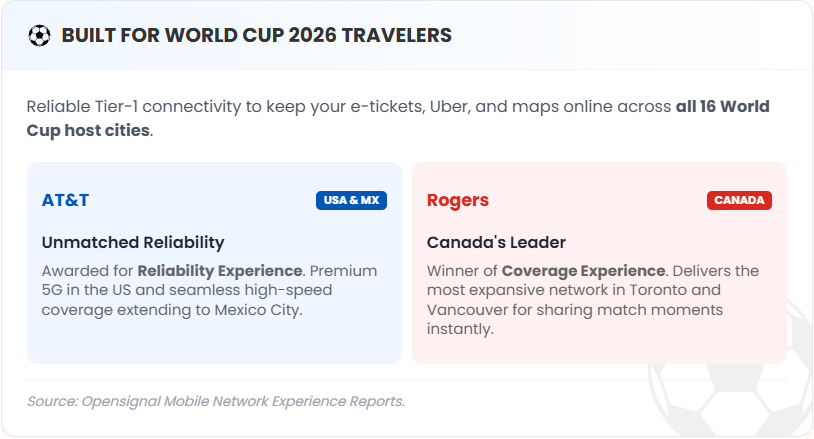
ByteSIM uses Local IP routing, meaning you connect directly to local towers (like AT&T in the US or Rogers in Canada) for the lowest possible latency. This significantly reduces latency during high-pressure moments.
Network Performance Comparison
| Network Solution | Routing Method | Latency (Ping) | Hotspot/Tethering | Best for Creators? |
|---|---|---|---|---|
| Traditional Roaming | Home-routed (Slow) | Very High (>200ms) | Often throttled | ❌ Laggy live streams |
| Budget Local SIMs | MVNO (Virtual) | Medium | May be restricted | ⚠️ Risk of congestion |
| ByteSIM eSIM | Local IP (Direct) | Very Low (<50ms) | *Supported | ✅ Smooth 4K uploads |
*ByteSIM's eSIM plans support hotspot sharing, but some may include hotspot usage limits. Double-check the plan details before checkout if tethering is essential for your workflow.
Upload Speed > Download Speed for Sports Creators
Most travelers ask the wrong question. They ask, "How fast is the internet?"
If you shoot video, the only question that actually matters is: "How fast can I upload this content before the trend dies?"
To put it in perspective, here are typical creator upload needs:
- Goal celebration TikTok: 200MB–500MB
- YouTube match vlog: 2GB–8GB
- 4K stadium footage: 10GB+
- TikTok Live: Continuous, relentless bandwidth demand
Standard tourist eSIMs heavily favor download speeds. If your upload speed is capped, that 4K vlog is going to take six hours to process.
USA vs Canada vs Mexico: Regional Network Challenges
The 2026 World Cup is unique because it's spread across three massive countries, and each presents its own telecom hurdles.
🇺🇸 United States
The Vibe: Strong baseline speeds across the board.
The Catch: Stadium congestion is notoriously bad during major sporting events.
Key Networks: AT&T, T-Mobile US, Verizon.
🇨🇦 Canada
The Vibe: Coverage is very strong in the host cities (like Vancouver and Toronto).
The Catch: Signal strength can drop off significantly during intercity travel or outside major metro areas.
Key Network: Rogers Communications.
🇲🇽 Mexico
The Vibe: Excellent connectivity in main hubs like Mexico City and Guadalajara.
The Catch: Coverage varies significantly once you step outside of the immediate tourist and stadium zones.
Key Network: Telcel.
How Much Data Do You Actually Need for the World Cup
Don't guess and run out of data right before kickoff. Here is a realistic breakdown:
The Casual Fan Creator: You're posting a few IG Stories and social updates throughout the day. → Aim for 1GB/day.
The Daily TikToker: You are editing and uploading short-form match content natively on your phone. → Aim for 3–5GB/day.
The Full-Time Sports Vlogger: You are doing daily heavy uploads, tethering to a MacBook, and livestreaming from the tailgate. → An unlimited plan is highly recommended.
Why ByteSIM Works Well for World Cup Travelers
If you are bouncing between host cities, managing your connection shouldn't be a part-time job. ByteSIM North America eSIM plans are specifically structured for this kind of heavy, multi-country travel.
It automatically works seamlessly across the USA, Canada, and Mexico without you having to swap physical SIMs at the border. It natively supports hotspot tethering, so you can edit on your laptop, and activation is instant. It just works, letting you focus on the match.
FAQ: World Cup 2026 Connectivity
Will my US SIM work in Mexico during the World Cup?
Sometimes—but check your fine print. Many US carriers include Mexico roaming, but they often throttle your speeds to 3G after a few gigabytes, and extra daily roaming fees can add up incredibly fast.
Can I livestream inside World Cup stadiums?
Yes, but extreme network congestion may severely affect your performance. Getting an eSIM that routes you directly through Tier-1 local networks (rather than cheap roaming networks) gives you the best possible chance of holding a stable stream.
Should I buy separate SIM cards for each country?
Usually, no. If you’re traveling across all three host nations (or even just two), buying a local physical SIM at every airport is a massive waste of time. A unified North American regional plan covers the entire tournament footprint.
Comment

