

Dreading a Dropped Connection at the 2026 World Cup? 7 Real-Life Scenarios to Keep You Online Abroad
May 14,2026 | Wang
What Happens When You Lose Internet at the World Cup
Picture this. You've just landed in Los Angeles after a 14-hour flight. Your phone shows zero signal bars.
WhatsApp messages won't send. Uber spins endlessly. Google Maps displays "No internet connection."
You're standing in a parking lot outside SoFi Stadium, completely cut off from the friends you're supposed to meet, with tens of thousands of people surging around you and no idea which direction the entrance is.
This isn't a worst-case hypothetical. During Euro 2024, social media was flooded with complaints from fans:
"Roaming cost me $15/day and the speed was basically 2G."
"Got to the stadium and realized my e-ticket requires an internet connection to verify."
"Switched cities and my SIM card just stopped working."
The 2026 World Cup will be even more complicated — matches are spread across three different countries, and many fans will travel between the US and Mexico multiple times, facing potential network disruption at every border crossing.
🏆 FIFA World Cup 2026™
16 HOST CITIES · UNITED STATES · CANADA · MEXICO
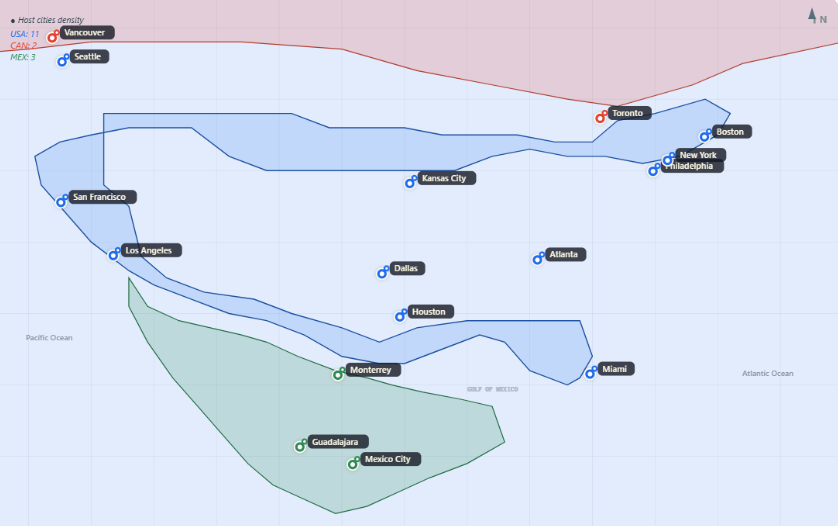
The good news: a single eSIM — an embedded SIM, meaning a digital SIM profile downloaded directly to your phone without needing a physical card slot — solves every one of these problems.
You scan a QR code before departure, and your phone automatically connects to local networks across all three countries, switching seamlessly as you cross borders without any manual setup.
7 Scenarios Where Losing Internet Ruins Your Trip
FIFA World Cup 2026™
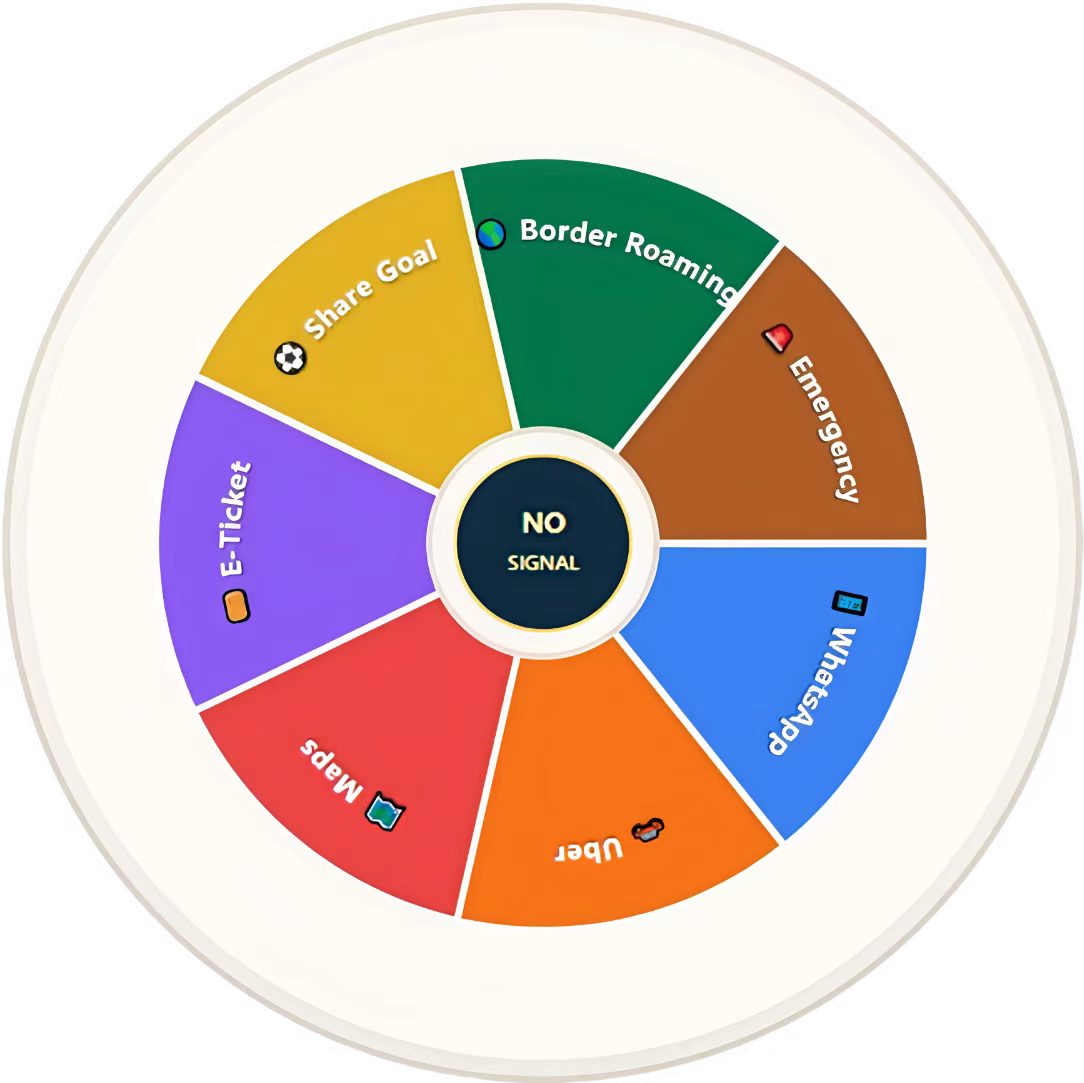
Scenario 1: WhatsApp Goes Silent — You Lose Your Group
World Cup trips are group adventures. Your fan group might have 15people spread across different flights, different hotels, all coordinating through one WhatsApp thread:
-"Who has the tickets?"
-"What time at which gate?"
-"Where are we eating after the match?"
WhatsApp runs entirely on data.
Without a network connection, you can't receive messages, share your live location, or accept voice calls. As WhatsApp's official help center confirms, the app has no SMS fallback — when your data drops, you're completely unreachable.
Key fact: WhatsApp uses roughly 1KB per text message, 0.7MB per minute for voice calls, and 5MB per minute for video calls. Even in the crowded environment around a stadium, these functions work reliably on a carrier network — unlike overloaded public WiFi.
Scenario 2: Uber Won't Load — You're Stranded Outside the Stadium
After the final whistle, tens of thousands of fans pour out of the stadium simultaneously. Among the16 World Cup host cities, many — Dallas, Houston, Kansas City — have limited public transit. Uber or Lyft is often the only realistic way to get back to your hotel.
Uber requires a constant data connection for GPS positioning, driver matching, real-time navigation, and payment processing. Without data, the app simply won't load. Worse, post-match ride demand spikes 5–10x above normal. Every minute you can't open the app means another 20 minutes added to your wait.
There's a technical factor many travelers overlook: Uber relies on A-GPS (Assisted GPS — a system that uses carrier cell towers to supplement satellite positioning, dramatically improving speed and accuracy).
Without a local carrier connection, your phone's location accuracy can drift by hundreds of meters, making it impossible for your driver to find you.
Scenario 3: Google Maps Goes Blank — You're Lost in a Foreign City
From hotel to stadium, from stadium to restaurant, from one city to another — your entire World Cup itinerary depends on the assumption that navigation is always available.
Some travelers counter, "I'll just download offline maps."
Google Maps does support offline downloads, but offline mode does not support real-time traffic conditions, public transit schedules, searching for new locations, or route updates due to temporary road closures.
On match days, traffic rerouting and restricted zones are the norm — the route showing on your offline map may already be wrong.
Scenario 4: Your E-Ticket Won't Load — You're Stuck at the Gate
The FIFA 2026 official ticketing system is fully digital — your ticket lives inside the FIFA app or your phone's wallet, and entry requires an online verification scan.
Imagine standing in the entry queue 30 minutes before kickoff.
You open the app. "Unable to connect to server."
Hundreds of people behind you are growing impatient. Without data, you can't even display the QR code.
Scenario 5: You Can't Share That Goal in Real Time
You witness a last-minute screamer that sends the entire stadium into eruption. You pull out your phone, record a clip, and try to post it to Instagram Stories — but there's no connection.
By the time you're back at the hotel on WiFi, your feed is already buried under professional highlights. In the age of social media, sharing from a live sporting event has a shelf life of minutes, not hours.
You need instant upload capability, not delayed posting.
Scenario 6: You Cross a Border and Lose Your Connection
This is the 2026 World Cup's most unique challenge.
A typical fan itinerary might look like this: group stage in Toronto → Round of 16 in New York → semifinal in Mexico City. Three countries, three separate carrier ecosystems.
If you're using a single-country SIM or eSIM, every border crossing means buying a new plan or swapping a new card. That's not just inconvenient — it creates "dead zones" of a day or two where your old plan has expired and your new one hasn't arrived yet.
A tri-country eSIM eliminates this problem entirely.
Your data connection auto-switches networks at every border, exactly as if you were traveling within a single country — a seamless experience that's especially critical for fans moving between host cities across all three nations.
Scenario 7: An Emergency Happens and You Can't Call Anyone
Large-scale events bring large-scale risks: crowd crushes, extreme heat, language barriers, petty theft.
If you're unwell, if your belongings are stolen, or if you've been separated from your group, the ability to make a phone call can be a matter of personal safety.
While most countries allow SIM-less phones to dial emergency numbers like 911, contacting your travel companions, hotel, or embassy requires a working voice and data plan.
An eSIM with calling capability gives you a local number — you can make and receive calls without relying on WiFi.
4 Ways to Get Internet Abroad: Which One Works for the World Cup?
| Factor | International Roaming | Public / Stadium WiFi | Local Physical SIM | eSIM (Tri-Country) |
|---|---|---|---|---|
| Cost (20 days) | $200–400+ | Free (with tradeoffs) | 30–50/country×3=90–150 | $62.90 (all 3 countries) |
| Cross-border switching | Auto, but costs spike | N/A | Must rebuy each country | Auto, seamless |
| Network quality | Depends on carrier agreements | Extremely unstable at peak times | Depends on brand | AT&T / Rogers Tier-1 5G |
| Ready on arrival | ✅ | Must find a hotspot | ❌ Need to queue and buy | ✅ Activated before departure |
| Voice calls | ✅ (but expensive) | ❌ | Depends on plan | ✅ Unlimited (US/MX/CA) |
| Hotspot sharing | Usually blocked or extra fee | N/A | Depends on plan | ✅ Supported |
| Security | High | ⚠️ Man-in-the-middle risk on public WiFi | Medium | High |
| World Cup ready? | ❌ Too expensive | ❌ Unreliable | ⚠️ Cross-border hassle | ✅ Best choice |
The 2026 World Cup's defining challenge is the tri-country format.
Only an eSIM covering the US, Mexico, and Canada delivers one plan, three countries, zero interruptions — at a fraction of what roaming costs and with far more reliability than any public WiFi.
Why eSIM Is the Best Option for World Cup Travelers
The comparison table tells most of the story, but here's why eSIM is particularly well-suited to this specific tournament:
1. One plan, three countries, no headaches.
Matches are spread across 11 US cities, 3 Mexican cities, and 2 Canadian cities. Most fans will visit at least two countries. A tri-country eSIM means flying from Toronto to Dallas to Monterrey without touching a single network setting — your phone automatically connects to the strongest local carrier.
2. Two-minute setup before you leave home.
No waiting for delivery, no hunting for a SIM shop at the airport. You scan a QR code on your phone (which installs an eSIM profile — an encrypted digital file containing your plan details and network authentication), and the moment you land, you flip on mobile data and you're online.
The process is about as complicated as downloading an app from the App Store. If you're unsure whether your phone supports eSIM, our complete eSIM compatibility list covers every major model released since 2018.
3. Premium networks that won't buckle under crowd pressure.
When 80,000 fans are simultaneously streaming, posting, and calling inside and around a stadium, public WiFi collapses instantly.
An eSIM connected to a Tier-1 carrier (a top-level network operator that owns its own core infrastructure rather than reselling capacity) delivers bandwidth and stability that shared WiFi simply cannot match.
According to Opensignal's 2025 US Mobile Network Experience Report, AT&T ranks first in the US for network reliability — the single most important metric when you're competing with tens of thousands of other users for signal.
4. Voice + data: a double safety net.
Most data-onlyeSIM plans give you internet but no calling.
A premium World Cup eSIM plan includes unlimited calls and SMS across all three countries — meaning you can directly call local restaurants, hotels, venue staff, and emergency services without depending on glitchy VoIP apps.
World Cup 2026 North America eSIM: Full Plan Breakdown
Based on the above analysis of actual travel needs for the World Cup, why is ByteSIM recommended?
Below are the core specifications of the three-country eSIM packages specifically designed for 2026 World Cup viewers:
| Specification | Details |
|---|---|
| Coverage | United States + Mexico + Canada (single plan) |
| Data | US & Mexico: Truly unlimited (no daily caps, no speed throttling) / Canada: 25GB |
| Calls & SMS | Unlimited across all three countries |
| Network | AT&T Premium 5G (US & Mexico) / Rogers (Canada) |
| Duration | 20 days (covers a typical group stage → knockout round itinerary) |
| Price | 62.90USD 3.15/day) |
| Hotspot | ✅ 10GB Supported |
| Support | 24/7 live support — under 5 min response via WhatsApp & email |
| Rating | ⭐ 4.8/ 5 on Trustpilot |
Why AT&T and Rogers? This isn't a random pairing.
AT&T was awarded the Reliability Experience crown by Opensignal for US mobile networks, and its premium 5G coverage extends into Mexico's major cities — including World Cup hosts Monterrey, Guadalajara, and Mexico City.
Rogers leads Canada in coverage breadth, with particularly strong performance in tournament host cities Toronto and Vancouver.
Together, these two Tier-1 carriers ensure top-tier connectivity across all 16 match venues.
FAQ: 14 Common Questions About Staying Connected at the World Cup
Q1: Does my phone support eSIM?
Most mid-to-high-end phones released after 2019 support eSIM, including iPhone XS and later, Samsung Galaxy S20 and later, and Google Pixel 3 and later.
Q2: Will the eSIM replace my existing SIM card? Can I still receive texts on my home number?
No. The eSIM operates alongside your physical SIM — this is dual-SIM functionality. Your home number stays active: you'll still receive SMS verification codes and incoming calls.
Q3: Can I use WhatsApp without WiFi?
Yes. As long as your phone has a cellular data connection, every WhatsApp feature — text, voice calls, video calls, live location sharing — works normally.
Q4: Won't the free WiFi at the stadium be enough? Why do I need an eSIM?
In theory, venues may offer free WiFi. In practice, the experience is typically terrible. The math is straightforward: an 80,000-seat stadium shares its WiFi bandwidth across all connected users.
When tens of thousands of people connect simultaneously, speeds drop to near zero. Your eSIM uses carrier cell towers — a completely independent channel with far greater capacity and stability than shared WiFi.
Q5: Do Uber and Lyft work in all World Cup host cities?
Uber operates in all 16 host cities across the US and Mexico, as well as in Toronto and Vancouver in Canada. Lyft primarily covers US cities. Both apps require a continuous, stable data connection to function — which is precisely what your eSIM provides.
Q6: Isn't Google Maps offline mode enough? Why do I need live data for navigation?
Offline maps display basic routes, but they cannot provide:
- Real-time traffic and congestion alerts
- Live public transit arrival times (subway / bus)
- New location searches (e.g., "Mexican restaurant near me")
- Route updates for match-day road closures and detours
During a major tournament, traffic rerouting and temporary restricted zones are standard. Only a live data connection gives you accurate, real-time navigation.
Q7: When I fly from the US to Mexico, do I need to manually switch the eSIM?
No. The tri-country eSIM automatically detects which country you're in and connects to the local partner carrier (AT&T in the US and Mexico, Rogers in Canada).
Q8: Is 20 days enough? What if my trip is longer?
The 2026 World Cup runs from June 11 to July 19 — a total of 39 days. The 20-day plan is designed to cover a typical fan itinerary (group stage plus one or two knockout rounds). If you're staying longer, you can easily purchase an additional plan online before your current one expires.
Q9: Is "Truly Unlimited" a marketing gimmick? Will speeds be throttled after heavy use?
This plan uses AT&T's Truly Unlimited data tier in the US and Mexico — no daily caps, no speed drops. The Canada portion provides 25GB of high-speed data, which is more than sufficient for most fans whose Canadian stop is limited to 1–3 match days.
Q10: Can I use the eSIM as a hotspot to share internet with friends?
Yes. This plan explicitly supports hotspot sharing (tethering). If you're traveling with companions, your phone can serve as a mobile WiFi hotspot — potentially saving everyone from buying individual plans.
Q11: Is eSIM activation difficult? How long does it take?
The entire process takes under two minutes and involves three steps:
- Receive your QR code via email after purchase
- Open Settings → Cellular → Add eSIM on your phone and scan the QR code
- The eSIM profile downloads and installs automatically — toggle on data roaming and you're connected
We recommend completing installation the day before departure so you're ready to go the moment you land.
Q12: If something goes wrong abroad, how do I reach support?
Customer support is available 24/7 through both WhatsApp and email, with an average response time under 5 minutes. Given the time zone challenges of a tri-country tournament, around-the-clock support means you can get help whether it's 3 AM in Mexico City or midnight in Toronto.
Q13: Do I need to set the eSIM as my default data line?
Yes. After installation, go to your phone's cellular settings and designate the eSIM as your default data line.
Q14: Is eSIM secure? Can someone steal or copy my plan?
eSIM is actually more secure than a physical SIM card. The eSIM profile is encrypted and stored in your phone's secure element — it cannot be physically removed, copied, or transferred to another device. Even if your phone is lost or stolen, no one can use your eSIM plan on a different device.
One Last Step Before You Fly
The 2026 World Cup may be a once-in-a-lifetime experience. You've spent thousands on flights, hotels, and match tickets.
Don't let internet access — the smallest expense on your list — become the biggest source of frustration.
Here's what it comes down to:
- WhatsApp, Uber, Google Maps, and digital tickets — every essential World Cup app requires an internet connection
- The tri-country format is this tournament's defining logistical challenge, and single-country SIM cards simply cannot handle it
- Stadium WiFi is unreliable — you need a dedicated carrier connection
- One tri-country eSIM on AT&T and Rogers networks,20 days of truly unlimited data, $62.90 total — delivers the best combination of reliability and value
Your World Cup starts with staying connected. Two minutes before departure, scan a QR code, and never worry about losing internet across16 cities and 3 countries → View World Cup 2026 eSIM Details

Comment

