You’re in a hotel room in Lisbon, watching your team play a match back home, when the stream freezes right before the goal. It’s a familiar kind of frustration for anyone who travels.
The instinct is to blame the eSIM or the hotel Wi-Fi, but more often than not, neither is really at fault. The actual problem is something travelers rarely think about — how far their data has to travel before it reaches them. And that’s precisely what a lot of new infrastructure is quietly starting to fix.

Why Streaming Abroad Just Feels Worse
Nobody tells you this when you buy a travel eSIM: your data doesn't just connect to "the internet" like some single magic pipe. It hits a local tower first, gets handed off to your provider's roaming partner, bounces over to a regional data center, and only after all that reaches whatever's actually hosting the stream. Every one of those hops eats time.
At home, Netflix can pull from a server a few miles away. Abroad? You're often pulling from a server still sitting in a different country, because the local caching setup for that app either doesn't exist where you are or your roaming partner hasn't struck a deal for it. A stream that looks flawless in Chicago turns into a slideshow somewhere in rural Portugal — on a connection that technically tests "fast."
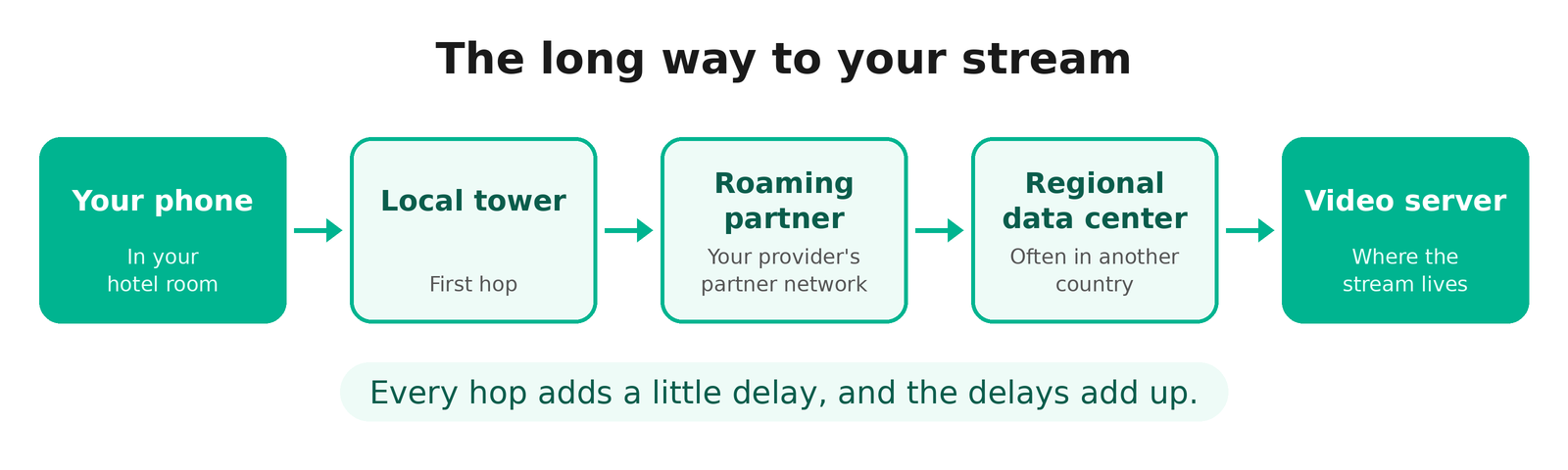
Roaming adds extra routing steps nobody sees. Major streaming services use a mix of their own delivery networks, ISP partnerships, and CDN infrastructure to bring content closer to viewers. How well this works varies by service, network, and location, so a good speed test doesn't always guarantee smooth playback. Airport Wi-Fi, meanwhile, was built for checking email. Not for three hundred people streaming the same match at once.
Companies actually building this infrastructure (rolling out 5G coverage, deploying edge nodes closer to users) publish real technical detail on it. Providers like DXC Technology, Akamai, and Cloudflare cover exactly this kind of work on their own industry pages, including DXC's at https://dxc.com/industries/technology-media-telecom.
The Short Version of Why It's Getting Better
Two things are quietly fixing this. One: newer 5G networks handle crowded places (airports, stadiums, train stations) a lot better than old ones, so one packed terminal doesn't drag everyone's connection down with it. Two: more video processing now happens on servers physically closer to you, instead of bouncing back to a data center on another continent.
That second part is the one that actually matters for a hotel room in Lisbon. Fewer hops, closer server, less time wasted in transit before anything hits your screen. It's basically the grocery-store trick — stock a local warehouse instead of trucking every single order in from one depot halfway across the country.
What to Do When Your Stream Actually Freezes
Here's the part that's genuinely useful mid-trip, when the match has already started and you don't care about the technical why.
- Switch network modes manually. Try switching between 5G and LTE to see which gives you a more stable connection in your current location. A stable LTE connection may perform better than a weak or congested 5G signal.
- Turn airplane mode on, then off again. Feels like a non-fix, but it works more often than you'd think — your phone reconnects fresh to whatever tower is actually strongest nearby, instead of stubbornly hanging onto the weak one it grabbed the second you walked into the building.
- Just turn off Wi-Fi for a minute. During any big live event, every single person in that hotel or terminal is hammering the same network trying to watch the same thing. Mobile data, even roaming, can be the quieter road.
- Drop the quality down yourself. Apps are supposed to auto-adjust, and sometimes they just don't react fast enough. Manually dropping from HD to SD right as the buffering wheel shows up tends to fix things quicker than waiting it out.
- Test whether your VPN is helping or making it worse. If you're using a VPN, try disconnecting it temporarily to see whether playback improves. A VPN can add another routing step and may also affect how a streaming service identifies your location.
- Restart the app, not just the stream. A surprising number of buffering issues are the app's local cache getting confused after switching networks a few times, not the connection itself.
How to Pick a Plan That Won't Let You Down
Not every eSIM provider is built the same. Price tags can look nearly identical and still hide very different networks underneath.
Start with which local carrier your eSIM actually lands on — some roaming deals ride far better networks than others. Does the provider actually name 5G coverage, or is it hiding behind vague "4G/LTE" wording in the fine print? That's a tell. Skip the generic speed-test screenshots too. A random forum thread complaining (or not) about streaming quality in your exact destination will tell you more than any marketing chart. And keep an eye on throttling caps — hit one, and even solid 5G underneath won't save your latency.
A few extra habits worth building in before you even land:
- Open a streaming app or make a video call within the first hour of activating — that's your window to actually troubleshoot or switch providers if something's badly off.
- Look up coverage for your actual route, not just "does this country have coverage." The rural stretch between two cities is usually where a plan quietly falls apart.
- A second eSIM from a different provider, tucked away as backup, saves a scramble if the main one underperforms somewhere you didn't expect.
- Buy a bit more data than the trip seems to need. Check whether your plan reduces speeds after you use up its high-speed data allowance, and monitor your remaining data to avoid unexpected slowdowns.
Chasing the biggest number on a speed test is kind of a trap, honestly. A moderately fast connection with fewer hops can be more reliable than a faster one that bounces through three pointless stops before it reaches you.
Pick your destination, install your eSIM before you fly, and be online the moment you land.
View eSIM→
Bottom Line
Buffering abroad isn't some unsolvable fact of travel. Part of it is infrastructure quietly getting better in the background — better 5G handling for crowded places, servers sitting physically closer to where travelers actually are. Part of it is just knowing which three or four things to try the moment a stream freezes, instead of staring at a spinning wheel. Between the two, the next hotel-room stream session has a real shot at not freezing right before the goal.