How to Check Hotspot Usage: iPhone and Android Guide
Sep 16,2025 | Milo
Table of contents
How to check hotspot usage on iPhone
How to check hotspot usage on Android
How to reduce hotspot data usage
Relying on your iPhone or Android as a personal hotspot? It’s important to track how much data you’re using so you don’t run out of your allowance sooner than planned.
In this guide, we’ll walk you through how to monitor hotspot usage on both iPhone and Android devices. You’ll also find practical tips to cut down on data consumption when tethering—such as using ByteSIM’s eSIM plans, which include unlimited hotspot sharing.
One hotspot, all devices
Unlimited connection made simple—your freedom to stay connected anytime.
Get ByteSIM Plans
How to check hotspot usage on iPhone
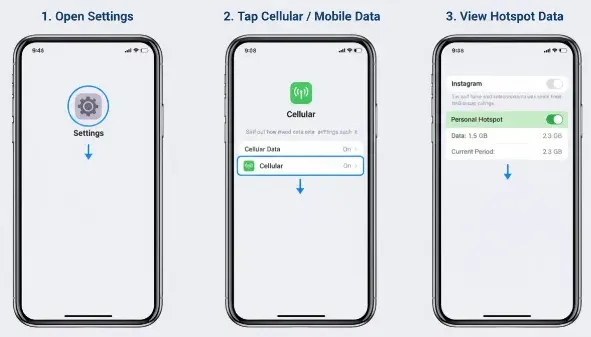
To monitor hotspot usage on iPhone:
- Go to Settings > Cellular/Mobile Data.
- Scroll down to see Cellular Data Usage.
- Look for the Personal Hotspot section or check which apps are consuming data.
- Reset your data statistics at the start of your billing cycle to track accurately.
How to check hotspot usage on Android
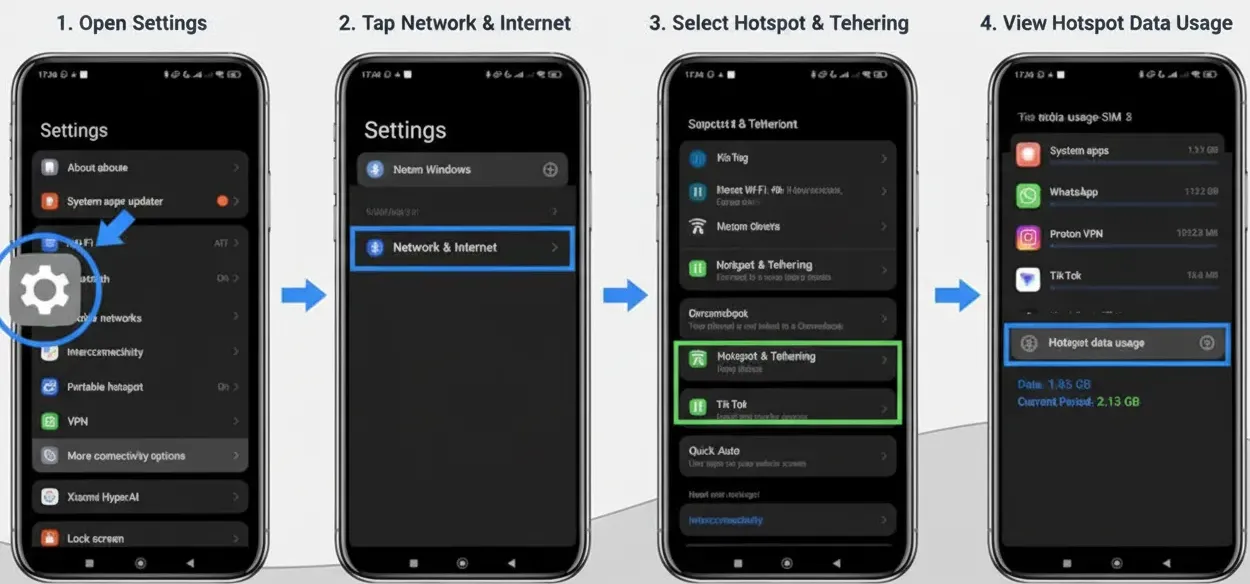
Steps may vary depending on your phone brand (Samsung, Google Pixel, etc.), but generally:
-
Open Settings > Network & Internet.
-
Tap Hotspot & Tethering > Wi-Fi Hotspot.
-
Look for Data Usage or Manage Devices.
-
Some Android phones show per-device data usage, which is useful for knowing which device consumes the most data.
How to reduce hotspot data usage
Using your phone as a hotspot can quickly consume your data allowance if you’re not careful. Here are some practical ways to cut down on hotspot data usage and avoid unexpected charges:
FAQs About Hotspot Usage
1. Does hotspot usage cost extra?
It depends on your mobile plan. For example, ByteSIM eSIM plans support hotspot tethering with no extra fees or restrictions. Some carriers may limit or charge for hotspot usage, so it’s best to check your plan details on the product page.
2. Does hotspot usage consume my mobile data?
Yes. When you share your connection through a hotspot, the data used by connected devices will be deducted from your mobile data allowance. Unless your plan includes unlimited hotspot data, it counts toward your total data package.
3. Can I see which device is using my hotspot?
Yes. On most Android phones, you can view a list of connected devices and even check their individual data usage. On iPhones, you can see which devices are connected, but detailed per-device usage statistics are not available.
4. How do I use the hotspot on my phone?
Turning on the hotspot is simple:
- On iPhone: Go to Settings > Personal Hotspot, then toggle Allow Others to Join. You can set a Wi-Fi password for security.
- On Android: Go to Settings > Network & Internet > Hotspot & Tethering, then turn on Wi-Fi Hotspot. You can customize the network name and password.
Once enabled, other devices can connect to your hotspot just like a normal Wi-Fi network.
5. Can I use a hotspot internationally with eSIM?
Yes. If your eSIM data plan supports (like ByteSIM's plans), you can use your hotspot abroad to share data with other devices. Just note that hotspot usage still counts toward your plan’s data allowance, and speed may vary depending on the country’s network coverage.
Plans that may interest you
Comment