

Digital Nomad eSIM for the 2026 World Cup: Remote Work Across All 16 Host Cities
May 15,2026 | Wang
Why the 2026 World Cup Is a Once-in-a-Lifetime Opportunity for Digital Nomads
If you watched the 2022 Qatar World Cup from your apartment at 3 a.m. because of the time zone difference, you know the frustration.
Maybe you even scored tickets but couldn't justify taking a month off work.
The freedom to work from anywhere is supposed to solve this — but in practice, unreliable cross-border connectivity, the hassle of swapping SIM cards between countries, and wildly inconsistent data costs turn "work from the World Cup" into "work until the Wi-Fi drops."
2026 changes everything.
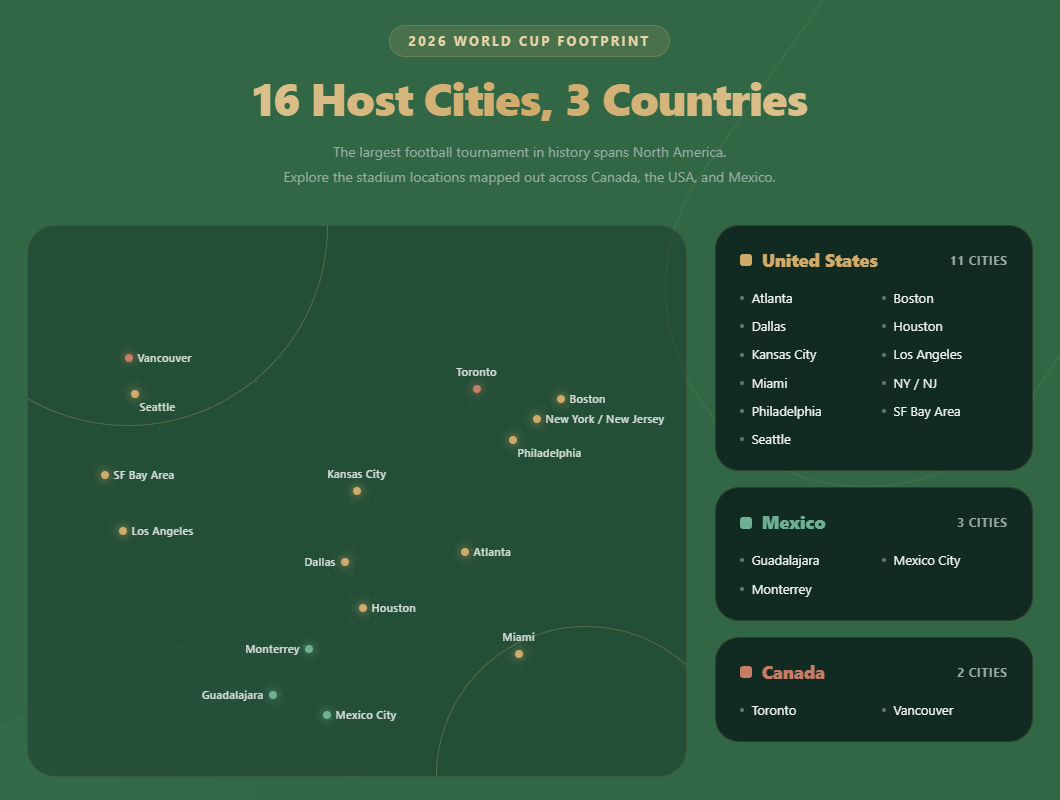
FIFA's first tri-nation tournament brings three massive advantages for location-independent workers:
- Time zone alignment. Most matches will kick off between noon and 9 p.m. local time. You can finish a full morning of deep work before the first whistle.
- World-class infrastructure. The US, Mexico, and Canada all have mature 5G networks and widespread coworking ecosystems.
- A thriving nomad scene. From Mexico City's Selina hostels to Manhattan's WeWork locations, every host city already caters to remote workers.
📌 This is the first World Cup you can realistically experience in "work by day, watch by night" mode — if your internet holds up.
The Biggest Challenge of Working Across Three Countries: Connectivity
A casual tourist needs enough data for maps, Uber, and Instagram. A digital nomad needs something fundamentally different.
Here's what remote work actually demands from a mobile connection:
| Work Scenario | Minimum Bandwidth | Latency Requirement | Hourly Data Usage |
|---|---|---|---|
| Zoom / Google Meet (1080p) | 3.8 Mbps | < 150ms | ~1.5–2.5 GB |
| Slack / Teams messaging | 1Mbps | < 300 ms | Very low |
| Google Docs / Notion | 2 Mbps | < 200 ms | Low |
| Uploading design files / Git push | 5+ Mbps (upload) | Flexible | Varies |
| Hotspot tethering to laptop | Add ~50% to all above | — | — |
A single one-hour video call can burn through 2 GB or more. With two to three meetings a day plus ongoing collaboration tools, daily consumption easily reaches 5–8 GB.
Now multiply that by the logistical reality of the World Cup: you're flying from Houston to Monterrey for a group stage match, then heading to Toronto for the Round of 16.
How do you maintain consistent network performance across three different countries?
The traditional options all have critical flaws:
- International roaming (e.g. AT&T International Day Pass): 12/day240 over 20 days — and speeds in Mexico and Canada are frequently throttled.
- Buying a local SIM in each country: Three separate cards, constant swapping, and potential language barriers at a Mexican kiosk.
- Relying on café or hotel Wi-Fi: According to Cisco's Annual Internet Report, public Wi-Fi bandwidth around major sporting events drops 40–60% due to crowd congestion.
World Cup Internet Plans Compared: Which One Wins for Remote Work?
To make this decision easier, here's a side-by-side comparison of the four realistic options for digital nomads during the tournament:
| Solution | Tri-Country Coverage | Data | Daily Cost | 5G | Hotspot | Video Calls | Convenience |
|---|---|---|---|---|---|---|---|
|
International roaming (carrier day pass) |
✅ | Throttled | $10–15/day | Partial | Usually blocked | ⚠️ Unstable | High (auto) |
| Local SIM per country |
✅(3 cards needed) |
Separate per country | $3–8/day/country | Varies | Varies |
✅Good locally |
❌ Tedious |
| Portable Wi-Fi rental | ✅ | Daily cap common | $8–12/day | ❌ |
✅device itself |
⚠️ Device-limited | Medium (pickup/return) |
|
Cross-border eSIM (North America) |
✅Single card |
Unlimited (US & MX) /25 GB (CA) | ~$3.15/day |
✅Premium5G |
✅ | ✅ Stable | ✅ Scan & go |
🧾 International roaming over 20 World Cup days costs $200–300. 62.90 — saving you over 70%.
For digital nomads who need to move between countries without network interruptions, the eSIM wins across cost, reliability, and convenience.
One eSIM, Three Countries: Why It's the Optimal Solution
An eSIM (embedded SIM — a digital SIM profile written directly to your phone's chip, requiring no physical card) is nothing new to most digital nomads.
But not every eSIM can handle the demands of a cross-border, high-intensity work-and-travel scenario like the World Cup.
A World Cup–ready eSIM for remote workers must check these boxes:
- Seamless tri-country coverage — US, Mexico, and Canada on a single profile, with no manual configuration changes at borders.
- Truly unlimited data — not the "unlimited until 2 GB then throttled to 128 Kbps" variety. You need sustained high-speed data for video calls.
- 5G network access — in cities like New York, Los Angeles, and Toronto, 5G delivers the 100Mbps+ speeds needed for simultaneous calls and file transfers.
- Hotspot tethering — when café Wi-Fi fails, your phone becomes the backup router for your laptop. Many eSIM plans quietly block this feature.
- Voice calls and SMS — for Uber rides, coworking reservations, and receiving verification codes.
Why is ByteSIM recommended?
Two details deserve special attention.
First, AT&T's network reliability.
According to Opensignal's 2025 USA Mobile Network Experience Report, AT&T scored highest in Reliability Experience — meaning it maintains the most consistent connections in crowded, high-traffic areas.
Around World Cup stadiums, where tens of thousands of fans will congest local networks, that reliability gap becomes critical for anyone trying to hold a stable video call from a nearby café.
AT&T's coverage also extends seamlessly into Mexico, so flying from Dallas to Guadalajara involves zero network transition friction.
Second, "truly unlimited" actually matters.
Many plans marketed as "Unlimited" include a Fair Usage Policy (FUP) that throttles speeds after a daily threshold — typically 2–5 GB.
For a digital nomad running two to three video meetings a day, hitting that cap by noon is a real risk.
ByteSIM's World Cup 2026 plan explicitly states "No daily caps, no speed drops," which is the difference between a working day and a frustrating one.
Best Remote Work Spots in 6 Key Host Cities
With reliable connectivity as your foundation, the next question is practical:
Where do you actually open your laptop the morning after a match?

Here are curated recommendations for six of the most relevant host cities, chosen from a "where to work the day after the game" perspective.
🇺🇸 United States
Home to the World Cup Final and one of the densest digital nomad ecosystems on Earth.
| Workspace | Type | Highlights | Day Rate |
|---|---|---|---|
| WeWork (multiple Manhattan locations) | Coworking |
Day Pass available |
$29–49/day |
| Think Coffee (Mercer St) | Café | Plenty of outlets long-stay friendly near NYU |
~$5(one coffee) |
| Brooklyn Kura | Café / sake bar | Quiet during daytime stable Wi-Fi good for deep work |
~$7 (one drink) |
| The Wing (SoHo) | Members' club | Premium environment day pass option available |
$35/day |
⭕ During match weeks — especially the semifinal and final — public Wi-Fi quality in midtown Manhattan will nosedive.
Your eSIM's 5G hotspot becomes your lifeline: tether your laptop to your phone's AT&T connection and you'll outperform every overloaded café router in the neighborhood.
| Workspace | Type | Highlights | Day Rate |
|---|---|---|---|
| The LAB Miami (Wynwood) | Coworking | Digital nomad favorite strong community vibe |
$25/day |
| Panther Coffee (Wynwood) | Café | Most popular local independent coffee shop | ~$6 |
| Büro (South Beach) | Coworking | Steps from the beach easy access to fan zones |
$35/day |
Los Angeles will host the opening ceremony, and the influx of international fans and remote workers is expected to break records.
| Workspace | Type | Highlights | Day Rate |
|---|---|---|---|
| Industrious (multiple locations) | Coworking | Premium brand across LA flexible Day Pass |
$39/day |
| Alfred Coffee (Melrose) | Café | Instagram-famous but genuinely good for working | ~$7 |
| Cross Campus (Santa Monica) | Coworking | Near the beach great neighborhood amenities |
$35/day |
🇲🇽 Mexico
Mexico City has become one of the world's most popular digital nomad hubs — low cost of living, incredible food, and a deep bench of coworking options.
On Nomad List, the city ranks among the top three in Latin America for both internet speed and affordability.
| Workspace | Type | Highlights | Day Rate |
|---|---|---|---|
| Selina (multiple locations) | Coworking + hostel | Global nomad brand with a location in Roma Norte | $15–20/day |
| Centraal (Roma Norte) | Coworking | Local favorite most popular independent space in CDMX |
$12/day |
| Café Avellaneda (Coyoacán) | Café | Quiet neighborhood plenty of outlets work-friendly |
~$3 |
| WeWork (Paseo de la Reforma) | Coworking | Standardized experience good for meeting room access |
$25/day |
💡 Some Mexico City cafés deliver inconsistent Wi-Fi speeds — often fluctuating between 5–15 Mbps during peak hours, which isn't enough for a stable video call.
This is where your eSIM tethering on AT&T's Mexican 5G network becomes an essential backup.
Many long-term nomads in CDMX already run a "café Wi-Fi + eSIM hotspot" dual-connection setup as standard practice.
🇨🇦 Canada
| Workspace | Type | Highlights | Day Rate |
|---|---|---|---|
| Workhaus (multiple locations) | Coworking | Toronto-based brand reasonably priced |
$30/day |
| Jimmy's Coffee (multiple locations) | Café | Great atmosphere suitable for lighter work sessions |
~$6 |
| iQ Offices (Bay Street) | Coworking | Financial district location excellent network speeds |
$40/day |
The eSIM delivers 25 GB via Rogers in Canada — more than enough for a short stop in Toronto or Vancouver to catch one or two matches.
If your Canadian leg extends beyond a week with heavy video call usage, check out our dedicated Canada eSIM plans for higher-data options.
Your Daily Schedule Template: Balancing Work and Matches
The question most digital nomads wrestle with: can you genuinely juggle a full remote workload and World Cup attendance?
Yes — with intentional time blocking.
Here's a template based on Eastern Time, the zone covering the majority of host cities. Most 2026 World Cup matches are expected to kick off between 12:00 and 21:00 local time:
⚽️World Cup 2026 – daily work & match schedule
-
7:00 – 8:00 – Morning routine + email / Slack triage
Connectivity: Low (phone only) -
8:00 – 12:00 – Deep work block (coworking space or café)
Connectivity: High – video calls + collaboration tools -
12:00 – 13:00 – Lunch + transit to stadium area
Connectivity: Medium – maps / rideshare -
13:00 – 15:30 – Watch afternoon match
Connectivity: Medium – social media + backup streaming -
15:30 – 17:30 – Light work block (café near the stadium)
Connectivity: Medium‑high – async collaboration + email -
18:00 – 20:30 – Watch evening match
Connectivity: Medium -
21:00 – 22:00 – Wrap‑up work / daily summary
Connectivity: Low
Front-load all camera-on meetings into the morning deep work block. Shift to asynchronous collaboration — documents, email, threaded messages — for the afternoon and evening.
⭐This way, even if you're inside a stadium, you won't miss anything urgent.
Your connection needs to hold up all day long.
From morning video calls at a coworking desk, to navigating via Uber at midday, to sharing live match moments from a bar at night — the unlimited data and seamless tri-country coverage of this eSIM is the infrastructure layer that keeps the entire day running smoothly.
How to Activate Your World Cup eSIM in 3 Steps
Set this up one to two days before departure, and you'll be online the moment you land:
- Purchase and receive your QR code
After checkout, you'll receive QR code and installation instructions via email. With24/7 support, even late-night orders get immediate assistance. - Scan to install
On your phone, go to Settings → Cellular → Add eSIM (iOS) or Settings → Network → SIM → Add Mobile Plan (Android).
Scan the QR code. The entire process typically takes under two minutes.
Not sure if your device supports eSIM? Our complete eSIM-compatible device list covers every major model released since 2018. - Activate on arrival
When you land in the US, Mexico, or Canada, set the new eSIM as your primary data line and enable data roaming. You'll connect to AT&T or Rogers 5G immediately.
Pro tip: Keep your existing SIM oreSIM active for receiving verification codes and messages from your home country.
Set the new World Cup eSIM as your primary data and voice line. Modern smartphones handle dual-SIM management seamlessly — both lines stay active simultaneously.
For a detailed walkthrough of dual-SIM configuration, see our eSIM + physical SIM dual setup guide.
Don't Let Connectivity Be Your World Cup Weak Link
The 2026 World Cup is a rare convergence: three countries, one month, and a time zone perfectly aligned for remote workers worldwide.
As a digital nomad, you already have the freedom to work from anywhere. The only remaining question is whether your network can keep up.
A single eSIM covering the US, Mexico, and Canada — with Premium 5G unlimited data, hotspot tethering, and local voice calls — is more than a data plan.
It's the invisible thread connecting your morning standup at a Manhattan WeWork, your afternoon Group F match at MetLife Stadium, and your evening celebrations with fans from every continent in a Times Square bar. All without a single dropped connection.
Ready? Get your World Cup 2026 network set up 2 minutes before you go—check out unlimited data eSIMs for three North American countries.
Comment

