

Philippines eSIM Guide 2026: Best Plans, Coverage & How to Activate
Jun 30,2026 | Milo
If you're traveling to the Philippines, one question usually comes up: Should I buy a local SIM card after I land, or install an eSIM before I fly?
Picture this: You just landed at NAIA (Manila's international airport) after a long flight. The humidity hits you instantly, and all you want to do is book a Grab car to your hotel. But your home network wants to charge you $15 a day for roaming, and the queue for physical tourist SIM cards stretches entirely out of the arrival hall. It’s a frustrating way to start an island-hopping vacation.
This is exactly why getting a Philippines eSIM sorted before you fly has become the ultimate travel hack. If you are wondering how to stay connected seamlessly across Manila, Cebu, and Palawan without the hassle, here is the real-world guide you need.
Does the Philippines Support eSIM?
Yes. The Philippines fully supports eSIM technology, and it's now one of the easiest countries in Southeast Asia for travelers to use a digital SIM.
If your phone supports eSIM and is carrier-unlocked, you can install your data plan before departure and connect to a local network shortly after arrival.
The Trap: Local SIMs vs. Travel eSIMs
For most visitors, there are two ways to get mobile data: local SIMs and travel eSIMs.
If you're relocating to the Philippines, studying abroad, or staying for several months, a local SIM card may be the better long-term choice.
But if you're visiting for a holiday, a business trip, or a short remote-working stay, an eSIM is usually the simpler option.
| Feature | Travel eSIM | Local SIM |
|---|---|---|
| Buy before departure | ✅ | ❌ |
| Physical SIM required | ❌ | ✅ |
| Airport queue | ❌ | Often |
| Keep your home SIM | ✅ | Usually No |
| Registration | ❌ | ✅ |
| Best for short trips | ⭐⭐⭐⭐⭐ | ⭐⭐⭐ |
| Best for long-term stay | ⭐⭐⭐ | ⭐⭐⭐⭐⭐ |
Philippines eSIM Coverage: What to Expect Across the Country
One of the biggest questions travelers ask before buying an eSIM is whether it will actually work where they're going.
The good news is that mobile coverage in the Philippines has improved significantly over the past few years. In major cities and popular tourist destinations, you'll generally have no trouble accessing 4G LTE, while 5G is becoming increasingly available in urban areas.
However, the Philippines is made up of more than 7,000 islands. As with many island destinations, network quality depends not only on the carrier but also on your exact location. Remote beaches, mountain areas, and smaller islands may have weaker signals regardless of which provider you use.
Coverage in Popular Tourist Destinations
Here's what most travelers can expect.
| Destination | Typical Coverage | Best For |
|---|---|---|
| Manila | Excellent 4G & 5G | Business, city travel |
| Cebu City | Excellent 4G & growing 5G | City breaks, diving trips |
| Boracay | Strong 4G, good 5G in busy areas | Beach vacations |
| Bohol | Good 4G in towns | Nature & island tours |
| Palawan | Good in Puerto Princesa and El Nido, limited in remote areas | Island hopping |
| Siargao | Good around General Luna, weaker inland | Surfing trips |
| Davao | Excellent 4G & expanding 5G | Southern Philippines |
If you're spending most of your trip in well-known destinations, you can expect a reliable connection for navigation, messaging, video streaming, and social media.
Which Local Networks Do Travel eSIMs Use?
Most travel eSIM providers partner with one or more of the Philippines' major mobile operators.
Smart Communications
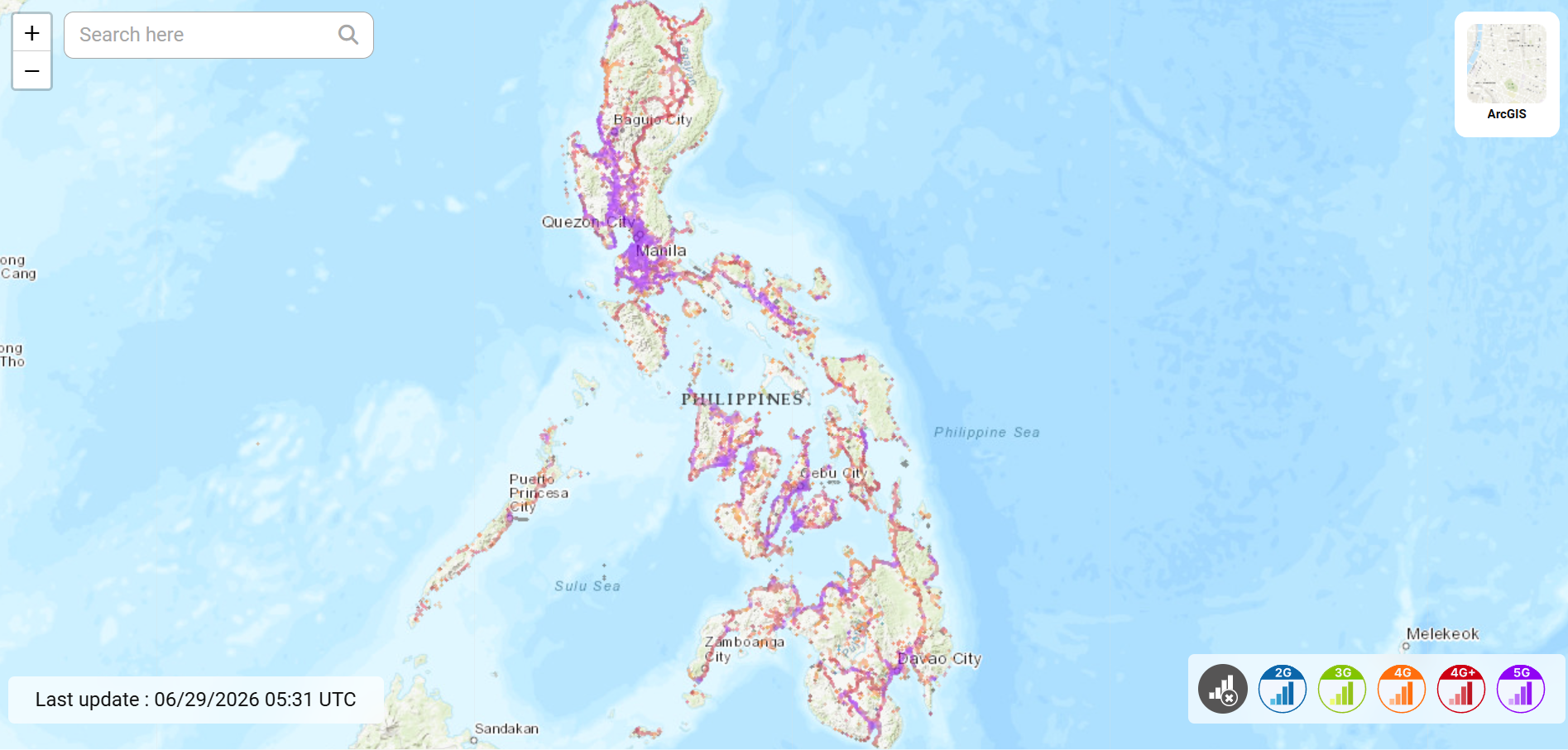
Smart is widely regarded as having one of the strongest nationwide networks, especially outside large cities. Many travelers find Smart provides better coverage during road trips and on inter-island journeys.
Globe Telecom
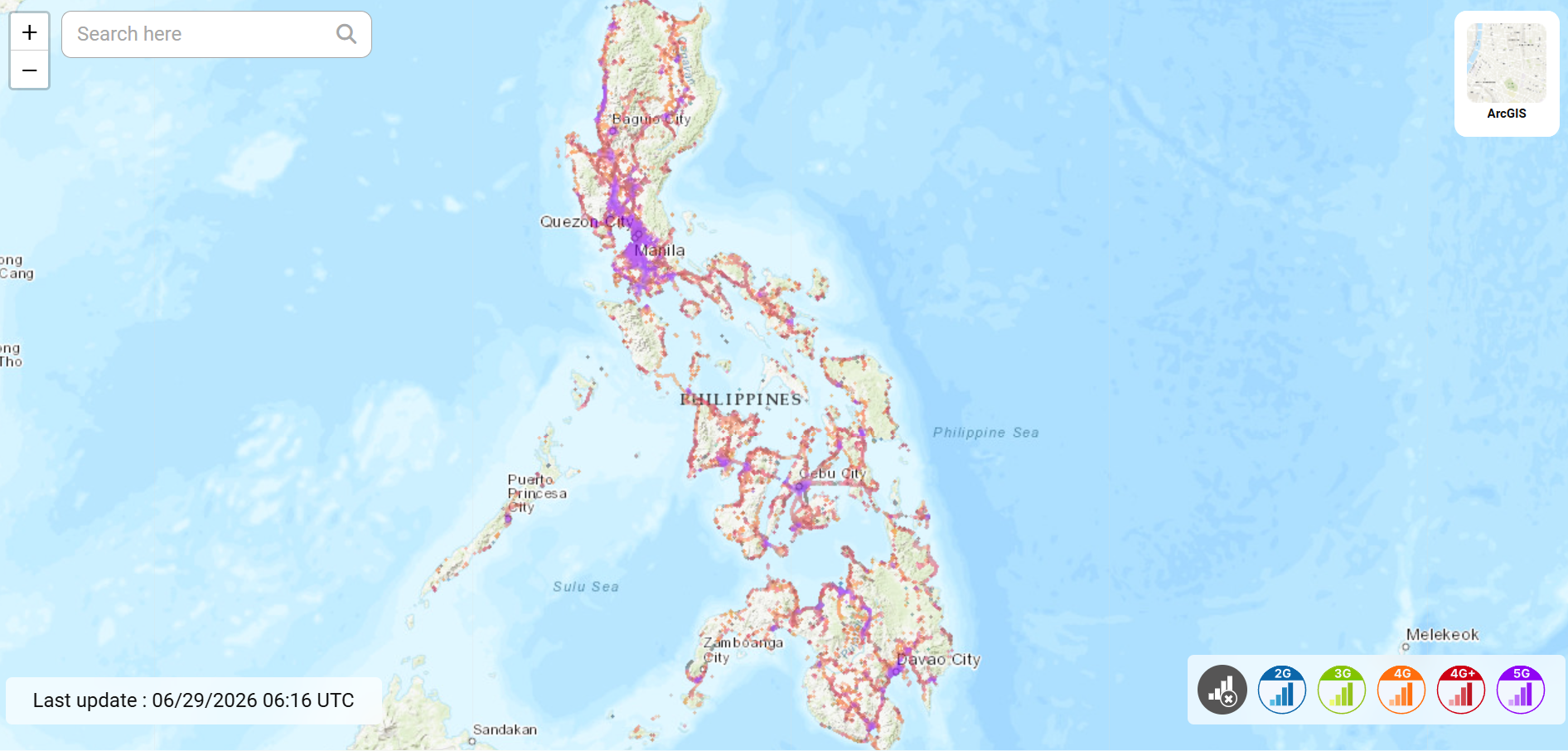
Globe offers excellent speeds in urban areas and remains one of the country's most popular mobile networks. In cities like Manila and Cebu, Globe performs very well for everyday travel needs.
DITO Telecommunity
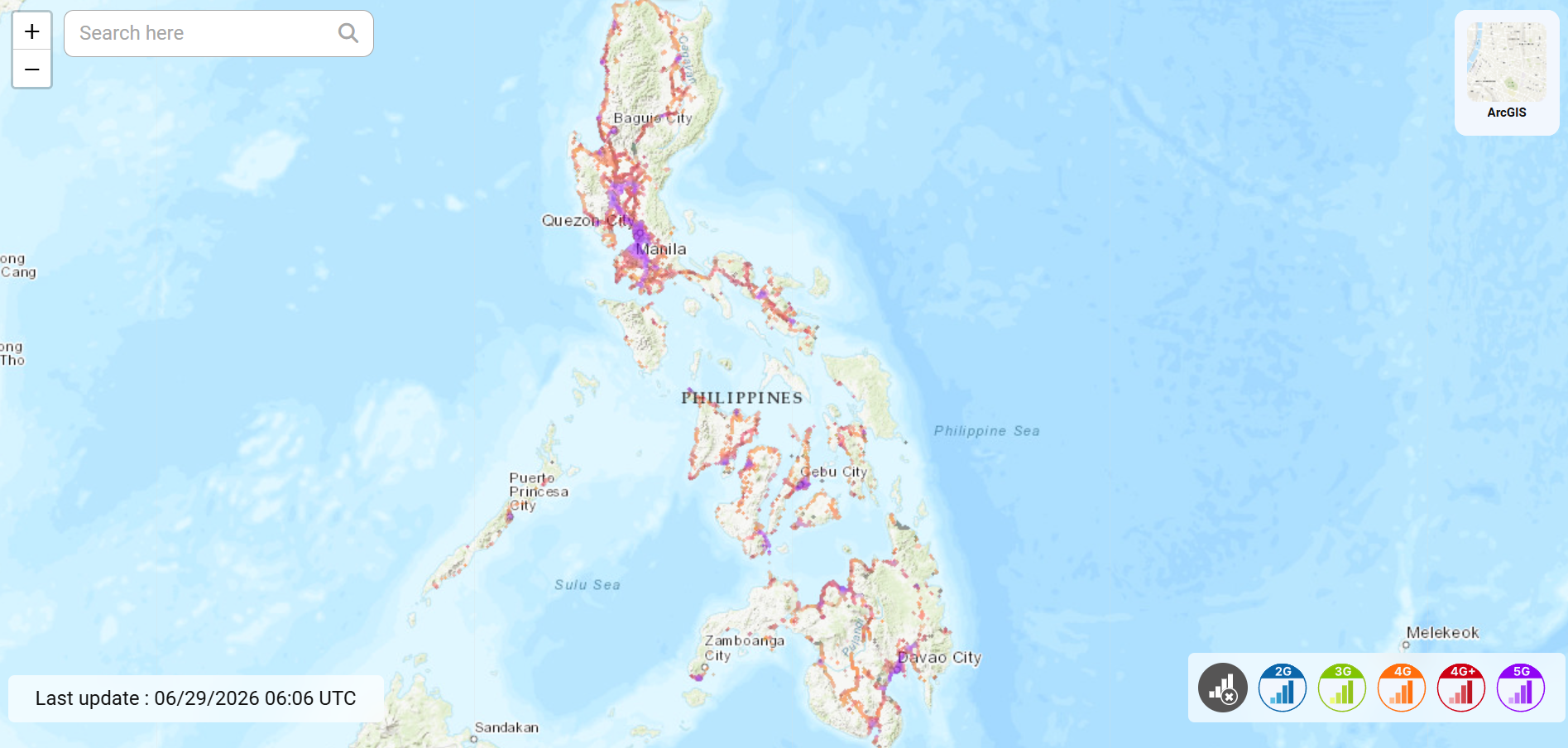
DITO is the newest national carrier. Its coverage continues to expand but remains more limited than Smart or Globe in some regions. Some travel eSIM providers include DITO as an additional network option.
Your actual experience depends on the eSIM provider's roaming agreements, so it's worth checking which local networks are supported before purchasing.
Real-World Coverage Tips
No matter which provider you choose, these tips can help you stay connected throughout your trip.
- Download Google Maps offline before visiting remote islands.
- Save hotel confirmations and flight tickets to your phone in case your signal temporarily drops.
- If you're planning to visit multiple islands, activate your eSIM before departure so you're connected as soon as you land.
- Expect slower speeds during holidays or major festivals when local networks become busier.
For most travelers, coverage is more than sufficient for navigation, messaging, food delivery apps, ride-hailing services, and sharing photos throughout the trip.
How Much Does a Philippines eSIM Cost?
The price of a Philippines eSIM depends on three main factors:
- How much data you need
- How many days you're staying
- Which provider you choose
Fortunately, mobile data in the Philippines is relatively affordable compared with many other travel destinations in Asia.
Typical Price Range
While prices vary between providers, most travel eSIMs fall into the following ranges.
| Plan Type | Typical Price (USD) | Service Days |
|---|---|---|
| Daily | $2.9 ~ 63.9 | 1 ~ 30 days |
| Total | $3.9 ~ 443.9 | 3 ~ 30 days |
| Unlimited* | $3.9 ~ 69.9 | 1 ~ 30 days |
*Some "unlimited" plans reduce speeds after a daily high-speed allowance, so always check the plan details before purchasing.
How Much Data Do You Actually Need?
Many travelers either buy far too little data—or pay for far more than they'll use.
Here's a simple guide based on typical travel habits.
Light Travelers (1–3 GB)
Suitable if you mainly use:
- Google Maps
- Basic web browsing
Average Travelers (5–10 GB)
Ideal for most vacations, including:
- Social media uploads
- Restaurant searches
- Video calls
- Music streaming
- Frequent navigation
Heavy Users (15 GB+)
Recommended if you plan to:
- Work remotely
- Upload videos regularly
- Stream HD content
- Use your phone as a hotspot
If you're unsure, it's usually better to choose the next data tier up. Running out of data during a trip is much more inconvenient than having a small amount left over.
Is the Cheapest eSIM Always the Best Choice?
Not necessarily.
A lower-priced plan may:
- Offer fewer supported networks
- Have slower customer support
- Include shorter validity periods
- Restrict hotspot usage
Instead of comparing price alone, consider the overall value—including coverage, ease of activation, and customer service.
For many travelers, paying a few dollars more for a smoother experience is well worth it.
How to Activate a Philippines eSIM in Minutes
One of the biggest advantages of an eSIM is that setup is surprisingly simple. Even if you've never used one before, the process usually takes less than five minutes.
Before You Fly: One Small Tip
Install your eSIM while you're still at home and connected to Wi-Fi.
Waiting until you arrive at the airport or hotel can be stressful if you don't have an internet connection available. Completing the installation in advance means your phone only needs to connect to the local network after landing, making the entire process much smoother.
Tips for Using an eSIM in the Philippines
Installing your eSIM is only the first step. A few simple preparations can help you avoid common connectivity issues and make your trip much smoother.
Install Your eSIM Before Departure
The best time to install your eSIM is while you're still at home with a stable Wi-Fi connection. Once installed, your phone only needs to connect to a supported network after you land. This avoids unnecessary stress if airport Wi-Fi is slow or crowded.
Don't Delete the eSIM After Installation
Many travelers accidentally remove their eSIM profile while adjusting phone settings. In most cases, deleting the eSIM means you'll need to reinstall it—and some providers only allow a limited number of installations. Unless you're completely finished with your trip, leave the eSIM installed.
Turn On Data Roaming
This surprises many first-time users. Even though you're using an eSIM, many travel eSIMs rely on international roaming agreements with local networks. If your provider instructs you to enable Data Roaming, don't worry—you won't receive unexpected roaming charges from the eSIM itself.
Download Offline Maps
Coverage is generally excellent in cities, but if you're traveling to remote beaches, islands, or mountainous areas, downloading Google Maps offline beforehand is a smart backup. Offline maps are especially useful in destinations such as:
- El Nido & Coron
- Siargao
- Northern Palawan & Mountain provinces
Monitor Your Data Usage
Navigation, messaging, and web browsing use very little data. However, uploading videos to TikTok, Instagram Reels, or YouTube can quickly consume several gigabytes. Most smartphones allow you to track mobile data usage directly in Settings, helping you avoid unexpected limits.
Frequently Asked Questions
Does an eSIM work throughout the Philippines?
Yes.
For most travelers, the answer is a definite yes.
Travel eSIMs connect to local networks such as Smart Communications and Globe Telecom, providing reliable coverage across major cities and popular tourist destinations.
If your itinerary includes places like Manila, Cebu, Boracay, Bohol, Palawan, or Siargao, you should have no trouble using Google Maps, Grab, WhatsApp, Instagram, or booking apps throughout most of your trip.
Just keep one thing in mind.
The Philippines is made up of more than 7,000 islands.
If you're heading deep into the mountains, sailing between remote islands, or spending the day far from towns, don't expect perfect signal everywhere.
That's true no matter which carrier you choose.
Can tourists use an eSIM?
Absolutely.
In fact, travel eSIMs are designed specifically for visitors.
You simply purchase your plan online, scan the QR code before departure, and activate it after landing.
There's no need to visit a mobile phone shop.
No physical SIM card to insert.
And no standing in airport queues after a long flight.
Can I keep my WhatsApp number?
Yes—and this is something many travelers worry about unnecessarily.
WhatsApp is linked to your phone number, not to whichever SIM card is currently providing your internet connection.
As long as you don't change your WhatsApp number inside the app, everything stays exactly the same.
Your chats.
Your contacts.
Your groups.
Even your chat history.
Nothing changes except the network carrying your data.
How much data should I buy?
It depends on how you travel.
Here's a simple rule.
Around 3–5GB is enough if you're mainly using maps, messaging apps, restaurant searches, and occasional photo uploads.
Around 10–20GB suits most travelers.
You'll comfortably navigate cities, post on social media, make video calls, and stream music throughout your vacation.
If you're planning to work remotely, upload videos every day, or use your phone as a hotspot, an Unlimited plan is usually the better investment.
When in doubt, choose slightly more than you think you'll need.
Running out of data on the last day of your trip is far more frustrating than finishing with a few gigabytes left.
Should I buy an eSIM before I fly?
Definitely.
It's one of those small travel decisions that makes the entire arrival experience much smoother.
Install the eSIM while you're still at home with a reliable Wi-Fi connection.
When your plane lands, all you need to do is switch it on.
Instead of searching for airport Wi-Fi or joining the SIM card queue, you'll already be online.
That means you can book your Grab, contact your hotel, and start your trip almost immediately.
Final Thoughts
Choosing the right mobile data solution doesn't have to be complicated.
For most visitors, a travel eSIM is the simplest way to stay connected from the moment they arrive. It eliminates the need to buy a physical SIM card, keeps your primary number available, and lets you access maps, transportation apps, and travel bookings without delay.
Before purchasing, remember to:
- Check that your phone supports eSIM.
- Estimate how much data you'll realistically need.
- Install your eSIM before departure using a stable Wi-Fi connection.
- Keep offline maps as a backup for remote destinations.
With a little preparation, you'll spend less time worrying about mobile data and more time enjoying everything the Philippines has to offer—from the streets of Manila to the beaches of Palawan and the surf breaks of Siargao.
Comment

