

No Signal, No Uber, No Way Home: How to Stay Safe After World Cup 2026 Matches Across All 16 Stadiums
May 08,2026 | Wang
Introduction
The reason you can't get a ride after the final whistle isn't a shortage of Ubers. It's that your phone has no network.
Fifty to eighty thousand people pull out their phones at the same moment. Cell towers buckle under the load. The stadium's free Wi-Fi covers the stands and the exit tunnels — but the rideshare pickup zone sits300 to 800 meters beyond the gates, well outside any Wi-Fi signal.
Outside Estadio Azteca in Mexico City at midnight. In the sprawling parking lots of Gillette Stadium, 35 kilometers from downtown Boston.
Without a data connection, you can't open Uber, you can't reach your pre-booked driver, and you can't even pull up directions back to your hotel.
Without a network, your phone is just a glowing brick.
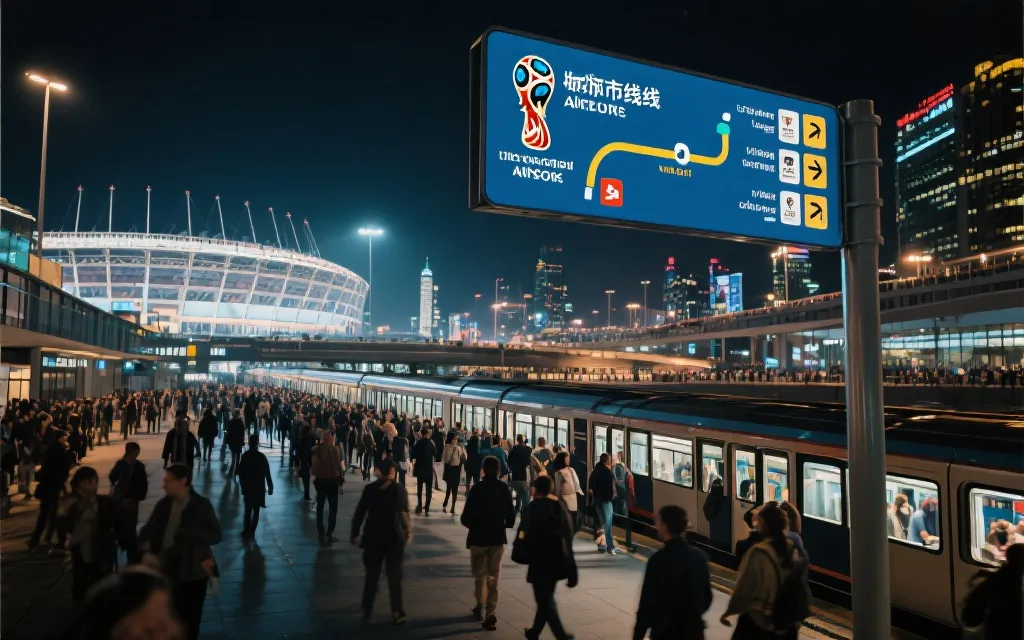
You spent thousands of dollars flying to North America for the World Cup. The referee blows the final whistle. You and80,000 other fans surge toward the exits. You open Uber — the app spins, fails to load.
You switch to Lyft — same result. You glance at your signal bar: zero. It's 11 p.m. local time. You're standing on the outer perimeter of a stadium in a city you've never been to. The streetlights are dim. The taxis are long gone.
This isn't hypothetical. Cell network congestion at the end of major sporting events is a well-documented problem. During Euro 2024, multiple venues reported widespread signal blackouts in exit areas.
The World Cup draws even larger crowds and more concentrated exits — the problem will be worse. And that free stadium Wi-Fi? Its coverage ends at the gates. You'll need to walk 300 to 800 meters to reach the designated rideshare pickup zone, and there's no Wi-Fi signal on that walk.
The fix comes down to one thing: an independent cellular connection.
Not stadium Wi-Fi. Not international roaming that might be throttled or deprioritized. A direct link to a local Tier-1 carrier's cell towers.
An eSIM is the most efficient way to get one — activate it before the match, and it works the moment you need it, across all three host countries.
Why Your Phone Goes Dark After the Final Whistle
Tens of thousands of phones hitting the same cell towers within minutes causes network overload, and stadium Wi-Fi coverage stops at the gates — leaving you without data at the exact moment you need it most.
Cell Congestion: Towers Aren't Built for 80,000 Simultaneous Users
A typical stadium area is served by three to five cell towers. Each tower supports a few hundred to a few thousand concurrent data connections, depending on the carrier's configuration and available spectrum.
During the match, fans are spread across multiple levels of seating, and the load is manageable.
But when the final whistle blows, everyone funnels toward the same exit zones within10 to 15 minutes — and every single person opens a rideshare app, sends a text, or posts to social media at the same time.
The result: your signal bar might show full strength, but data packets crawl or stop entirely. Uber freezes on "Looking for drivers." Google Maps won't load your route.
Full bars don't mean you're online — when a tower is overloaded, your phone is just waiting in line for a data slot.
The Stadium Wi-Fi Dead Zone
FIFA requires all host stadiums to offer free Wi-Fi. But these networks are engineered for inside the venue — the stands, concourses, and hospitality areas.
The moment you pass through the stadium gates, the signal drops off sharply.
Rideshare platforms like Uber and Lyft set up designated pickup zones during major events. These zones are typically located 300 to 800 meters from the nearest exit, along access roads or at the edges of parking structures.
The walk from the gate to the pickup point is a Wi-Fi dead zone.
What happens when you have no data connection:
❌ Can't open Uber or Lyft to request a ride
❌ Can't see your pre-booked driver's location or license plate
❌ Can't load Google Maps to navigate to the pickup zone
❌ Can't message your travel companions to coordinate a meeting point
❌ Can't call your hotel or emergency services (without a local number)
All 16 Stadiums: Post-Match Transport and Network Risk Table
Not all stadiums carry the same post-match risk.
Suburban venues with no rail transit (Gillette, AT&T Stadium, Hard Rock) are far more dangerous after dark than downtown stadiums with direct metro access (BC Place, Mercedes-Benz, Lumen Field).
Check your venue's risk level before you go.
The table below covers every stadium hosting the 2026 FIFA World Cup.
The night-safety rating is based on three factors: distance from city center, availability of direct rail transit, and the general nighttime safety profile of the surrounding neighborhood.
| Country | Rideshare | Stadium | City | Rail Transit | Distance to Downtown | Night Risk |
|---|---|---|---|---|---|---|
| 🇺🇸 |
Uber / Lyft |
MetLife Stadium | East Rutherford, NJ | ❌ No direct rail | ~16 km to Manhattan | 🔴 |
| SoFi Stadium | Inglewood, CA | ✅ K Line light rail | ~20 km to DTLA | 🟡 | ||
| AT&T Stadium | Arlington, TX | ❌ No rail | ~30 km to Dallas | 🔴 | ||
| Hard Rock Stadium | Miami Gardens, FL | ❌ No direct rail | ~27 km to Miami | 🔴 | ||
| Levi's Stadium | Santa Clara, CA | ✅ VTA light rail | ~8 km to San Jose | 🟡 | ||
| NRG Stadium | Houston, TX | ✅ METRORail | ~10 km | 🟡 | ||
| Mercedes-Benz Stadium | Atlanta, GA | ✅ MARTA | Downtown | 🟢 | ||
| Lincoln Financial Field | Philadelphia, PA | ✅ Broad Street Line | ~8 km | 🟡 | ||
| GEHA Field (Arrowhead) | Kansas City, MO | ❌ No rail | ~16 km | 🔴 | ||
| Lumen Field | Seattle, WA | ✅ Link Light Rail | Downtown | 🟢 | ||
| Gillette Stadium | Foxborough, MA | ❌ No rail | ~35 km to Boston | 🔴 | ||
| 🇲🇽 | Uber / DiDi | Estadio Azteca | Mexico City | ✅ Metro Línea 2 | ~15 km to Reforma | 🔴 |
| Estadio Akron | Guadalajara | ✅ Mi Macro light rail | ~18 km | 🟡 | ||
| Estadio BBVA | Monterrey | ✅ Metrorrey | ~10 km | 🟡 | ||
| 🇨🇦 | Uber | BC Place | Vancouver | ✅ SkyTrain | Downtown | 🟢 |
| BMO Field | Toronto | ✅ Streetcar / GO | ~3 km to Union | 🟢 |
How to read the risk ratings:
- 🟢 Low risk: Downtown stadium with direct rail transit and a well-lit, well-patrolled surrounding area
- 🟡 Medium risk: Rail transit available but the stadium sits far from the city center, or the last train may depart before the match ends
- 🔴 High risk: No direct rail, long distance to downtown, post-match transport depends entirely on rideshare or private vehicles, and/or the surrounding area has elevated nighttime safety concerns
Keep in mind that FIFA and host cities are expected to add event-specific shuttle routes during the tournament. For official updates on match-day transport, check the FIFA World Cup 2026 event page as schedules are finalized.
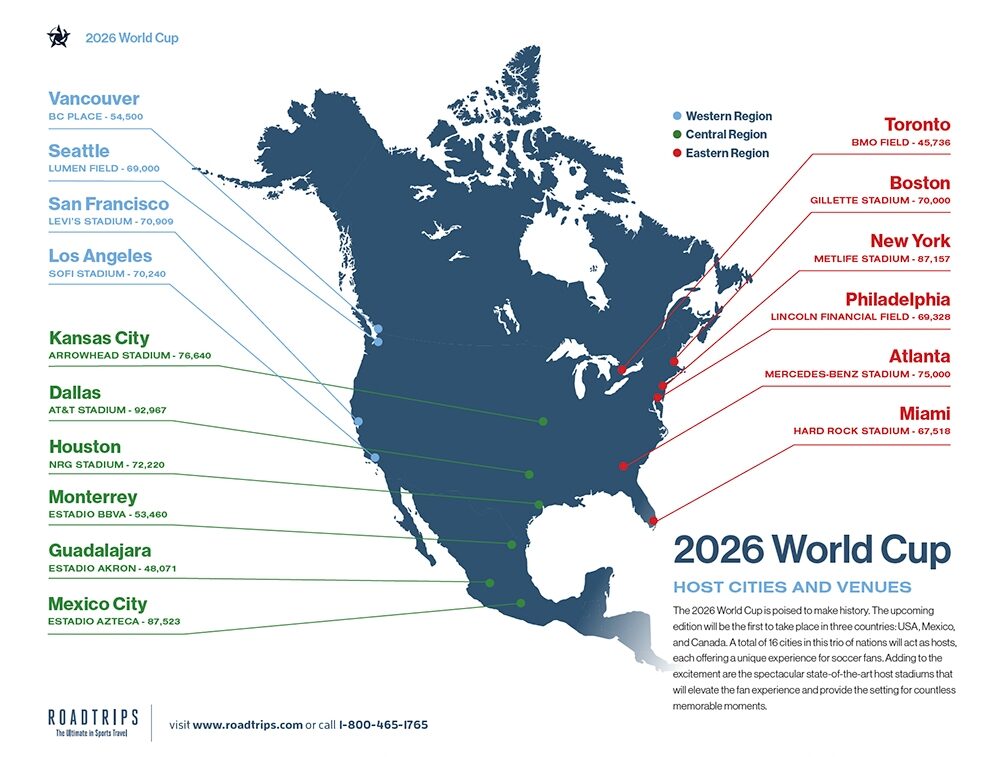
Three High-Stakes Venues: Deep Dives With Exit Maps
We picked one stadium from each host country — Azteca (highest overall risk), Gillette (most remote), and BC Place (low-risk benchmark) — to show just how different the post-match experience can be from venue to venue.
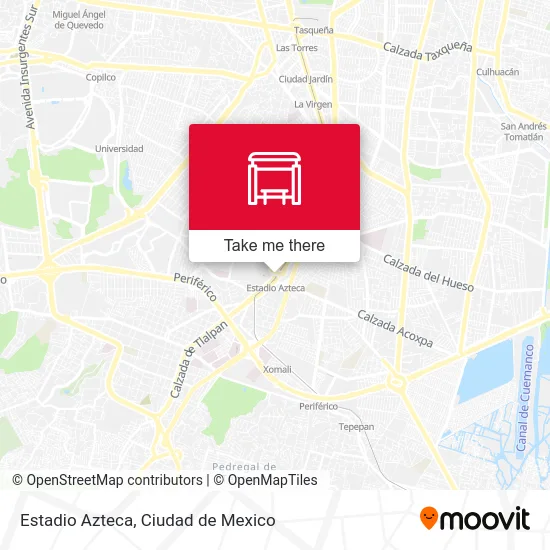
🇲🇽 Estadio Azteca, Mexico City — Risk Level: 🔴
Why Azteca ranks among the most challenging post-match exits:
Estadio Azteca sits in the southern reaches of Mexico City, in the Coyoacán district, at an elevation of 2,240 meters. Capacity: roughly 87,000.
For the 2026 tournament, FIFA has officially designated it "Estadio Ciudad de México." It will host five matches:
| Date | Local Time | Match | Round |
|---|---|---|---|
| June 12 (Fri) | 13:00 | Mexico vs. South Africa | Opening Match |
| June 18 (Thu) | 20:30 | Uzbekistan vs. Colombia | Group Stage |
| June 25 (Thu) | 19:00 | Czechia vs. Mexico | Group Stage |
| July 1 (Wed) | 19:00 | Round of 32 | Knockout |
| July 6 (Mon) | 18:00 | Round of 16 | Knockout |
(Schedule per FIFA's published fixtures; subject to change. Always verify at FIFA.com.)
Pay close attention to June 18, June 25 and July 1— evening kickoffs at 7:00–8:30 PM mean the match won't end until 9:00–10:00 PM.
Factor in the time it takes to exit the stadium, and you could be outside the gates close to midnight.
Post-match exit flow:
The main exits face north and east. The nearest metro station is Tasqueña on Línea 2, roughly 1.5 km on foot.
Uber and DiDi pickup zones during large events are typically set along Calzada de Tlalpan, about 400 to 600 meters from the gates.
Key risk factors:
- Stadium Wi-Fi coverage ends at the exit tunnels; by the time you reach Calzada de Tlalpan, there is no Wi-Fi
- Mexico City's metro usually runs until around midnight, though service may be extended on match days — confirm beforehand
- Uber is legal in Mexico City, but post-match surge pricing can spike to 3–5× the normal fare
- The streets around Coyoacán carry a moderate-to-elevated nighttime safety risk; walking long distances after dark is not recommended
Backup transport options:
- Sitio taxis: Fixed taxi stands outside the stadium operate without an app. Look for numbered, registered Sitio vehicles — they run on a meter.
- FIFA event shuttles: FIFA typically arranges free shuttle buses from the stadium to major transit hubs. Booking is usually required through the FIFA App.
For travelers who want to make sure their phone stays online throughout the Azteca experience — from the final whistle to the hotel lobby — ByteSIM's Mexico eSIM plan connect directly to AT&T Mexico's network with no daily data caps.
🇺🇸 Gillette Stadium, Foxborough, MA — Risk Level: 🔴
Why Gillette is the most isolated World Cup venue:
Gillette Stadium sits in the small town of Foxborough, Massachusetts — roughly 35 kilometers southwest of downtown Boston.
There is no subway, no commuter rail station within walking distance, and no regular bus service.
The stadium is surrounded by vast parking lots and low-density suburbia. After a match, your only options are driving yourself or getting a rideshare.
Post-match exit flow:
Multiple exits feed into the parking lot complex.
Uber and Lyft pickup zones are typically set at the outer edges of Lot P7or P8, about 500 to 700 meters from the nearest gate. That walk crosses open, poorly lit asphalt.
Key risk factors:
- Zero rail transit of any kind
- Tens of thousands of cars trying to exit simultaneously create gridlock; Uber drivers may need30to 60 minutes to reach the pickup zone
- No Wi-Fi coverage between the stadium gates and the pickup area
- Foxborough itself has very few hotels, restaurants, or businesses open late — if you can't get a ride, there's almost nowhere to wait indoors
Backup transport options:
- Event shuttles: The New England Patriots (stadium owners) run paid shuttle buses from Boston during NFL season. A similar service is expected for the World Cup — check for announcements closer to the tournament.
- Rental car: If you're traveling with a group, a rental car eliminates the rideshare dependency entirely — but requires a designated sober driver.
Gillette is the kind of stadium where "can't get a ride" genuinely means "can't leave" — the nearest subway station is 35 kilometers away.
🇨🇦 BC Place, Vancouver — Risk Level: 🟢(Benchmark)
Why BC Place offers the safest post-match experience:
BC Place sits right in downtown Vancouver on the north shore of False Creek.
The Stadium-Chinatown SkyTrain station is a two-minute walk from the gates.
The surrounding area is a well-established commercial district with restaurants, convenience stores, and hotels open late into the night.
But even at a low-risk venue, connectivity still matters:
- SkyTrain queues after a sellout match can mean 15to 30 minutes of waiting on the platform
- If your hotel isn't on the SkyTrain line, you'll still need to call an Uber
- Uber only became legal in Vancouver in 2020; the driver pool is smaller than in most US cities, and post-match wait times can be longer than expected
The takeaway from BC Place: Even at the safest stadium on the list, an independent cellular connection is your baseline insurance. You can never be 100% certain that public transit alone will get you where you need to go.
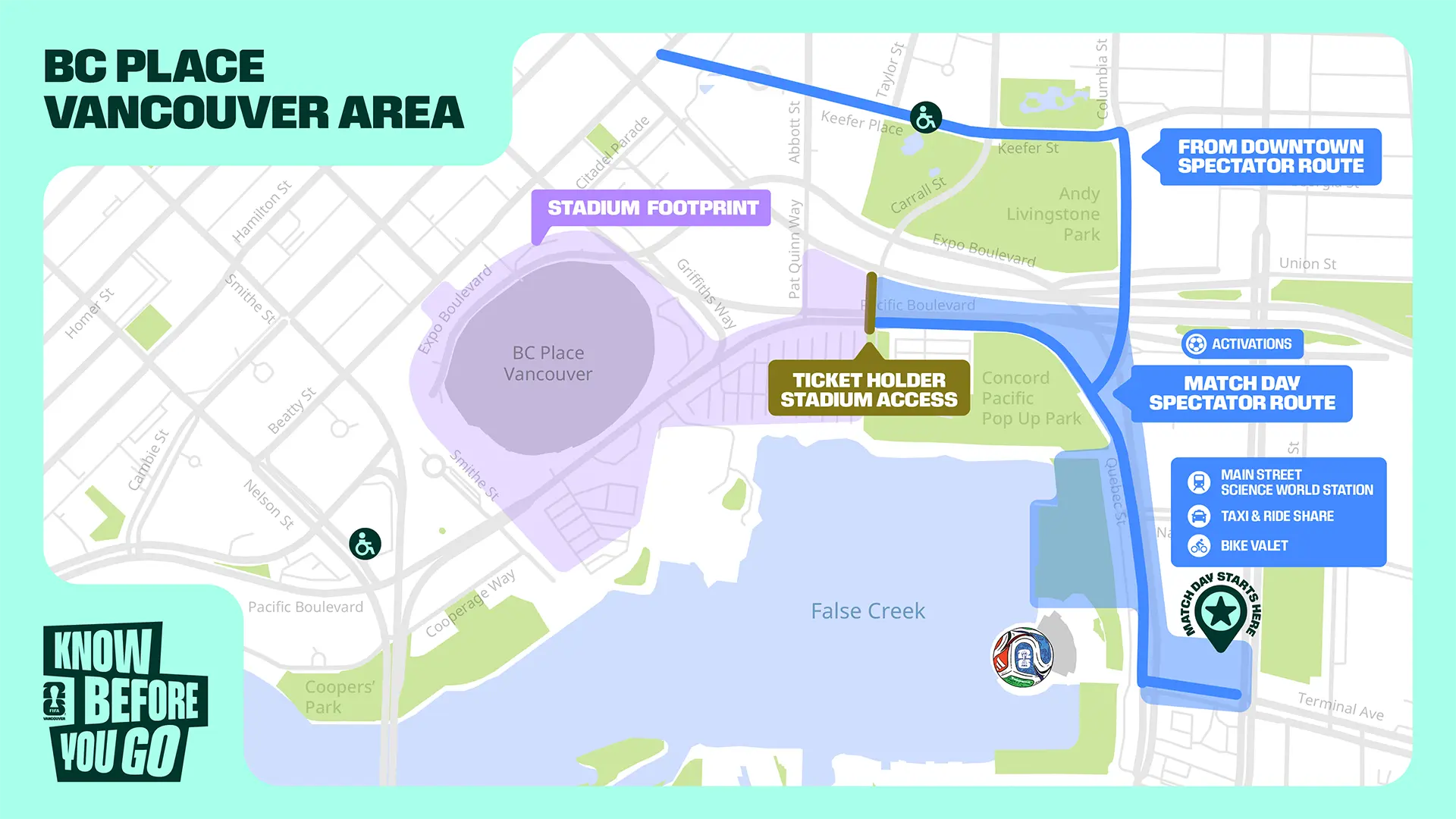
Source: FLFA VANCOUVER
Five Things to Do Before Kickoff
Post-match safety starts with pre-match preparation. Complete these five steps before the opening whistle — the core principle is "depend on nothing the stadium provides."
1. Activate Your eSIM and Confirm Cellular Data Is Working
Install and activate your eSIM profile through the ByteSIM App before you leave your hotel — or even before you leave home.
Before entering the stadium, check that your phone's status bar shows a local carrier name (e.g. AT&T) and a data indicator (4G/5G).
How to verify on your device:
- iOS: Settings → Cellular → confirm theeSIM line is toggled on for data.
- Android: Settings → Network & Internet → SIMs → confirm the eSIM line is set as the preferred mobile data line.
2. Pre-Set the Stadium Pickup Zone in Your Rideshare App
During major events, Uber and Lyft often display event-specific pickup pins inside the app.
But loading these pins requires a data connection. While you're still at the hotel on Wi-Fi, open the app, search for the stadium name, and check whether a designated pickup zone is already marked.
Take a screenshot — if your data drops later, you'll still know exactly where to walk.
3. Download Offline Maps
In Google Maps, download an offline map package covering at least a 5 km radius around the stadium.
Even with zero connectivity, you'll still be able to see your GPS position and get walking directions.
How: Google Maps → search for the stadium → tap your profile icon → Offline maps → Select custom area → Download.
4. Confirm Backup Transit Schedules
If your stadium has rail transit (check the table above), look up the last train time before match day.
Some cities extend service during major events; others don't.
Screenshot the schedule and save it to your camera roll — don't rely on being able to load a transit website after the match.
5. Save Emergency Numbers to Your Contacts
| Number | Purpose |
|---|---|
| Hotel front desk | Ask the hotel to arrange a car or confirm a shuttle |
| 911 (US / Canada) | Emergency services |
| 911 (Mexico) | Emergency services (unified since 2017) |
| Your country's embassy / consulate | Passport loss, consular assistance |
| ByteSIM 24/7 support | Network troubleshooting (WhatsApp & Email) |
If your eSIM plan includes a local phone number — ByteSIM's World Cup 2026 eSIM comes with a +1 US number — you can dial any of these numbers directly at no extra charge, including calls across all three host countries.
eSIM vs. Stadium Wi-Fi vs. International Roaming
An eSIM connects to local Tier-1 cell towers and gives you the same network priority as a local subscriber. Stadium Wi-Fi doesn't reach the pickup zone.
International roaming is expensive and often deprioritized during congestion.
For the specific moment when you need a ride home at midnight, eSIM is the most reliable option.
World Cup 2026
| Factor | 🏆ByteSIM World Cup eSIM | Free Stadium Wi-Fi | International Roaming |
|---|---|---|---|
| Works after you leave the stadium | ✅ Signal wherever there's cell coverage | ❌ Drops at the gates | ✅ But may be throttled |
| Network priority | Tier-1 local carrier (AT&T / Rogers) | Shared bandwidth — degrades with crowd size | Depends on roaming agreement; often lower than local users |
| Covers all 3 countries | ✅ One eSIM for US, MX, CA | ❌ Current venue only | ✅ But billed per country/day |
| Data limits | ⚡️US & MX: truly unlimited, no daily throttle · CA: 25GB high-speed Unlimited core | Free but unreliable | Usually capped daily; overage = shock bill |
| Voice calls | ✅ Includes +1 US number; unlimited calls within US, MX, CA | ❌ | ✅ But extremely expensive |
| Hotspot sharing | ✅ 10 GB — share with travel companions | ❌ | Most carriers block hotspot while roaming |
| Activation | Pre-install via ByteSIM App; activate when ready | No setup needed (but unreliable) | Contact home carrier; may take hours |
| Cost | 💰Fixed plan price (currently 5% off with Summer Sale) | Free | $10–15+/day; three countries can total hundreds |
Why "Tier-1 Carrier" Matters Most in a Crowd
ByteSIM's World Cup plan connects to AT&T across the United States and Mexico, and to Rogers in Canada.
According to Opensignal's Mobile Network Experience Reports, AT&T ranks among the top carriers in the US for reliability, while Rogers leads in coverage experience across Canada.
These aren't resold connections through a smaller virtual operator — they're direct links to the carriers with the densest tower infrastructure in each country.
During post-match congestion, Tier-1 carriers allocate capacity across their full spectrum holdings. Users on smaller MVNOs (mobile virtual network operators) are often deprioritized when the host network is under strain.
In practical terms, this means an AT&T-connected eSIM user is more likely to get a usable data connection in a congested exit zone than someone on a budget reseller plan.
FAQ: Post-Match Transport and Connectivity
Q1: How do I call an Uber at Estadio Azteca after a World Cup match?
Before the match ends, search for "Estadio Azteca" in the Uber app to locate the event-specific pickup zone (typically along Calzada de Tlalpan, 400–600 m from the gates).
Q2: Do World Cup stadiums have free Wi-Fi?
Yes — FIFA mandates free Wi-Fi at all host venues. However, coverage is designed for inside the stadium (stands, concourses, hospitality areas). Once you walk through the gates, the signal fades fast.
Q3: What should I do if my phone has no signal after the match?
First, don't panic. Stay in a well-lit area near the stadium where other fans and security are present. If you downloaded offline maps beforehand, use GPS to navigate toward the pickup zone or the nearest transit station. If you saved your hotel's phone number, try calling — voice calls sometimes connect even when data is congested.
Q4: Can I use the same eSIM in the USA, Mexico, and Canada?
Yes. ByteSIM's North America plan covers all three host countries on a single eSIM profile. The phone switches carriers automatically when you cross a border — AT&T in the US and Mexico, Rogers in Canada. No manual settings changes needed.
Q5: Does an eSIM perform better than international roaming in a crowded stadium area?
The eSIM itself isn't inherently faster — what matters is which carrier it connects to. ByteSIM routes through AT&T and Rogers, both Tier-1 operators with priority access to their own tower capacity.
Q6: What if my phone doesn't support eSIM?
Most iPhones from the XS (2018) onward and most recent Android flagships support eSIM — you can verify your specific model on ByteSIM's eSIM compatibility list or your Android manufacturer's support page. If your device doesn't support eSIM, buy a local prepaid SIM card when you arrive (T-Mobile kiosks at US airports, Telcel at Mexican airports) so you have independent cellular data after the match.
Q7: What's the best backup if I can't get an Uber or Lyft?
It depends on the venue. At stadiums with rail transit (see the risk table above), the subway or light rail is your strongest fallback — just confirm the last departure time in advance. At venues with no rail (Gillette, AT&T Stadium, GEHA Field), look for FIFA's official event shuttle service, which typically runs to major transit hubs.
Conclusion: Three Layers of Post-Match Safety
Getting home safely after a World Cup match isn't luck. It's preparation.
Layer 1 — Independent network. Don't depend on stadium Wi-Fi. Don't gamble on international roaming that might be throttled. A single eSIM on a Tier-1 local carrier is the most reliable way to stay online when80,000 other phones are fighting for the same signal.
Layer 2 — Pre-set plans. Pin your rideshare pickup point, download offline maps, and screenshot your backup transit schedule — all while you're still on hotel Wi-Fi. These steps take five minutes before kickoff and save you from panic after the final whistle.
Layer 3 — Informed judgment. Check the risk level of your specific stadium. A 🔴 venue like Gillette or Azteca demands more preparation than a 🟢 venue like BC Place. Know what you're walking into before you walk out.
The ByteSIM North America eSIM was built for exactly this scenario — truly unlimited data across the US and Mexico on AT&T's network, 25 GB in Canada on Rogers, a +1 phone number for local calls, and 10 GB of hotspot to share with a friend.
Activate it before the tournament starts. When the final whistle blows and everyone else is staring at a loading screen, you'll already have your Uber confirmed.
Comment

