World Cup Network Guide for Portugal Fans: Keep MB WAY Working & Avoid Roaming Shock
May 28,2026 | Wang
Why EU Fans Face the Biggest Roaming Trap in North America
As a Portuguese football fan, you've probably grown comfortable with EU roaming regulations.
Traveling to Spain for El Clásico or France for a Champions League night means your phone works exactly as it does at home — same data, same prices, no surprises.
This World Cup is different. The United States, Mexico, and Canada are all outside the EU's "Roam Like at Home" agreement.
Cross-continental roaming with MEO, NOS, and Vodafone PT is typically charged per megabyte or requires expensive daily packages costing €15-20 each.
Let's do the math.
During a 90-minute match, if you're sending WhatsApp voice messages, posting to social media, and checking scores, you'll easily consume 500MB or more.
At roaming rates, that's potentially €250 for a single match — more than many World Cup tickets cost.
The worst part? Many fans don't realize the problem until it's too late.
Your phone automatically connects to your carrier's roaming network the moment you land, and before you can react, the charges have already started accumulating.
The smartest approach is to purchase a local North American eSIM before departure, completely bypassing your Portuguese carrier's roaming channel.
An eSIM is a digital SIM that requires no physical card slot — you simply scan a QR code to activate it, connecting your phone directly to local networks like AT&T in the US or Rogers in Canada.

Four Network Pitfalls Every Portuguese Fan Must Avoid
Any one of these four pitfalls could ruin your World Cup experience — but each has a solution.
Pitfall One: MB WAY Verification Failure — Can't Even Buy a Beer at the Stadium
MB WAY is Portugal's national payment app.
According to the Portuguese Banking Association (APB), over 70% of Portuguese adults use MB WAY daily for transfers and payments. The problem is that MB WAY is deeply tied to your Portuguese phone number, and bank verification codes are sent to that number.
This system works flawlessly in Portugal, but once you leave the country, three scenarios can cause it to completely break down:
Scenario A: Removing Your Physical SIM Card
Many fans, trying to avoid roaming charges, simply remove their Portuguese SIM and insert a local card upon arrival.
The result? Bank verification codes can't be delivered, and MB WAY becomes completely unusable. Imagine trying to buy a Super Bock at the stadium to celebrate a goal, pulling out your phone to pay, only to find your account is locked.
Nobody wants that embarrassment.
Scenario B: Unstable IP Addresses from Low-Quality eSIMs
Many cheap eSIMs on the market are actually "roaming cards" — your data gets routed through servers in Hong Kong, Singapore, or even back to Europe before returning to North America. This architecture causes your IP address to jump between multiple countries.
Portuguese banks like CGD, Millennium bcp, and Novo Banco have fraud detection systems that flag this as suspicious activity, freezing your MB WAY or refusing to send verification codes.
Scenario C: Verification Timeouts Due to Network Latency
Even if the verification code is sent, high network latency means by the time you receive the SMS, enter the code, and submit, you may have exceeded the bank's 60-second validity window.
After several failed attempts, your account gets temporarily locked.
The Solution: Clean Local IP + Dual SIM Configuration
ByteSIM's North America 3-Country plan connects directly to AT&T (US & Mexico) and Rogers (Canada) local networks, giving your phone a genuine North American IP address rather than routing through other regions like roaming cards do.
A stable local IP means Portuguese banks' fraud detection systems won't flag your account as suspicious.
Combined with proper dual SIM setup — keeping your Portuguese physical SIM for voice/SMS (to receive bank codes) while routing all data through the eSIM — you avoid roaming charges while ensuring MB WAY works normally.
Pitfall Two: RTP/Sport TV Streams Constantly Buffering — The Goal Happened But You're Still Watching the Replay
Jorge Perestrelo's passionate calls, Nuno Matos's tactical analysis — these are inseparable parts of the viewing experience. Many fans use RTP Play or the Sport TV app to watch live broadcasts or listen to real-time commentary.
But using these apps in North America presents two technical obstacles:
Obstacle A: Buffering Hell from Network Latency
If you're using a low-quality roaming eSIM, your data transmission path might look like this:
Your phone → North American cell tower → Hong Kong/Singapore server → European server → RTP/Sport TV content source → back the same way
This "around the world" architecture results in network latency (ping) of 300-500ms or higher.
What does 300ms mean?
When you hear the commentator shout "GOLO!", the stadium crowd has already been chering for half a second.
More tangibly: the video bufers every few seconds, the screen freezes at the moment of a goal, and by the time it catches up, the ball is already in the net.
Obstacle B: Geo-blocking Misidentification
RTP Play and Sport TV both have geo-fencing systems that restrict content to authorized regions.
If your IP address is jumping between Europe and North America (a typical symptom of poor roaming eSIMs), the system may determine you're in an unauthorized area and cut your signal, displaying "Este conteúdo não está disponível na sua região" (This content is not available in your region).
Even if you use a VPN to connect back to Portugal, if the underlying network latency is too high, the VPN can't save you — the video will still stutter.
The Solution: Localized Routing + Low-Latency Network
ByteSIM connects to AT&T and Rogers, both Tier-1 carriers in North America (meaning they own their own backbone networks).
Data transmission uses localized routing, with ping typically between 30-50ms. This means:
- When used with a VPN, RTP Play and Sport TV streams will be dramatically smother
- Even without a VPN, WhatsApp voice messages and social media refresh almost instantly
- You can truly watch in "real-time" — commentary synced with the action, no awkward delays
Pitfall Three: WhatsApp Video Calls Dropping — Sharing a Goal Becomes "Can You Hear Me?"
During the World Cup, you'll definitely want to video call your family in Lisbon to share the atmosphere — when Ronaldo scores, you hold up your phone toward the pitch so they can experience the roar of thousands of fans.
But WhatsApp video calls have strict network requirements:
- Minimum bandwidth: 1Mbps down + 1Mbps up (group calls need more)
- Latency requirement: Ping ideally below 150ms
- Stability requirement: No frequent packet loss or disconnections
If you're using MEO/NOS international roaming, the cost alone will hurt — video calls consume roughly 3-5MB per minute, which at roaming rates means a 10-minute chat with family could cost €25 or more.
If you're using a low-quality eSIM, network instability causes:
- Frequent video freezing and pixelation
- Chopy audio where "Can you hear me?" becomes the main conversation
- Calls randomly disconnecting, requiring repeated redials
The Solution: Unlimited Data + Stable 5G Network
ByteSIM's North America 3-Country plan offers truly unlimited data in the US and Mexico — no daily caps, no throttling after reaching a limit.
This means you can video call freely without worrying about running out of data or being slowed down.
The plan connects to AT&T and Rogers Premium 5G networks, with excellent coverage in all World Cup host cities (New York, Los Angeles, Miami, Mexico City, Toronto, and more).
5G's low-latency characteristics are perfect for real-time video calls — the moment you raise your phone, your family sees the live scene with virtually no delay.
Additionally, the plan includes 10GB of hotspot sharing. If you're watching with friends, you can temporarily share your connection for emergency use.
Pitfall Four: Dual SIM Setup Confusion — A Nightmare for Mid-Range Android Users
According to Statcounter's Portugal mobile market data, brands like Xiaomi, Samsung, and OPPO have significant market share in Portugal, and many fans use mid-range Android devices.
While these phones support eSIM, their dual SIM setup interfaces are often less intuitive than iPhone's, and the settings path varies between brands and system versions.
The correct configuration should be:
Portuguese physical SIM → Keep voice/SMS function (receive bank codes) → Disable data roaming
eSIM → Handle all data traffic → Set as default data SIM
But in practice, many users make these mistakes:
Mistake A: Forgetting to disable data roaming on the physical SIM
In certain situations (like when eSIM signal is weak), the phone automatically switches to the physical SIM's data network, generating massive roaming charges.
Some fans have reported receiving €50 roaming bills just because their phone switched for 5 minutes while in a subway tunnel.
Mistake B: Setting the eSIM as the default voice line
Phone calls use the eSIM's number instead of your Portuguese number. While ByteSIM's plan includes a US number with free calling, if you need to call back to a Portuguese bank's customer service to verify your identity, calling from a US number may fail identity verification.
Mistake C: Not knowing how to add an eSIM at all
On some mid-range devices, the eSIM setup option is buried deep in menus. Some phones purchased through MEO or NOS contracts may even have eSIM functionality locked by the carrier.
The Solution: Step-by-Step Tutorial +24/7 Customer Support
To address this pitfall, I've prepared a detailed dual SIM setup tutorial below, covering specific steps for iPhone and major Android brands (Xiaomi, Samsung, OPPO).
If you encounter any issues during setup, ByteSIM offers 24/7 online customer support via WhatsApp or email. The support team can guide you through the setup remotely, ensuring everything is ready before departure.
Why ByteSIM's North America 3-Country Plan?
After analyzing all four pitfalls in detail, you've probably noticed how ByteSIM's plan specifically addresses each one. Here's a quick summary:
This plan was designed specifically for World Cup cross-city viewing scenarios, covering all 16 host cities across the United States, Mexico, and Canada.
At $49.90 for 20 days, you get unlimited data in the US and Mexico (no daily caps, no throttling) and 25GB high-speed data in Canada.
The plan also includes a +1 US phone number with free calls and texts across all three countries — perfect for contacting local hotels, restaurants, or Uber drivers without worrying about extra charges.
Compared to MEO/NOS daily roaming packages at €15-20 per day, ByteSIM's daily cost is under $2.50.
More importantly, you get a genuine local network experience rather than data bouncing around through roaming connections.
The plan can be purchased in advance through the ByteSIM App and activated whenever you're ready. Click to activate when needed to start billing.
How to Set Up Your North America eSIM in 3 Minutes
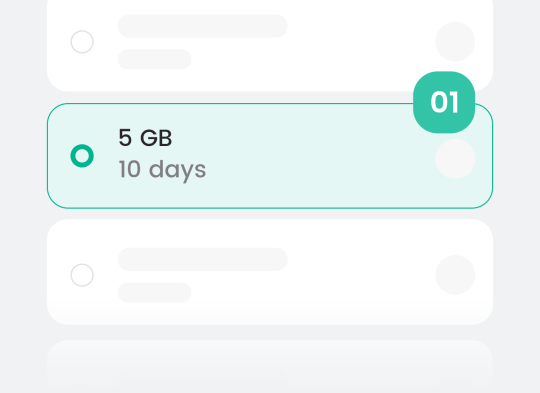
Check & Choose
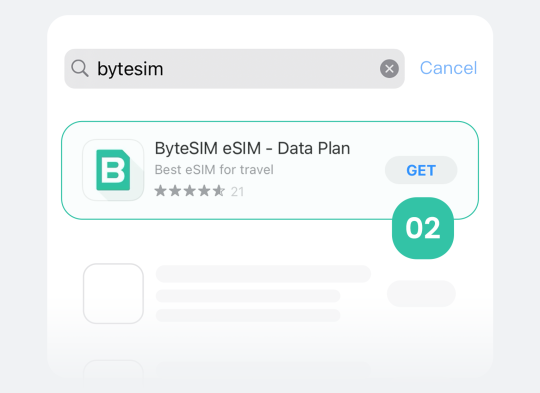
Download & Activate
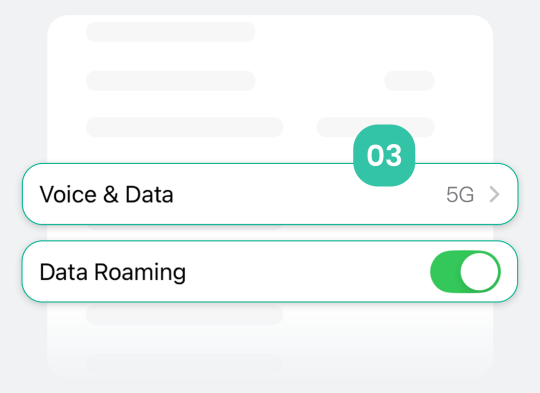
Install & Connect
Step-by-Step Guide: Dual SIM Setup & Keeping MB WAY Alive
This is the most important practical section of this guide.
Follow these steps to ensure your Portuguese number stays active (receiving bank verification codes) while all data traffic goes through the eSIM channel (avoiding roaming charges).
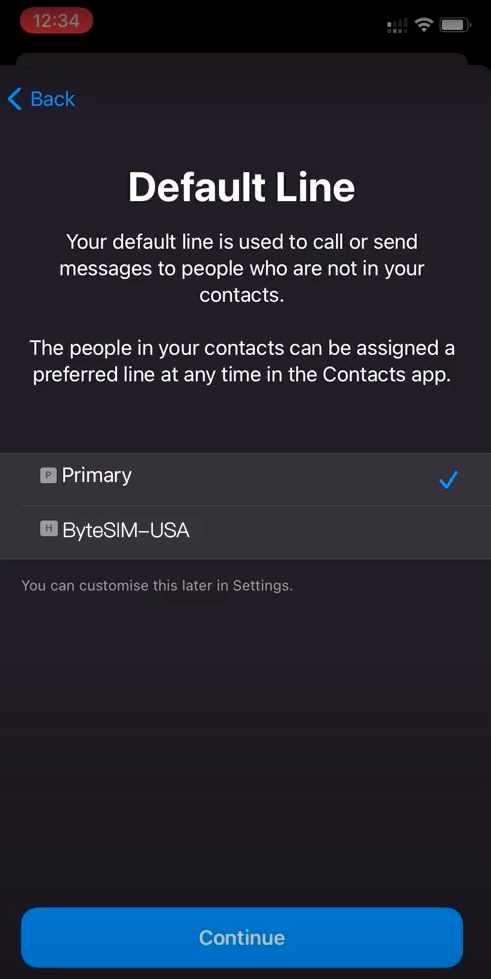
Step 1: Activate Your eSIM Before Departure
- Download the ByteSIM App and purchase the North America 3-Country plan
- Scan the QR code within the app to download the eSIM profile to your phone
- Don't enable data yet — wait until you land in North America
💡 Tip: You can download the eSIM profile in advance, I recommend activating it only when needed, as billing begins after eSIM activation. This maximizes the use of the 20-day validity period.
Step 2: Configure Dual SIM Data Priority
For iPhone Users:
- Go to Settings → Cellular
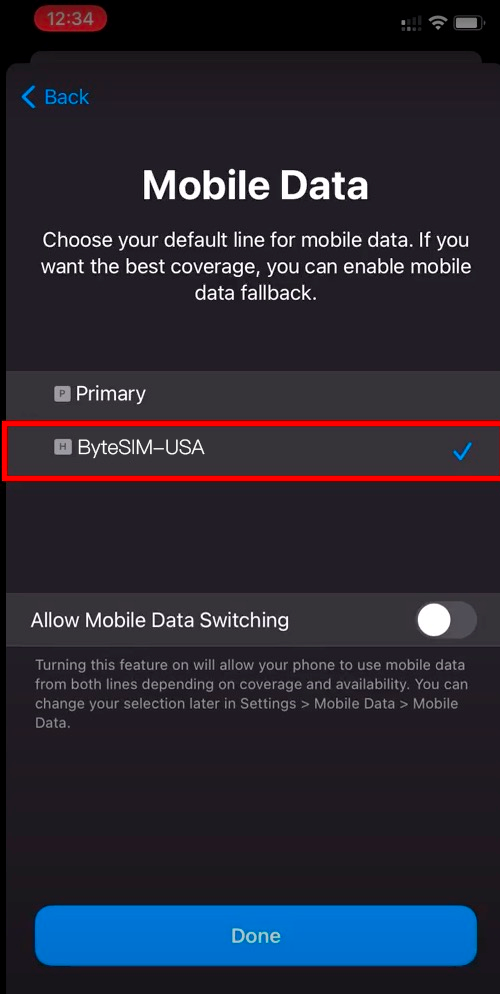
- Switch "Cellular Data" to your eSIM line
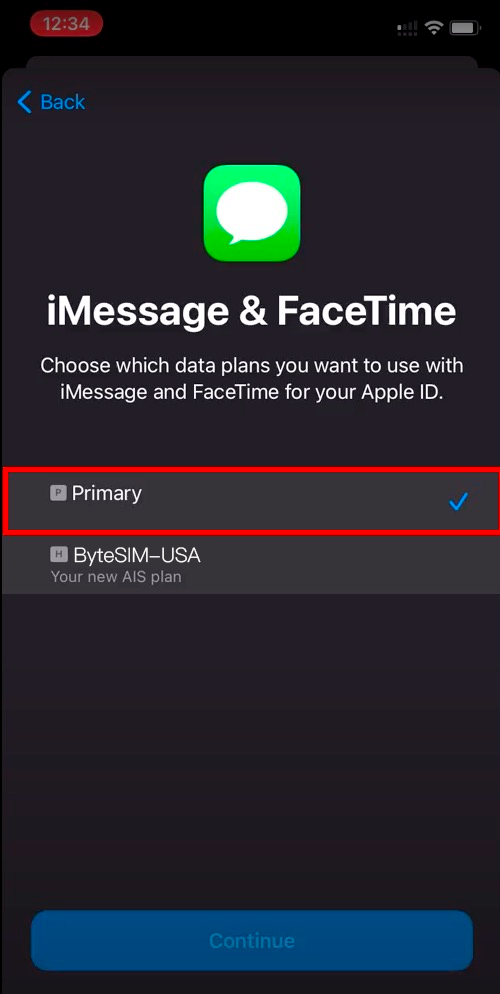
- Keep "Default Voice Line" set to your Portuguese physical SIM
- Turn OFF "Allow Cellular Data Switching" (this is crucial to prevent your physical SIM from using data)
For Android Users (Xiaomi/Samsung example):
- Go to Settings → SIM cards and mobile networks
- Set "Mobile data" default to eSIM
- Set "Calls" and "SMS" defaults to your Portuguese physical SIM
- Enter your Portuguese physical SIM settings and turn OFF "Data roaming"
Step 3: Ensure MB WAY Works Properly
- Before departure, log into MB WAY on your Portuguese network to confirm your account status is normal
- After landing in North America, keep your Portuguese physical SIM's voice/SMS function enabled
- If your bank sends a verification code, it will arrive via SMS to your Portuguese number
- Data traffic goes through the eSIM, so it won't trigger your bank's IP anomaly detection
⚠️ Critical Warning: Do NOT remove your Portuguese physical SIM card while in North America! Keep it in the slot with only data roaming disabled. Removing the card means you cannot receive any SMS, including bank verification codes.
Step 4: Network Switching After Landing
- After your plane lands, toggle Airplane Mode on and off (this refreshes network connections)
- Confirm your eSIM has connected to AT&T or Rogers (the carrier name will appear in your status bar)
- Open a browser and visit any webpage to confirm data connection is working
- Test sending a WhatsApp message to confirm everything is ready
Pre-Departure Checklist: Device Compatibility
The Portuguese market has many mid-range Android devices, and not all phones support eSIM. Before purchasing, make sure your device is compatible.
Quick Self-Check Methods
Method 1: Dial *#06#
If your screen displays an EID (a 32-digit number), your phone hardware supports eSIM.
Method 2: Check Settings Menu
- iPhone: Settings → Cellular → Look for "Add eSIM" option
- Android: Settings → Network & Internet or SIM card management → Look for "Add eSIM" or "Download SIM" option
Common Compatible Devices
| Brand | eSIM-Compatible Models |
|---|---|
| iPhone | iPhone XS and all later models (including SE 2nd/3rd gen) |
| Samsung | Galaxy S20 and later, Galaxy Z Flip/Fold series, A35/A36 |
| Xiaomi | Xiaomi 12T Pro, 13 series, 14 series |
| Pixel 3 and all later models | |
| OPPO | Find X5 Pro and select later models |
⚠️ Carrier Lock Warning: Some phones purchased through MEO, NOS, or Vodafone PT contracts may hav eSIM functionality locked. If your phone is a contract device, contact your carrier before departure to confirm it's unlocked. Unlocking typically requires completing your contract term or paying a fee.
For a complete list of compatible devices, see our full eSIM compatibility guide. If you're unsure whether your phone supports eSIM, you can also contact ByteSIM customer support directly for confirmation.
Final Recommendations
The World Cup comes once every four years — don't let network problems become your regret.
Action Checklist for You
Tap the items to check them off as you complete your World Cup preparation.
If your World Cup trip includes a warm-up in Europe first (like meeting up in Spain before flying to North America together), I also suggest you take a look at ByteSIM European eSIM plan.
Força Portugal! May every match in North America come with stable connectivity, letting you share every goal's joy with your family in real-time.
Ready to go? Get the ByteSIM North America 3-Country plan now — $49.90 for 20 days of unlimited data. Connect the moment you land and focus on enjoying every match.
Comment