

If your iPhone eSIM is locked, it means your device is restricted to a specific carrier and cannot freely use other eSIM providers. This is the main reason why many users fail to activate international eSIMs during travel or major events like the FIFA World Cup.
In most cases, the issue is not a technical error or incorrect setup. It happens because your iPhone is carrier-locked, which prevents it from accepting alternative mobile networks. Once this restriction is removed, your device can use any compatible eSIM globally, including travel data plans designed for the World Cup.
This guide will show you exactly how to check whether your iPhone is locked, why it happens, and how to unlock it using official methods. It will also cover the best eSIM options for FIFA World Cup travel so you can stay connected across the USA, Canada, and Mexico without roaming fees.
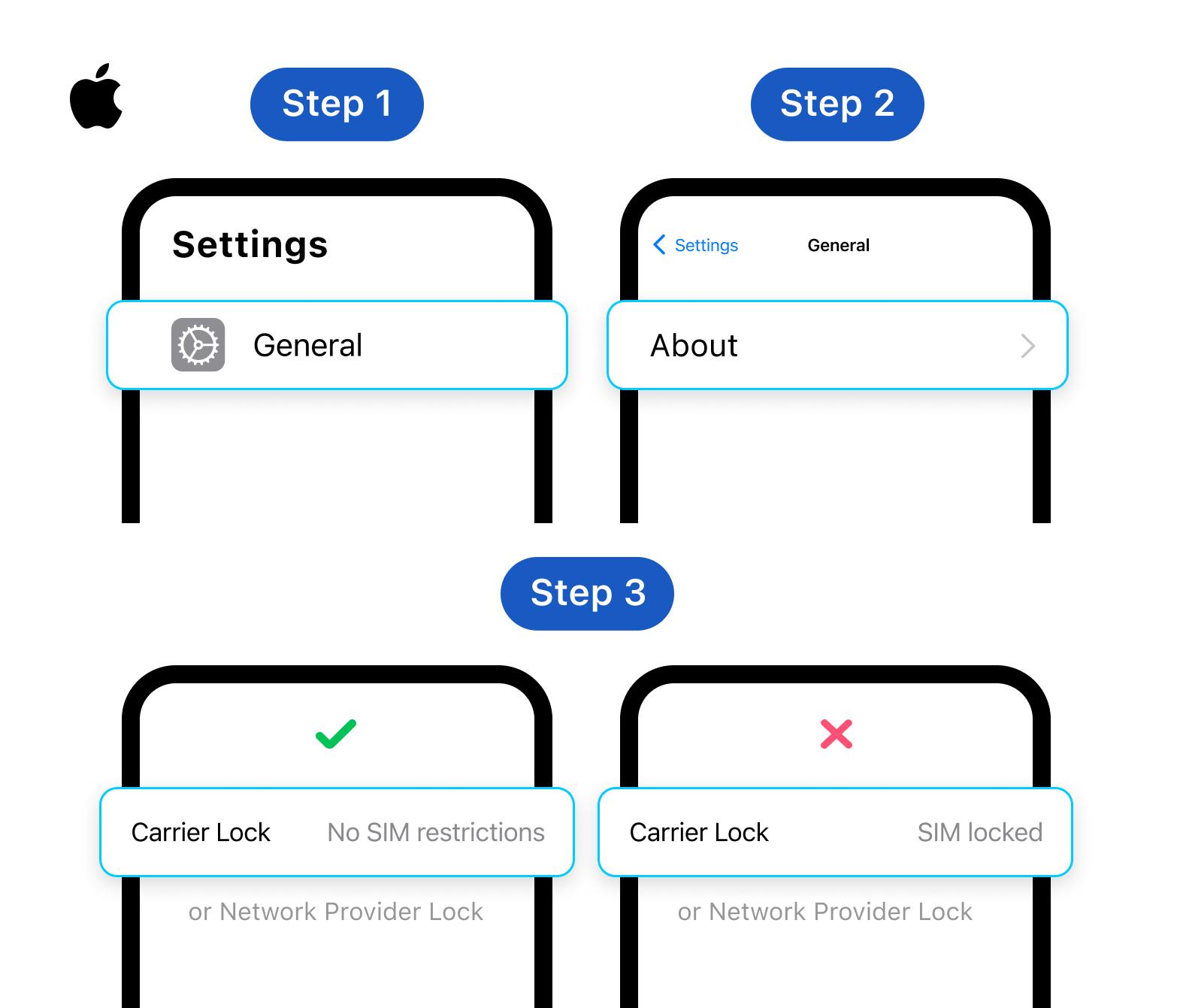
Step-by-Step: How to Check If Your iPhone Is Locked
Before trying to unlock your eSIM, you need to confirm whether your iPhone is actually carrier-locked. Many users assume their eSIM is broken, but in reality, the device is restricted to a specific mobile carrier. This section will show you simple ways to check your lock status in less than a minute.
Check Carrier Lock Status in iPhone Settings
The fastest way to verify your device is through iOS settings.
- Go to Settings
- Tap General
- Select About
- Scroll to Carrier Lock
You will see one of two results:
- No SIM restrictions → Your iPhone is unlocked and supports any eSIM
- SIM locked / Carrier locked → Your device is restricted to a specific carrier
If your device is locked, you will not be able to fully use international eSIM plans, even if they are correctly installed.
Try Adding a Foreign eSIM
Another practical method is to test with a different eSIM. This is useful if you are already traveling or preparing for the FIFA World Cup.
- Install a travel eSIM from another provider
- Scan the QR code and activate it
- Observe whether activation succeeds
If activation fails immediately or shows “not supported,” your iPhone is likely carrier-locked.
Check Using a Physical SIM Swap Test
If your iPhone supports dual SIM (physical SIM + eSIM), you can also test with a different SIM card.
- Insert a SIM from another carrier
- Restart your device
- Check if it can connect to a network
If only your original carrier works, your device is still locked.
Why This Step Matters Before Unlocking
Understanding your lock status is important because:
- You may not actually need to unlock anything
- Some eSIM issues are caused by incorrect assumptions
- Unlocking is only possible if the device is eligible
This step prevents unnecessary troubleshooting and helps you move directly to the correct solution.
Pro Tip: Always check the carrier lock status in Settings before purchasing any travel eSIM. It takes less than 30 seconds and can save you from buying a plan that won't work.
Why Your iPhone eSIM Is Locked
If your iPhone is eSIM locked, it is almost always due to restrictions set by the mobile carrier or device purchase conditions. This is not a software bug, and it cannot be fixed through simple settings changes. Understanding the root cause helps you know whether your device is eligible for unlocking and what options you actually have before traveling for the FIFA World Cup.
Carrier Lock Restrictions (Most Common Cause)
Most iPhones are sold through mobile carriers with a built-in network restriction.
- The device is tied to one specific carrier
- Only that carrier’s SIM or eSIM can be used
- Other eSIM providers will be blocked
This is the most common reason users cannot activate travel eSIMs during international trips. In this case, unlocking must be approved by the original carrier.
Regional or Device Variants
Some iPhones are manufactured differently depending on the region.
- Certain models may have limited eSIM functionality
- Some regions prioritize physical SIM usage
- Carrier policies differ by country
For example, devices purchased through specific markets may have stricter network limitations.
Contract, Installment, or Payment Conditions
Your iPhone may also be locked due to financial or contract status.
- Device is still under installment plan
- Contract has not been completed
- Outstanding payments exist
In these cases, carriers usually block unlocking until all conditions are fulfilled.
Why This Matters for FIFA World Cup Travelers
During the FIFA World Cup, many users switch between multiple countries. If your device is locked:
- You cannot freely use local or travel eSIMs
- Roaming becomes the only option (often expensive)
- Connectivity across USA, Canada, and Mexico becomes limited
That’s why checking and understanding the lock reason is essential before choosing a travel eSIM plan.
How to Unlock eSIM on iPhone (Official Methods)
If your iPhone is eSIM locked, the only reliable way to fix it is through official unlocking methods. There is no safe or permanent shortcut, and most “free unlock tools” found online do not work or may risk your device security. Below are the legitimate ways to unlock your iPhone so you can use any eSIM, especially for international travel during the FIFA World Cup.
Request an Official Unlock from Your Carrier
This is the most common and recommended method.
- Contact your original mobile carrier
- Request a “device unlock” or “carrier unlock”
- Meet eligibility requirements (contract completed, no outstanding bills)
Once approved, your iPhone will be unlocked remotely. After unlocking:
- You can use any eSIM provider
- International travel eSIMs will activate normally
- No hardware changes are needed
This is the only method that fully complies with carrier policies.
Use a Factory-Unlocked iPhone
If you have not purchased your device yet, this is the simplest long-term solution.
- Buy an iPhone labeled “SIM-free” or “factory unlocked”
- These devices are not tied to any carrier
- eSIM works globally without restrictions
This option is especially useful for frequent travelers or users planning to attend events like the FIFA World Cup across multiple countries.
Switch to a Global eSIM Provider (Workaround Option)
If unlocking is not possible immediately, you can still stay connected using global eSIM services.
- Works even if your phone is partially restricted (depending on carrier rules)
- Offers multi-country coverage (USA, Canada, Mexico)
- Can be activated instantly via QR code
This is often the fastest way to get online during travel, even before a full unlock is completed.
Important Warning About “Free Unlock Tools”
You may find websites claiming:
- “Free iPhone eSIM unlock”
- “Instant carrier bypass”
- “No carrier approval needed”
In most cases:
- These tools are unreliable or outdated
- Some may compromise your device security
- Official carrier unlock remains the only safe method
Why Unlocking Matters for the FIFA World Cup
During the FIFA World Cup, network switching is common due to multi-country travel. If your iPhone is unlocked:
- You can switch between local eSIMs easily
- You avoid expensive roaming charges
- You stay connected across different host countries
Pro Tip: If you plan to travel internationally often, always buy a factory-unlocked iPhone from the start. It will save you from carrier lock issues and give you the freedom to use any eSIM provider worldwide.
Best eSIM Options for the FIFA World Cup
Once your iPhone is unlocked, the next step is choosing a reliable eSIM for the FIFA World Cup. Since the tournament involves travel across the USA, Canada, and Mexico, you need a solution that works across multiple countries without complicated setup. One option designed specifically for international travelers is ByteSIM.
Why ByteSIM Works Well for FIFA World Cup Travel
ByteSIM is built for users who need simple and fast connectivity while traveling internationally.
- Instant eSIM delivery via QR code
- Works across multiple countries without SIM swapping
- Designed for short-term travel and event-based trips
- No physical store or shipping required
This makes it suitable for travelers moving between different World Cup host cities.
Multi-Country Coverage for North America
For FIFA World Cup 2026, coverage across North America is essential.
- Supports USA, Canada, and Mexico connectivity
- Automatically connects to local partner networks
- Helps avoid roaming charges when crossing borders
You can stay connected without changing settings at each destination.
Simple Setup on iPhone
Using ByteSIM on iPhone is straightforward:
- Purchase the plan online
- Scan the QR code
- Add the eSIM in Settings
- Activate mobile data before or after arrival
No physical SIM card or store visit is required.
Best Use Cases During the World Cup
ByteSIM is especially useful for:
- Stadium navigation and live updates
- Social media posting and content sharing
- Messaging and travel coordination
- Streaming highlights and match updates
It is designed for travelers who want stable internet without roaming costs.

FAQ: eSIM and iPhone Lock Issues
In most cases, yes—but only through official carrier eligibility. If your contract is completed, carriers may unlock it at no cost. Some carriers require full payment of the device first. There is no safe or reliable “instant free unlock tool.” The only legitimate “free” option is carrier-approved unlocking.
This usually means the device is unlocked, but the issue is elsewhere. The eSIM plan may not be activated correctly, the QR code may be expired or invalid, or network settings may need updating. In this case, it is not a lock issue.
Yes, most modern iPhones support Dual SIM mode. One physical SIM + one eSIM can run simultaneously. You can separate data and calls, which is useful for travel and domestic use together.
If your phone is already unlocked, use a global travel eSIM like ByteSIM. Activate before departure to avoid roaming charges entirely. This is the simplest way to stay connected across multiple host countries.
Key Takeaway: A locked iPhone is one of the most overlooked reasons for eSIM activation failure. Before you travel, always check your carrier lock status. If your device is locked, request an unlock from your carrier well before your trip—it can take a few days. If unlocking isn't possible, consider using a global eSIM that may still work under certain carrier restrictions, or plan to use roaming as a backup.
© 2026 iPhone eSIM Guide — Unlock your device for seamless connectivity across North America.

