

An eSIM on iPhone is a built-in digital SIM that lets you activate a mobile data plan without inserting a physical SIM card. Instead of swapping SIM cards while traveling, you can download and activate a plan directly on your iPhone in just a few minutes.
This has become especially useful for travelers heading to the FIFA World Cup. With matches taking place across the United States, Canada, and Mexico, many fans need a simple way to stay connected between cities and countries without paying expensive roaming fees.
In this guide, you'll learn what an eSIM card for iPhone actually is, how it works, which iPhones support it, and why many international travelers now prefer eSIMs for major events like the FIFA World Cup. We'll also show you how to set up an eSIM on iPhone and what to look for when choosing the best travel eSIM for North America.
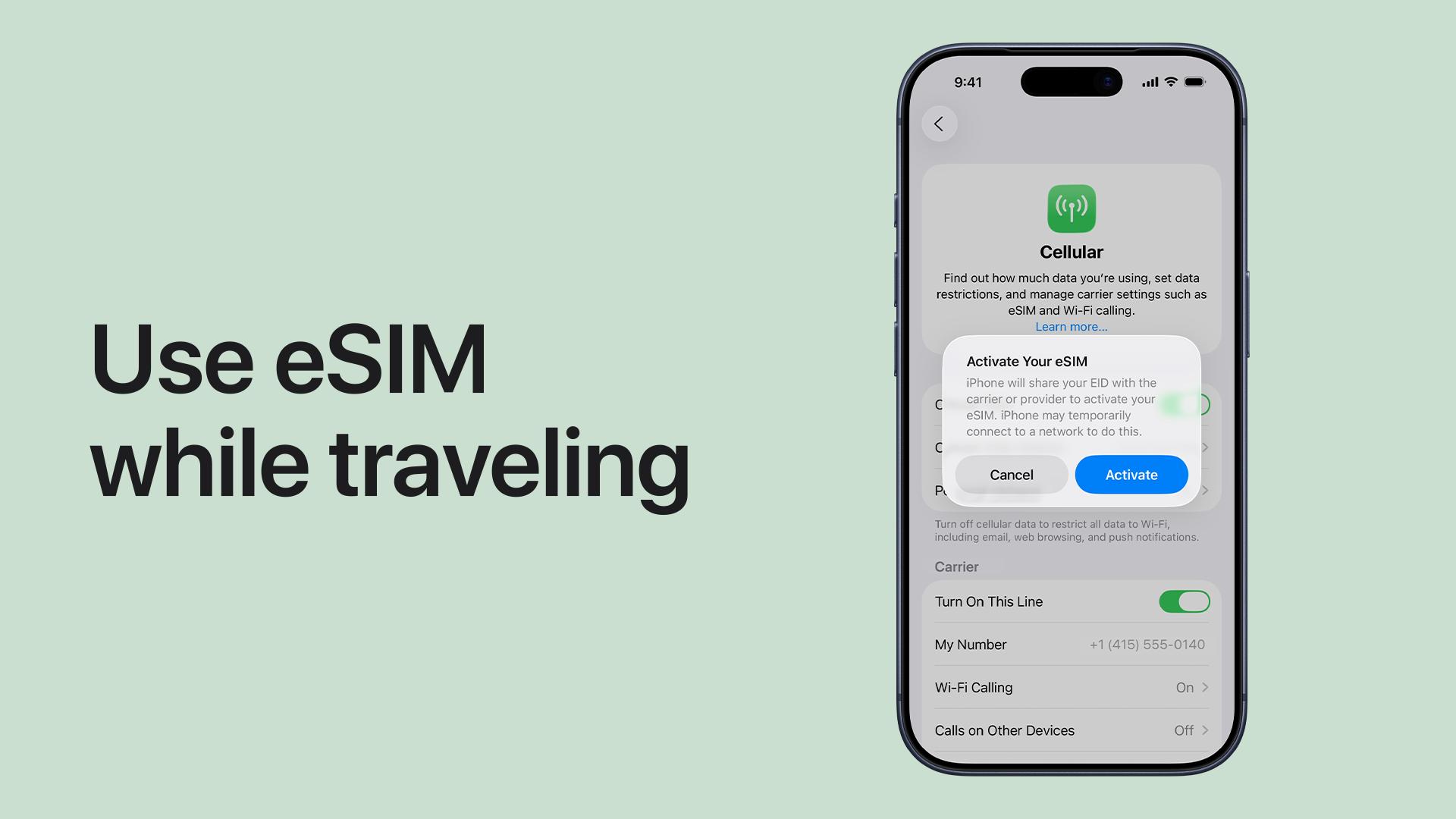
1. What Is an eSIM Card on iPhone?
An eSIM is a digital version of a traditional SIM card that is built directly into your iPhone. Instead of inserting a plastic SIM card into your device, you can activate a mobile plan digitally. The term "eSIM" stands for "embedded SIM." Because it's already built into the phone, there's no need to swap physical cards when changing carriers or traveling internationally.
How eSIM Works on iPhone
With an eSIM, you can:
- Download a mobile plan online
- Activate service using a QR code
- Switch between carriers digitally
- Use multiple phone lines on one iPhone
Most travel eSIM providers send a QR code after purchase. Once scanned, your iPhone installs the mobile plan automatically.
Why iPhone Users Are Switching to eSIM
Many iPhone users now prefer eSIM because it's faster and more convenient than traditional SIM cards. Benefits include:
- No physical SIM card required
- Easy setup directly from your phone
- Better for international travel
- Supports dual SIM on compatible iPhones
- Faster carrier switching
This is especially useful for travelers attending the FIFA World Cup across multiple countries.
Can You Still Use a Physical SIM?
Yes. Many iPhones support both one physical SIM and one or more eSIMs. This allows travelers to:
- Keep their home number active
- Use a separate eSIM for mobile data abroad
For example, you can continue receiving calls and messages from your regular number while using a travel eSIM in the United States, Canada, or Mexico.
Is eSIM Safe to Use? Yes. eSIM technology is supported directly by Apple and major carriers worldwide. Because the SIM is embedded inside the device, it can't be physically lost or damaged, switching plans is more secure digitally, and activation is usually encrypted through carriers.
Good to Know: Most newer iPhones sold in the United States are now eSIM-only, meaning they no longer include a physical SIM card tray.
2. Which iPhones Support eSIM?
Most modern iPhones support eSIM technology, especially models released in the last few years. If you're planning to use a travel eSIM for the FIFA World Cup, checking compatibility should be your first step.
iPhones That Support eSIM
Apple introduced eSIM support starting with the iPhone XR and iPhone XS series. Compatible models include:
- iPhone XR
- iPhone XS and XS Max
- iPhone 11 series
- iPhone 12 series
- iPhone 13 series
- iPhone 14 series
- iPhone 15 series
- iPhone 16 series
- iPhone 17 series
Newer iPhones also support dual SIM functionality, allowing you to use one physical SIM + one eSIM, or multiple eSIM profiles. This is particularly useful for international travel.
How to Check if Your iPhone Supports eSIM
You can verify eSIM support directly in your iPhone settings. Follow these steps:
- Open Settings
- Tap Cellular or Mobile Data
- Look for Add eSIM
If this option appears, your iPhone supports eSIM activation.
Make Sure Your iPhone Is Unlocked
Even if your device supports eSIM, some carrier-locked phones may prevent you from using international eSIM plans. To check:
- Go to Settings > General > About
- Scroll to Carrier Lock
- Look for No SIM Restrictions
If your iPhone is locked, contact your carrier before purchasing a travel eSIM.
Why This Matters for FIFA World Cup Travel
During the FIFA World Cup, many fans will travel between host cities across the United States, Canada, and Mexico. Having an eSIM-compatible iPhone allows you to:
- Activate a travel data plan instantly
- Avoid buying local SIM cards at airports
- Stay connected across multiple countries
- Use maps, ride-sharing apps, and digital tickets more easily
Pro Tip: Even if your iPhone supports eSIM, always check the carrier lock status before buying a travel eSIM. A locked phone will reject most international eSIM plans.
3. How Does an eSIM Work on iPhone?
An eSIM works by digitally connecting your iPhone to a mobile carrier without requiring a physical SIM card. Instead of inserting a card into your phone, you simply download a mobile plan directly to your device. For most users, the setup process only takes a few minutes.
How the Activation Process Works
The typical eSIM setup process looks like this:
- Purchase an eSIM plan online
- Receive a QR code from the provider
- Open Settings > Cellular > Add eSIM
- Scan the QR code
- Activate the mobile plan
Once activated, your iPhone connects to the carrier network automatically.
What Happens After Activation?
After setup, your eSIM works just like a regular SIM card. You can use it for mobile data, calls and text messages (depending on the plan), navigation apps, social media, and streaming apps.
Can You Use eSIM and Physical SIM Together?
Yes. Many iPhones support dual SIM functionality. This means you can keep your home SIM active while using a travel eSIM for mobile data abroad. For example, your regular number can still receive calls or SMS, while your eSIM handles internet access during your trip. This setup is popular among World Cup travelers visiting multiple countries.
Why eSIM Is Convenient for International Travel
Traditional SIM cards often require visiting airport kiosks, swapping SIM cards manually, and managing multiple local carriers. With an eSIM, you can usually:
- Buy a plan before departure
- Install it at home using Wi-Fi
- Connect immediately after landing
This is especially helpful during large international events where airport lines and local SIM availability can become frustrating.
How Many eSIMs Can an iPhone Store?
Most newer iPhones can store multiple eSIM profiles at the same time. However, only one or two lines can typically remain active simultaneously. The exact limit depends on your iPhone model. This allows travelers to switch between plans more easily without deleting old eSIMs.
Good to Know: Many travel eSIM providers allow you to activate your plan only after arriving at your destination, helping you maximize your data validity period.
4. eSIM vs Physical SIM: Which One Should You Use?
If you're traveling for the FIFA World Cup, the choice between eSIM and physical SIM is mostly about convenience. Here's a simple comparison:
| Feature | eSIM | Physical SIM |
|---|---|---|
| Setup | Digital, instant | Manual SIM swap |
| Travel use | Works across countries easily | May require multiple SIMs |
| Activation | QR code, online | Physical card + carrier setup |
| Switching networks | Fast and flexible | Slower and manual |
| Suitability for travel | ⭐ Best option | Less convenient |
So which one should you use? For international travel, especially during the FIFA World Cup, eSIM is the better choice. Because it allows you to:
- Activate your mobile plan before departure
- Avoid changing SIM cards in different countries
- Stay connected immediately when you land
- Manage everything directly on your iPhone
Once you choose eSIM, the next step is selecting the right travel plan.
5. Best eSIM for FIFA World Cup Travelers
For travelers attending the FIFA World Cup across the United States, Canada, and Mexico, you need a plan that works seamlessly across all three countries.
What to look for in a World Cup eSIM
A good travel eSIM should include:
- Coverage across USA, Canada, and Mexico
- Quick QR code activation
- Stable mobile data for travel apps
- Easy setup on iPhone
Recommended: ByteSIM North America eSIM
A simple and reliable option for World Cup travelers is the ByteSIM North America eSIM.
What You Actually Get (Plan Details)
- Data Plan: Truly Unlimited (USA & Mexico) – No daily data caps, no sudden speed throttling, designed for heavy usage like maps, tickets, and live match updates
- Canada Coverage: 25GB High-Speed Data – Full-speed access in Toronto, Vancouver, and other host cities, optimized for navigation, streaming highlights, and ride-hailing apps
- Hotspot Support: Up to 10GB Sharing – Share connection with travel companions, useful for groups moving between stadiums or long transit routes
- Phone Number Included: +1 USA Number – Unlimited local calls & SMS across USA, Mexico & Canada, useful for booking confirmations, ride services, and local verification
Built Specifically for Football Travel
Designed for FIFA World Cup 2026 multi-city travel flow, supports all 16 host cities across USA, Canada, and Mexico, optimized for real-world stadium congestion conditions, keeps essential apps running even during peak match traffic. What this means in practice:
- Your FIFA ticket loads even at stadium entry gates
- Your Uber still works after midnight matches
- Your maps stay responsive when leaving crowded venues
Network Performance Advantage
ByteSIM runs on Tier-1 local networks in North America:
- AT&T (USA & Mexico): Awarded for reliability performance, strong nationwide 5G coverage, stable connectivity even in large stadium environments
- Rogers (Canada): Ranked as Canada's leader in coverage experience, strong performance in Toronto and Vancouver host cities, reliable upload speeds for sharing match-day content
Real Support When You Need It
24/7 live support via WhatsApp & Email, average response time under 5 minutes, assistance for activation, setup, and connectivity issues. This is especially important during travel, when you are switching cities, in stadium environments, or dealing with time-sensitive tickets or bookings.

6. How to Set Up an eSIM on iPhone
Setting up your eSIM only takes a few minutes. Follow these steps:
- Connect your iPhone to Wi-Fi
- Go to Settings > Cellular > Add eSIM
- Scan the QR code from your provider
- Assign the eSIM as your mobile data line
- Enable data roaming if required
Once completed, your eSIM is ready to use.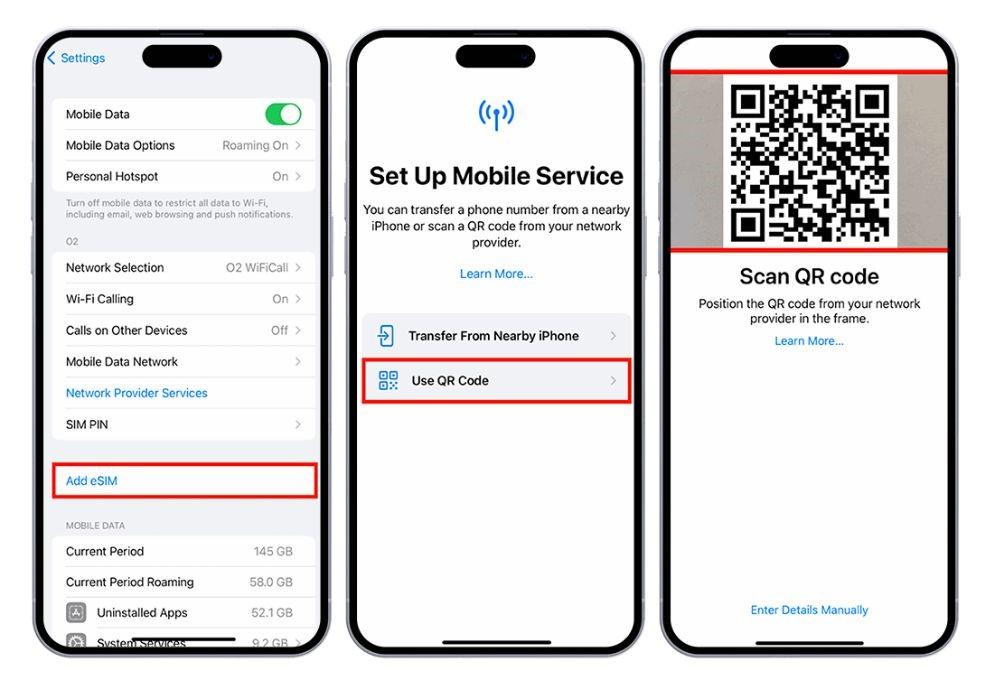
Pro Tip: Install your eSIM before you leave home while connected to stable Wi-Fi. This way, you'll have instant connectivity as soon as you land in North America, without hunting for local SIM cards or airport Wi-Fi.
7. FAQ
Yes. Most modern iPhones support Dual SIM. You can keep your home SIM active while using a travel eSIM for mobile data. This setup is commonly used by international travelers to avoid roaming charges while still receiving regular calls and messages.
Yes. Wi-Fi is required during the initial setup process because your iPhone needs to download the eSIM profile before it can connect to a mobile network. Once installed, the eSIM works independently without Wi-Fi.
In most cases, an eSIM cannot be reused after deletion. However, many providers allow you to reissue a new QR code or transfer the plan to a new device. It depends on the eSIM provider you choose.
If you delete your eSIM profile, your mobile data connection will stop immediately. To restore it, you usually need a new QR code from your provider or a reactivation request. This is why it's recommended to keep your QR code saved during travel.
Yes. For most travelers, eSIM is more practical than international roaming because it allows you to set up your data plan before departure, avoid unpredictable roaming charges, and stay connected across multiple countries. For trips across the United States, Canada, and Mexico, many travelers prefer using a regional eSIM such as ByteSIM for simpler setup and consistent coverage.
Key Takeaway: An eSIM is the simplest way to stay connected during the FIFA World Cup. You can set it up before departure, avoid roaming fees, and use it seamlessly across the USA, Canada, and Mexico. For most travelers, a regional eSIM like ByteSIM offers the best balance of convenience, coverage, and cost.
© 2026 iPhone eSIM Guide — Stay connected across North America during the FIFA World Cup.

