Why does my phone show 5G, but the internet still feels slow? You may notice webpages taking longer to load, videos buffering, or downloads moving at unexpectedly low speeds—even when the 5G icon shows a strong connection.
Does 5G always mean faster internet? Not necessarily. The 5G indicator only shows that your phone is connected to a 5G network. Actual speed depends on factors such as signal quality, network congestion, available bandwidth, frequency bands, and your mobile plan.
In this guide, you'll learn why 5G can be slower than expected, how to identify the cause, and which troubleshooting steps can help improve your connection.
Why Is 5G So Slow?
A 5G connection can be slower than expected for several reasons. The 5G icon only indicates that your phone is connected to a 5G network; it does not guarantee high-speed data transmission.
5G Slow Speed — Common Causes
Signal
Congestion
Bandwidth
Conditions
Restrictions
Network
Config
1. Weak or Poor-Quality 5G Signal
Distance from a cell site, indoor obstacles, and physical obstructions can weaken the radio connection and reduce data throughput. Signal bars alone do not fully reflect connection quality.
2. Network Congestion
When many devices connect to the same cell, they share the available radio resources. This can significantly reduce speeds in crowded locations such as airports, stadiums, concerts, and tourist attractions.
3. Limited 5G Bandwidth
5G operates across different frequency bands with different coverage and capacity characteristics. Your connection may use a band with limited available bandwidth, resulting in lower speeds despite showing a 5G connection.
4. Poor Radio Conditions
Interference and unstable radio conditions can reduce transmission efficiency. The network may adjust its transmission parameters to maintain a stable connection, which can lower actual throughput.
5. Data or Speed Restrictions
Some mobile and travel eSIM plans may reduce speeds after a high-speed data allowance is used or under specific fair-use policies. If your speed drops suddenly after heavy usage, check your plan's data allowance and usage terms.
6. Device or Network Configuration
Incorrect mobile data settings, carrier configuration, or temporary network registration issues can affect 5G performance. For travel eSIM users, the correct eSIM should be selected for mobile data, with data roaming enabled when required.
How to Find Out Why Your 5G Is Slow
Before changing network settings, identify whether the slowdown comes from your location, the 5G network, your data plan, or your device. The following checks can help narrow down the cause.
1. Run a Speed Test
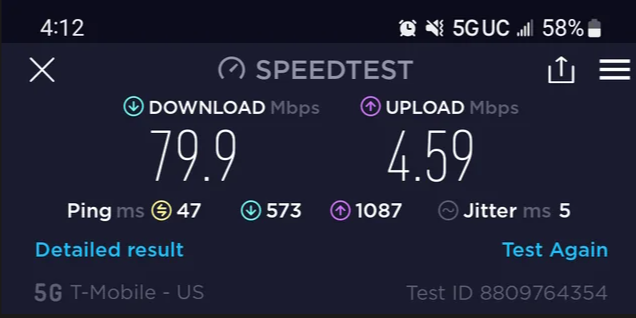
Turn off Wi-Fi and run a speed test using mobile data. Check the download speed, upload speed, and latency. Run the test more than once if the result seems unusually low. A single measurement can be affected by temporary network conditions.
2. Test Your Connection in Another Location
Move to an open area or a different location and run the test again.
- Speed improves significantly: The original location may have weak coverage, interference, or network congestion.
- Speed remains slow: The issue may be related to your plan, device, or wider network conditions.
3. Compare 5G With LTE
Temporarily switch your preferred network from 5G to LTE and run the same speed test in the same location. If LTE is consistently faster than 5G, the local 5G network may have limited capacity, weaker radio conditions, or less favorable coverage. In this case, using LTE temporarily may provide a more stable connection.
4. Check Whether the Problem Affects All Apps
Try several services, such as a website, video platform, and messaging app.
- Everything is slow: The issue is more likely related to the mobile network or device.
- Only one app or website is slow: The problem may be related to that service, its server, or a VPN rather than your 5G connection.
5. Check Your Data Usage and Plan
If your connection became slow after substantial data usage, check your remaining data allowance and plan terms. Look for high-speed data limits, fair-use policies, or speed restrictions. This is particularly important for travel eSIMs, as plan conditions can vary.
6. Check Your Mobile Data Settings
If the problem persists, verify that your phone is using the intended SIM or eSIM for mobile data. For a travel eSIM, also check whether data roaming is enabled if required by the plan. Incorrect network settings can prevent the eSIM from connecting or using mobile data as expected.
How to Fix It?
Once you have identified the likely cause, work through the following fixes in order. Test your connection after each step to see whether performance improves.
1. Refresh Your Mobile Connection
- Turn on Airplane Mode.
- Wait 10–15 seconds.
- Turn it off and wait for your phone to reconnect.
- Test your mobile data again.
This can resolve temporary network registration or connection issues.
2. Restart Your Phone
Restart your device and wait until it reconnects to the mobile network. Then open a website or run a speed test to check whether the connection has improved.
3. Move to a Different Location
If 5G is slow in your current location:
- Move outdoors or to an open area.
- Avoid underground spaces and heavily enclosed areas.
- If possible, move away from crowded locations.
- Run another speed test.
If your speed improves significantly, the slowdown is likely related to local coverage, signal quality, or network congestion.
4. Switch From 5G to LTE/4G
If 5G remains slow, temporarily switch your preferred network to LTE/4G. Test the connection in the same location.
- LTE is faster: The local 5G network may have weaker coverage or higher congestion.
- Both are slow: Continue with the checks below.
5. Check Your Data Plan
Check your mobile or eSIM plan for:
- Remaining data
- High-speed data allowance
- Fair-use limits
- Speed restrictions
If your speed dropped after heavy data usage, your plan may have reached a high-speed data limit.
6. Check Your SIM or eSIM Settings
If you use a travel eSIM, confirm that:
- The eSIM is enabled.
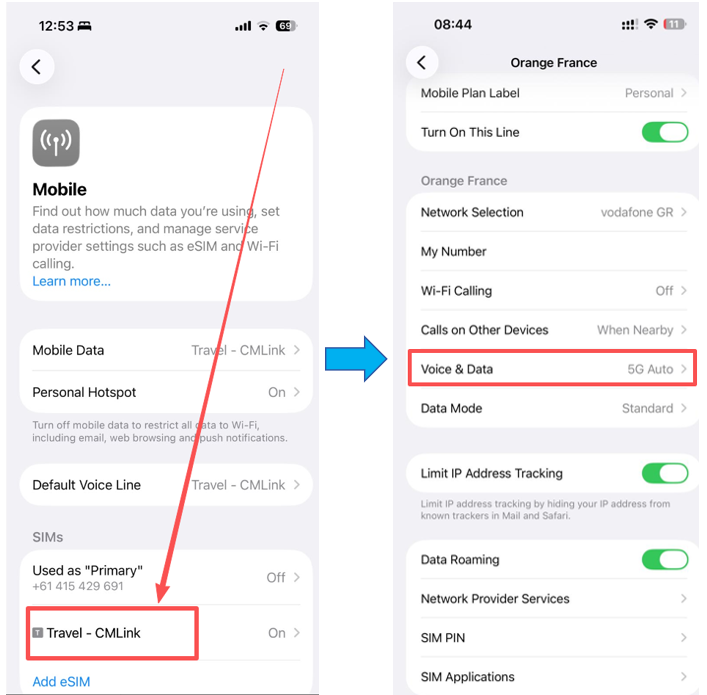
- It is selected as the Mobile Data line.
- Data Roaming is enabled if required by the plan.
- Your phone is not using another SIM for mobile data.
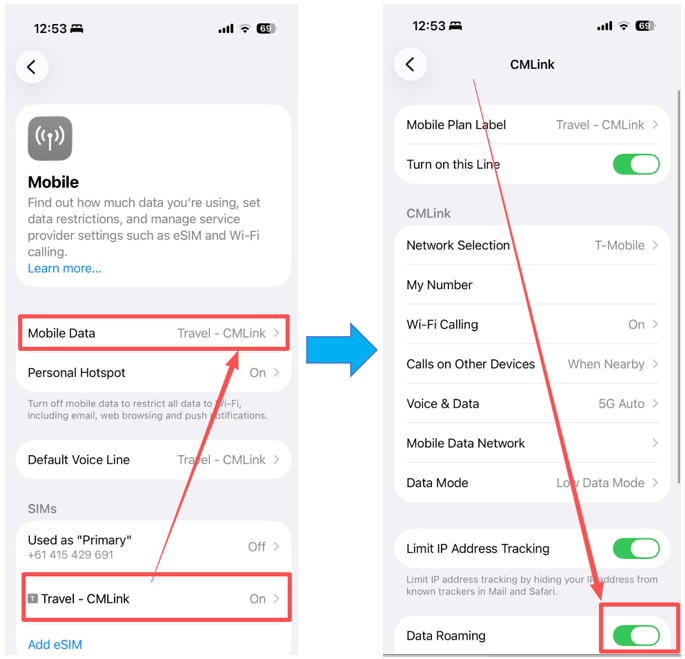
If you use Dual SIM, temporarily disable the other line if necessary to make sure the travel eSIM is handling mobile data.
7. Disable VPN Temporarily
If you use a VPN, disconnect it and run another speed test. If your connection becomes noticeably faster, the VPN server or network routing may be affecting your performance.
8. Reset Network Settings
On iPhone:
- Open Settings.
- Go to General → Transfer or Reset iPhone → Reset.
- Tap Reset Network Settings.
- Enter your device passcode if prompted.
- Confirm the reset and wait for your iPhone to restart.
On Android:
The exact menu names vary by manufacturer, but the option is usually under network or system settings.
- Open Settings.
- Go to System → Reset options or General management → Reset.
- Select Reset Wi-Fi, mobile & Bluetooth or Reset network settings.
- Confirm the reset.
Note: This removes saved Wi-Fi networks, Bluetooth connections, and cellular network configurations. You will need to reconnect to your networks afterward.
When to Contact Your Carrier or eSIM Provider
If your 5G connection is still slow after trying the troubleshooting steps above, the issue may require further investigation by your mobile carrier or eSIM provider.
Before contacting support, prepare the following information:
- Your exact location: Include the city, area, or venue where the problem occurs.
- Device model: For example, iPhone 15 Pro or Samsung Galaxy S24.
- Network type: Note whether your phone shows 5G, 5G UC, 4G, LTE, or another network indicator.
- Speed-test results: Include download speed, upload speed, and latency.
- Time of the issue: Note when the slowdown occurred and whether it happens consistently.
- Troubleshooting steps already tried: Mention whether you restarted the phone, switched to LTE, changed locations, or checked your eSIM settings.
This information helps support teams determine whether the problem is related to local network coverage, network congestion, your plan, or the device configuration.
Stay connected with reliable mobile data.
ByteSIM offers travel eSIM plans for destinations around the world. Check your phone's eSIM compatibility and choose a plan before your trip.
Explore ByteSIM eSIM →FAQ
Can a full 5G signal still be slow?
Yes. Signal bars mainly indicate signal strength and do not fully reflect network quality or available capacity. A congested network or interference can result in slow speeds even with a strong signal.
Why does my 5G speed change throughout the day?
Mobile network performance can vary with network traffic. Speeds may decrease during busy periods when more users are connected to the same cell and increase when network demand is lower.
Can a VPN make my 5G slower?
Yes. A VPN can affect connection speed depending on the VPN server, routing path, encryption overhead, and distance between your device and the server. Temporarily disabling the VPN can help determine whether it is contributing to the slowdown.
Does 5G use more battery than LTE?
It can. Maintaining a 5G connection may increase power consumption in some network conditions, particularly when the device frequently switches between 5G and LTE. If battery life is more important than maximum network speed, LTE can be a practical option in areas where 5G provides little benefit.
Can a travel eSIM affect 5G speed?
A travel eSIM does not inherently make 5G slower. Actual performance primarily depends on the local carrier network, coverage, network capacity, and the terms of the eSIM plan. If speeds remain slow across different locations and both 5G and LTE, check your plan and contact your eSIM provider for assistance.
© 2026 5G Troubleshooting Guide — Stay connected and fast on the go.