When traveling abroad, your phone is more than a communication device. It stores payment information, travel bookings, personal data, and authentication codes, making it an important part of your trip.
Keeping your phone safe means protecting both the device and the information on it. From securing your phone before departure to avoiding risky Wi-Fi networks and knowing what to do if your phone is lost, a few simple precautions can reduce common travel risks.
This guide covers 12 practical tips to help you keep your phone safe and connected while traveling abroad.
Why Phone Security Matters When Traveling Abroad
Your phone often becomes your primary travel tool. Losing access to it can affect not only communication but also your ability to manage essential travel tasks.
A compromised or lost phone may give others access to:
- Payment and banking apps used for purchases or financial transactions.
- Travel bookings, including flights, hotels, and transportation tickets.
- Email and social accounts that may contain personal information or be used to reset other passwords.
- Authentication codes for accounts protected by two-factor authentication.
- Travel documents, such as digital boarding passes, reservation details, and stored copies of identification documents.
- Navigation and communication tools needed to find your destination or contact family and friends.
For this reason, phone security while traveling should cover both physical protection and digital security. Taking a few precautions before and during your trip can reduce the impact of loss, theft, unauthorized access, or unsafe network connections.
12 Ways to Keep Your Phone Safe While Traveling
- Use a Strong Screen Lock
Set a strong PIN or password and enable Face ID, Touch ID, or fingerprint authentication where available. Avoid easy-to-guess codes such as 1234, 0000, or your birth year. A strong screen lock provides the first layer of protection if your phone is lost or stolen.
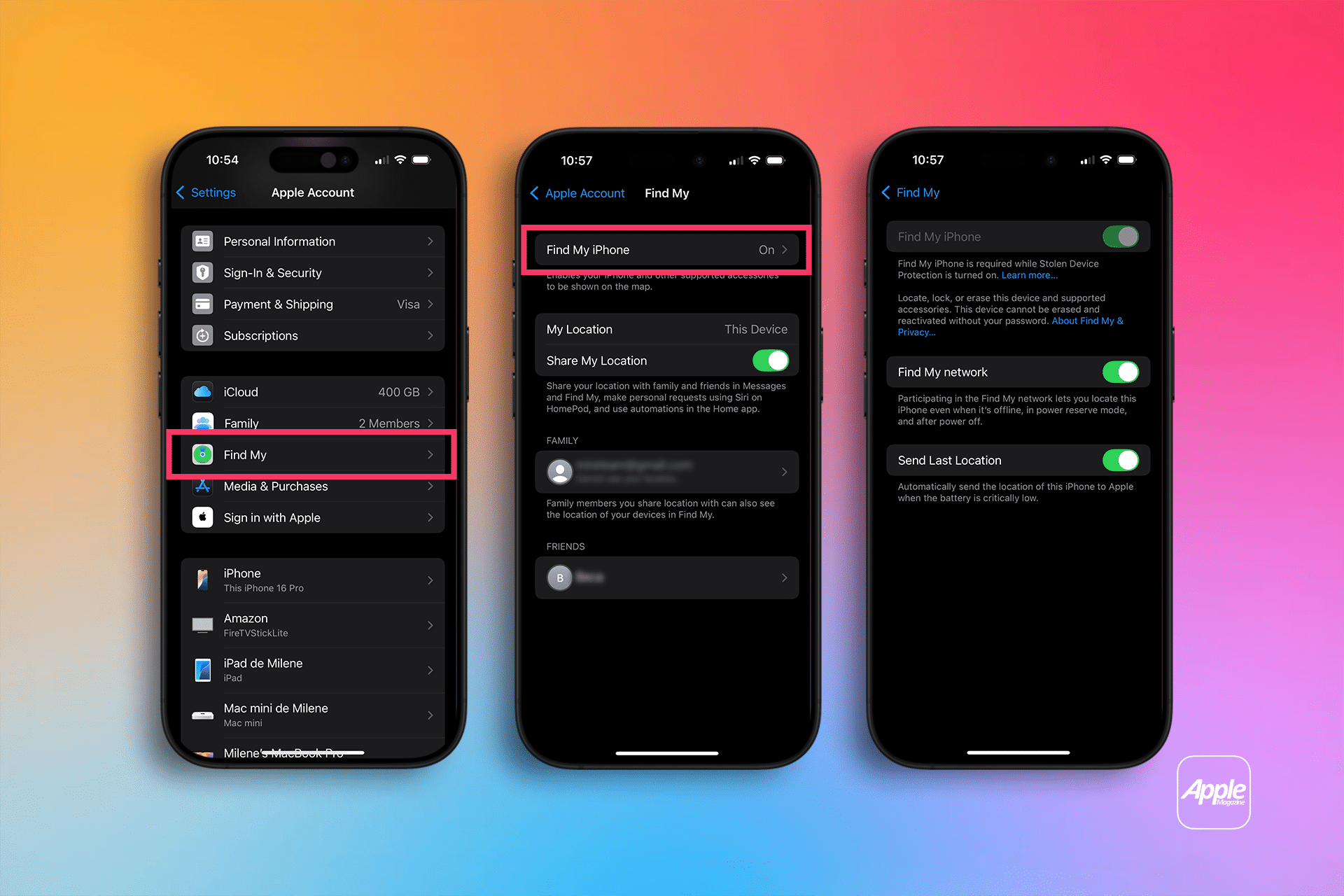
- Enable Find My Device Before You Leave
Turn on the device-tracking feature before your trip:
- iPhone: Enable Find My.
- Android: Enable Find My Device.
![]()
Also make sure location services and the required account settings are enabled. This allows you to locate, lock, or remotely manage your phone if it goes missing.
- Keep Your Phone and Apps Updated
Install operating system and app updates before departure. Updates often include security fixes for known vulnerabilities. If possible, enable automatic updates so your phone remains protected throughout your trip.
- Keep Your Phone Within Sight
Avoid leaving your phone unattended in places such as:
- Restaurant or café tables
- Airport lounges
- Hotel common areas
- Public transportation
- Tourist attractions
When carrying your phone, keep it in a secure pocket or bag rather than an easily accessible outer pocket.
- Be Extra Careful in Crowded Tourist Areas
Crowded places such as festivals, markets, train stations, and popular attractions can increase the risk of pickpocketing. When using your phone to take photos or check directions:
- Stay aware of your surroundings.
- Avoid holding your phone loosely near crowds.
- Put it away immediately after use.
- Use a secure bag or crossbody pouch when possible.
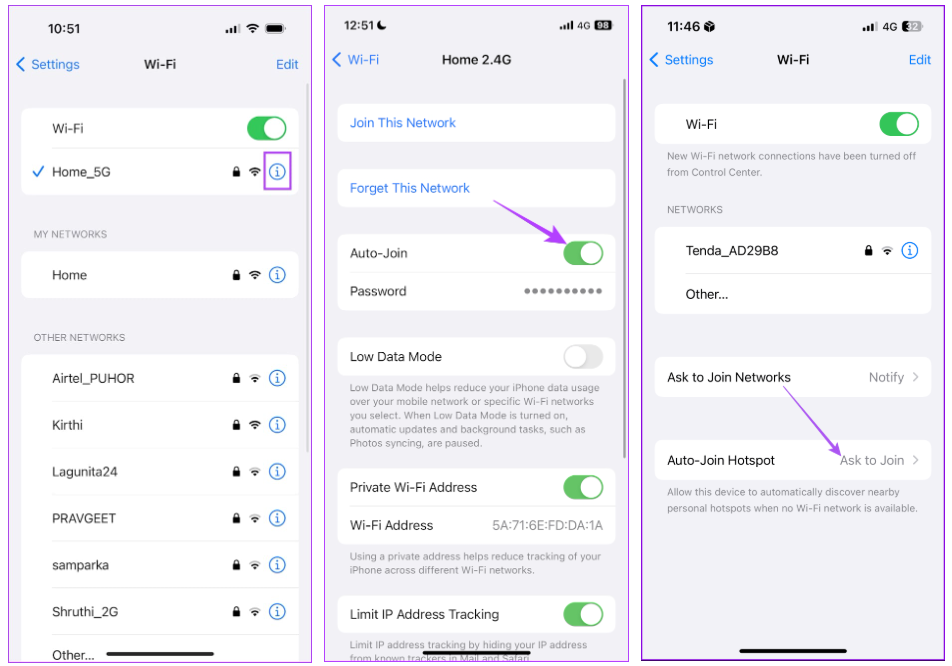
- Turn Off Automatic Wi-Fi Connections
Disable automatic connections to unknown or unsecured Wi-Fi networks. Your phone may otherwise connect to a network without you actively checking whether it is the one you intended to use. Before connecting manually, verify the network name with the hotel, airport, restaurant, or other venue.
![]()
- Be Cautious When Using Public Wi-Fi
Public Wi-Fi isn't automatically unsafe, but you have less control over an unfamiliar network. Use extra caution when accessing sensitive information. When using public Wi-Fi:
- Verify the network name before connecting.
- Avoid entering sensitive information on suspicious networks.
- Don't download unknown files or apps.
- Disconnect when you no longer need the network.
For banking, account management, or other sensitive activities, consider using your own mobile data instead.
- Use Mobile Data for Sensitive Activities
Your own mobile connection can reduce your reliance on unfamiliar public Wi-Fi when you need to access important services. Mobile data can be particularly useful when:
- Checking travel bookings
- Accessing banking or payment services
- Logging into important accounts
- Using navigation
- Communicating with family or travel companions
A travel eSIM can provide mobile data abroad without requiring you to replace your physical SIM.
- Be Careful When Charging Your Phone in Public
When possible, use your own charger with a power adapter or carry a power bank instead of relying on unfamiliar USB charging ports. This is especially useful at airports, stations, cafés, and other public locations where charging facilities may be shared.
- Watch Out for Phishing and Fake Travel Messages
Travelers may receive convincing messages claiming to be from airlines, hotels, booking platforms, or delivery services. Be cautious of messages that:
- Ask you to click an unexpected link.
- Request payment or personal information.
- Claim that your booking has been cancelled.
- Create urgency, such as asking you to act immediately.
If a message seems suspicious, verify the information through the company's official website or app instead of using the link provided in the message.
- Back Up Important Travel Information
Keep essential travel information available outside your phone so you can access it if your device is lost or unavailable. Consider keeping offline or cloud backups of:
- Flight and hotel details
- Emergency contacts
- Travel insurance information
- Important booking confirmations
- Copies of essential travel documents
Avoid relying entirely on your phone or an internet connection to access critical information.
- Know What to Do If Your Phone Is Lost or Stolen
If your phone goes missing, act quickly. Use your device-tracking service to locate or lock it, then contact your mobile provider and secure important accounts. If the phone was stolen, report the incident to the appropriate local authorities and consider using a backup device or replacement phone.
What to Do If Your Phone Is Lost or Stolen Abroad
Losing your phone abroad can disrupt navigation, communication, payments, and access to important accounts. If your phone goes missing, act quickly to reduce the risk of unauthorized access.
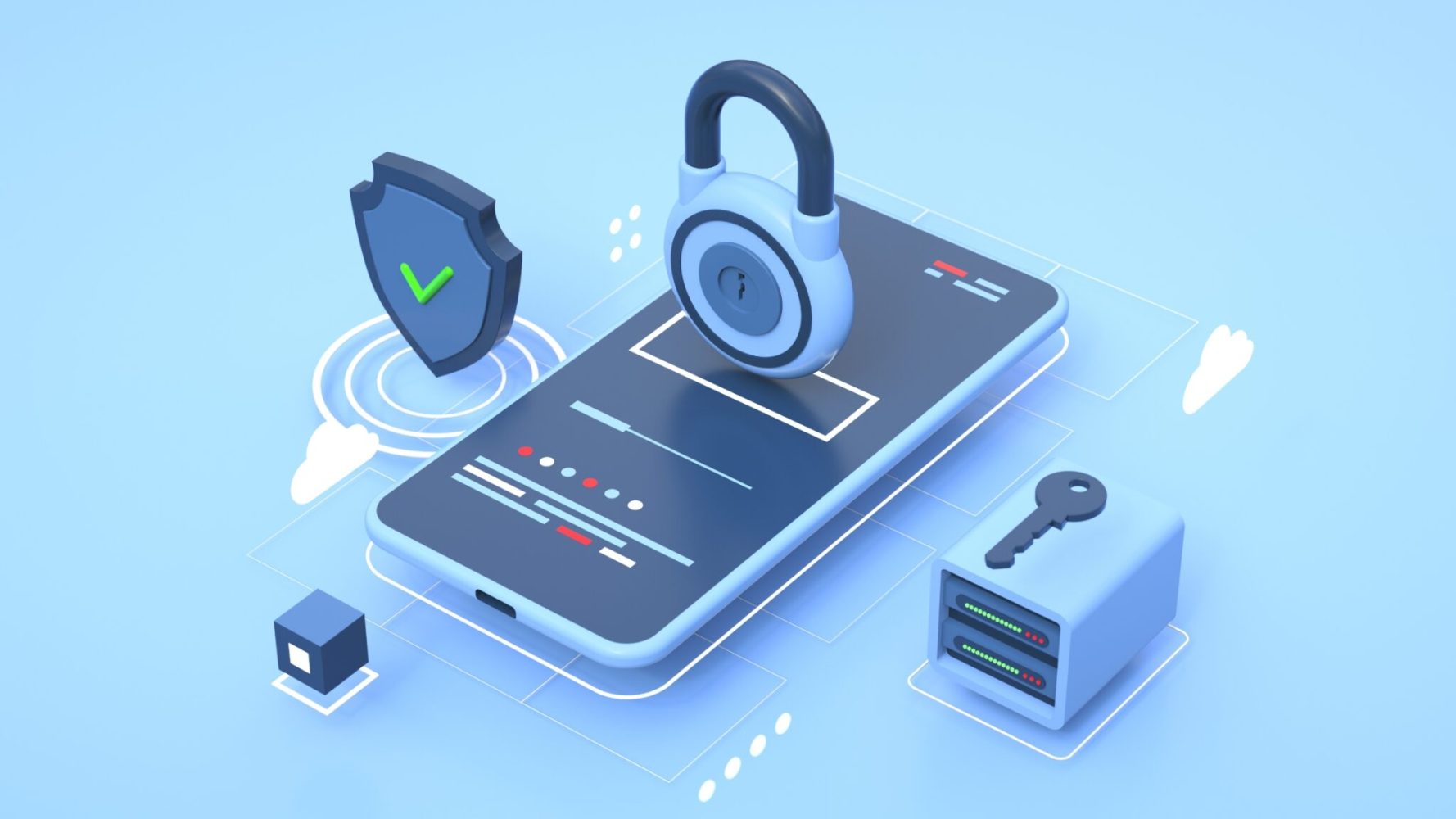
Try to Locate and Lock Your Phone
Use your device's built-in tracking service as soon as possible:
- iPhone: Use Find My to locate the device or enable Lost Mode.
- Android: Use Find My Device to locate, secure, or erase the device remotely.
If the phone appears to be in an unsafe location or has likely been stolen, don't attempt to retrieve it yourself.
Contact Your Mobile Provider
Contact your mobile provider to suspend your physical SIM or mobile service if necessary. This can help prevent unauthorized use of your phone number.
If you're using a travel eSIM, check the provider's instructions before deleting or reinstalling the eSIM. Some eSIM plans have installation or activation restrictions.
Secure Your Important Accounts
Prioritize accounts that could expose financial or personal information:
- Banking and payment apps
- Primary email account
- Apple or Google account
- Social media and messaging apps
- Accounts that use your phone number for verification
Change passwords where necessary and revoke access from the lost device if the service supports it.
Report the Loss or Theft
If you believe your phone was stolen, report it to the local police. You may need a police report for an insurance claim.
You should also contact relevant travel providers if the phone contained essential booking information that you can no longer access.
Use a Backup Device or Replacement Phone
If you have access to another device, use it to restore essential travel information and contact family, your hotel, airline, or other service providers.
Before traveling, keeping important contacts, booking details, and document copies in a secure cloud account or offline format can make this process much easier.
Quick Check
& Lock
Provider
Accounts
Police
Device
How to Stay Connected Without Relying on Public Wi-Fi
Public Wi-Fi can be convenient at airports, hotels, cafés, and other tourist locations, but it should not be your only way to get online. Wi-Fi availability and network quality can vary, and travelers may not always know whether an unfamiliar network is trustworthy.
Why You Shouldn't Rely Entirely on Public Wi-Fi
Using public Wi-Fi isn't automatically unsafe, but travelers should take a few precautions:
- Verify the network: Confirm the Wi-Fi name with the hotel, café, airport, or other venue before connecting.
- Avoid sensitive activities on unfamiliar networks: Use extra caution when accessing banking or other important accounts.
- Don't connect automatically: Disable auto-join for unknown or unsecured networks.
- Use mobile data when needed: Your own mobile connection can be a practical alternative when you don't want to use an unfamiliar Wi-Fi network.
- Keep a backup connection: Having mobile data available is especially useful when you're outside, moving between destinations, or unable to access Wi-Fi.
Use a Travel eSIM for Mobile Connectivity
A travel eSIM provides mobile data through a local or regional cellular network, giving you an alternative to public Wi-Fi while traveling abroad.
With a travel eSIM, you can:
- Stay connected on the move: Use maps, messaging, translation, and travel apps without looking for a Wi-Fi hotspot.
- Install before departure: Many travel eSIMs can be installed before your trip and activated after you arrive at your destination.
- Keep your physical SIM: On compatible dual-SIM devices, you can keep your primary SIM available while using the travel eSIM for mobile data.
- Avoid physical SIM swapping: There's no need to remove your existing SIM card just to add a travel data plan.
A travel eSIM does not replace basic phone security measures, but it can reduce your reliance on unfamiliar public Wi-Fi and give you a more convenient way to stay connected throughout your trip.

Stay connected on your next trip.
Get a travel eSIM before you go and avoid relying on public Wi-Fi.
Explore ByteSIM eSIM →FAQ
Should I Put My Phone on Airplane Mode When Traveling Abroad?
Airplane Mode is not required simply because you're traveling internationally. If you plan to use a travel eSIM or mobile data, keep Airplane Mode off after configuring your cellular settings. You can turn it on when you don't need cellular connectivity, such as during a flight.
Can Someone Access My Phone If They Know My Phone Number?
Knowing your phone number alone does not normally give someone access to your phone. However, it can be used in phishing or social engineering attempts. Never share verification codes, passwords, or other sensitive information with someone who contacts you unexpectedly.
Should I Carry a Backup Phone When Traveling?
A backup phone can be useful for long trips or destinations where replacing a device may be difficult. Before departure, make sure the backup device is charged, updated, and capable of accessing the accounts or services you may need.
Do I Need a VPN When Using My Phone Abroad?
A VPN is not mandatory for every traveler. It can add an additional layer of privacy by encrypting traffic between your device and the VPN server, particularly when using networks you don't fully trust. However, a VPN does not protect against phishing, malicious apps, weak passwords, or a stolen device.
Is It Safe to Save Passwords on My Phone While Traveling?
Using a reputable password manager can be safer than storing passwords in notes or using the same password across multiple accounts. Protect your password manager with a strong master password and enable multi-factor authentication where available.
© Travel Phone Security Guide — Stay safe and connected on the road.