미국 2026 FIFA 월드컵 여행을 위한 최고의 eSIM
May 25,2026 | Milo
월드컵에 신뢰할 수 있는 데이터 없이 여행하는 것은 발생할 악몽입니다. 당신의 티켓은 디지털입니다. 경기장 앱은 연결이 필요합니다. 당신은 차량 공유가 필요합니다. 당신은 한 번도 방문한 적이 없는 도시 간의 내비게이션이 필요합니다.
집에서 사용하는 통신사의 로밍 요금은요? 생각조차 하지 마세요. 여러 주에 걸친 토너먼트에서 수백 달러가 될 수 있습니다.
An eSIM은 이 모든 문제를 해결합니다. 즉시 활성화됩니다. 지역 데이터 요금이 적용됩니다. 도착하는 순간부터 작동합니다. ByteSIM은 모든 11개의 미국 월드컵 개최 도시를 주요 네트워크에서 커버하고, 무제한 데이터를 제공하며, 신분 확인이나 대기 시간이 필요하지 않기 때문에 월드컵 여행자에게 특히 돋보입니다.
2026년 가장 큰 스포츠 이벤트를 위한 실제로 의미 있는 연결 솔루션입니다.
2026 FIFA 월드컵을 위해 eSIM이 필요한 이유
2026년 월드컵은 미국 전역의 11개 도시에서 개최됩니다. 애틀랜타. 보스턴. 댈러스. 휴스턴. 캔자스 시티. 로스앤젤레스. 마이애미. 뉴욕/뉴 Jersey. 필라델피아. 샌프란시스코. 시애틀.
열한 개 도시. 토너먼트 동안 팀을 따라가려면 많은 지역을 커버해야 합니다.
대부분의 팬들은 한 곳에 머물지 않습니다. 휴스턴에서 조별 리그 경기를 관람한 후, 댈러스로 날아가서 녹아웃 라운드를 관람하고, 마지막으로 메트라이프 스타디움에서 결승전을 위해 뉴 Jersey로 향할 수 있습니다. 이는 세 개의 다른 도시, 세 개의 다른 공항, 수많은 차량 공유 서비스, 그리고 끊임없는 내비게이션 필요성을 의미합니다.
모바일 티켓은 이제 표준입니다. FIFA의 티켓팅 시스템은 디지털입니다. 입장, 경기장 내 길 찾기 및 매점 주문에 필요한 경기장 앱은 모두 데이터를 요구합니다. 주요 스포츠 이벤트에서의 WiFi는 notoriously 신뢰할 수 없습니다. 50,000명이 동시에 같은 네트워크에 접속한다고요? 행운을 빕니다.
토너먼트 동안 데이터 사용량이 일반 여행보다 더 높을 것입니다. 경기 하이라이트를 스트리밍하고 있습니다. 사진과 비디오를 지속적으로 업로드하고 있습니다. 집에 있는 친구들과 영상 통화를 하고 있습니다. 다른 장소의 점수를 확인하고 있습니다. 낯선 도시에서 하루에 여러 번 지도를 사용하고 있습니다.
국내 통신사의 국제 로밍은 이 경우 현실적이지 않습니다. 5-6주 동안 하루에 여러 기가바이트를 사용할 때 비용이 빠르게 증가합니다.
eSIM이란 무엇이며 어떻게 작동합니까?
An eSIM는 내장된 SIM입니다. 이미 전화기에 내장되어 있습니다. 교체할 물리적인 카드가 필요 없습니다. 비행기가 착륙한 후에 현지 SIM 상점을 찾을 필요가 없습니다.
활성화는 완전히 디지털입니다. 온라인에서 요금을 구매하고, 이메일로 QR 코드를 받은 후, 휴대폰으로 스캔하면 설정이 완료됩니다. 약 5분 정도 소요됩니다.
여행을 위한 eSIM에 대해 제가 정말 좋아하는 점은 다음과 같습니다. 당신의 집 SIM는 활성 상태를 유지합니다. 통화와 문자 메시지를 위해 일반 전화번호를 유지합니다. 이는 이중 인증, 은행 앱, 당신의 번호와 연결된 모든 것에 중요합니다. eSIM는 데이터 연결을 별도로 처리합니다.
미국에 도착하면, 당신의 eSIM이 활성화되어 현지 네트워크에 연결됩니다. 즉시 온라인 상태가 됩니다. 공항 키오스크를 찾을 필요가 없습니다. 언어 장벽이 없습니다. SIM 판매자가 당신의 카드를 받기를 바랄 필요도 없습니다.
장치 호환성은 확인할 가치가 있습니다. XR 이후의 아이폰은 eSIM을 지원합니다. 삼성 갤럭시 S20 및 그 이후 모델. 구글 픽셀 3 및 그 이후 모델. 최근 몇 년간의 대부분의 플래그십 폰은 잘 작동합니다. 구매하기 전에 특정 모델을 확인하세요.
월드컵 여행에서 찾아야 할 주요 특징 eSIM
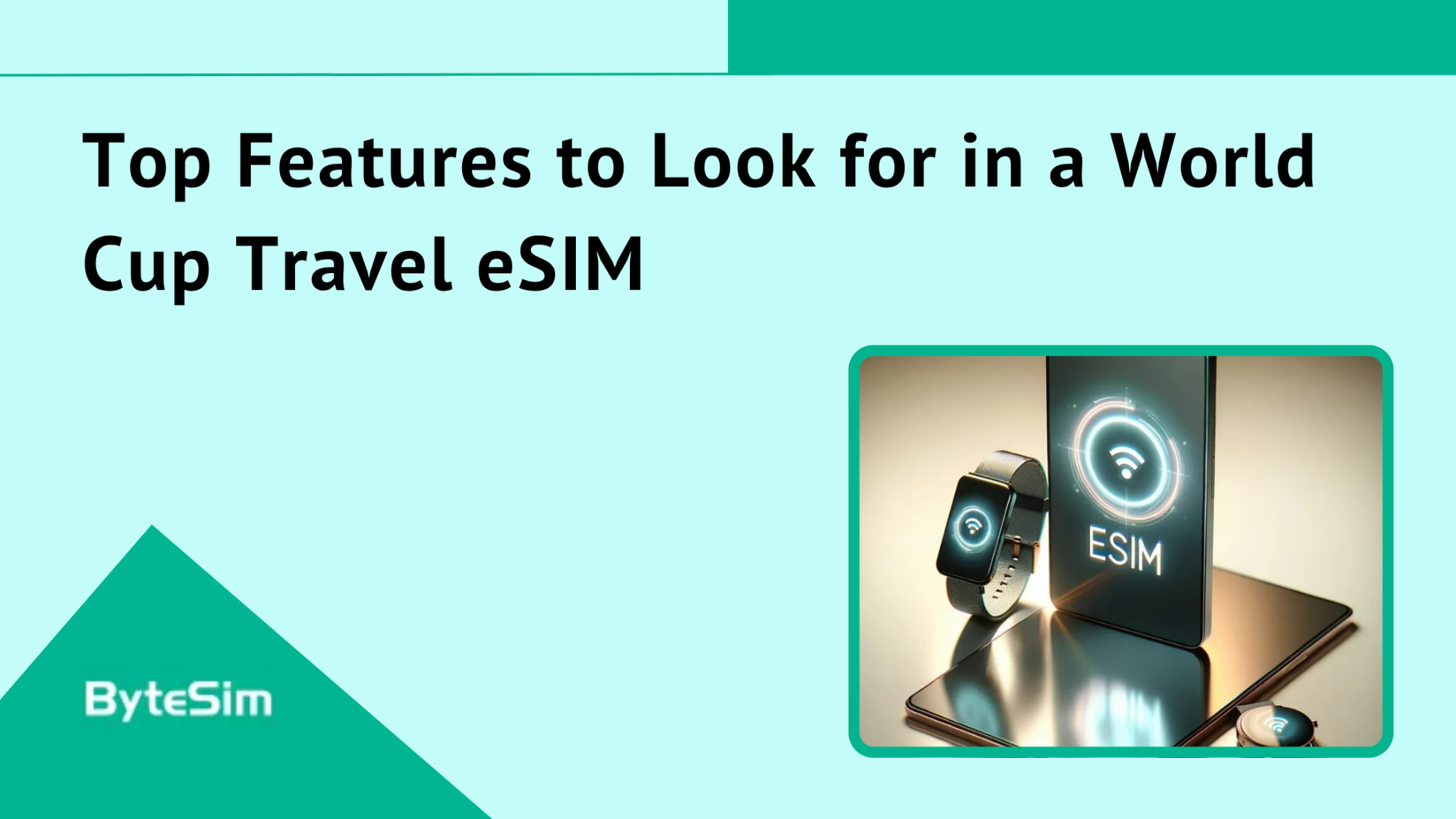
모든 11개 호스트 도시에서의 커버리지는 협상할 수 없습니다. 일부 저가 eSIM은 주요 대도시 외부에서 커버리지가 불균형합니다. 이는 뉴욕과 LA뿐만 아니라 캔자스시티나 시애틀로 여행할 때 문제가 됩니다.
데이터 용량은 생각보다 더 중요합니다. 무제한 요금제나 대용량 옵션은 토너먼트 여행에 적합합니다. 연중 가장 큰 여행 동안 데이터 사용을 제한하고 싶지 않을 것입니다. 스트리밍, 지도, 소셜 미디어, 차량 공유 앱—모두 빠르게 합산됩니다.
단일 계획으로 전국적으로 보장됩니다. 다른 주나 도시를 위해 별도의 계획을 구매할 필요가 없습니다. 하나의 eSIM는 어디서나 작동해야 합니다.
5G 속도가 가능한 곳에서 제공됩니다. 모든 11개 호스트 도시에는 5G 커버리지가 있습니다. 귀하의 eSIM는 단순히 구형 4G 인프라가 아닌 이러한 네트워크에 연결되어야 합니다.
핫스팟 기능은 친구나 가족과 여행할 때 매우 유용합니다. 모든 사람이 별도의 요금제를 구매하지 않고도 연결을 공유할 수 있습니다.
즉시 활성화. 이메일을 통한 QR 코드 전달. 배송 대기 없음. 설정을 지연시키는 신분증 확인 없음.
토너먼트 날짜에 맞는 유효 기간. 월드컵은 2026년 6월 11일부터 7월 19일까지 진행됩니다. 총 39일입니다. 계획이 실제 여행 날짜를 포함하여 어색한 공백이나 비싼 갱신 없이 커버되는지 확인하세요.
ByteSIM: 2026 FIFA 월드컵 여행자를 위한 최고의 eSIM
2026년 월드컵을 순조롭게 헤쳐나가기
미국, 멕시코, 캐나다 전역에서 원활한 5G 커버리지를 제공하는 프리미엄 3-in-1 eSIM을 만나보세요. 전자 티켓과 지도가 항상 온라인 상태인지 확인하세요! 미국, 멕시코, 캐나다 내에서 무제한 지역 통화 및 SMS가 포함되어 있습니다.
월드컵 eSIM을 받으세요
ByteSIM는 월드컵 여행을 위한 모든 조건을 충족합니다. 그 이유는 다음과 같습니다.
T-Mobile과 AT&T 네트워크에서 무제한 데이터. 두 개의 주요 통신사에 접근할 수 있는 것은 중요합니다. 경기장이나 특정 지역에서 한 네트워크가 혼잡할 경우, 당신의 전화는 다른 네트워크에 연결될 수 있습니다. 연결이 절대적으로 필요할 때 중복성은 가치가 있습니다.
모든 11개 개최 도시에서 5G 커버리지. NYC, LA, Dallas, Miami, Atlanta—모든 주요 장소가 적절한 고속 연결을 제공합니다.
즉시 이메일 배달. 요금제를 구매하고 QR 코드를 즉시 받으세요. 집을 떠나기 전에 설치하세요. 제시간에 도착할지에 대한 스트레스는 없습니다.
ID가 필요하지 않습니다. 일부 eSIM 제공자는 여권 스캔 및 인증 단계를 원합니다. ByteSIM은(는) 모든 과정을 건너뜁니다. 더 빠른 설정, 더 적은 마찰.
6개월 환불 보장. 계획은 변경됩니다. 항공편이 취소됩니다. 사전 구매에 대한 안전망이 중요합니다.
24/7 WhatsApp 지원. 해외에 있는 동안 문제가 발생하면 실제로 누군가에게 연락할 수 있습니다. 시간대 차이는 중요하지 않습니다.
핫스팟 공유가 포함되어 있습니다. 여행 동반자는 자신의 요금제를 구매하지 않고도 귀하의 전화로 연결할 수 있습니다.
무제한 국내 통화. 요금제에는 +1 미국 번호가 포함됩니다.멕시코나 캐나다에 있는 친구와 가족에게 미국에 있을 때도 쉽게 전화하고 문자 메시지를 보내세요.
그리고 2026 월드컵을 위해 특별히 큰 소식이 있습니다: ByteSIM 북미 요금제 제공됩니다.미국, 캐나다, 멕시코를 포함합니다. 이 대회는 세 나라 모두에 경기장이 있습니다. 토론토나 멕시코시티에서 경기를 관람하신다면, 지역 요금제를 이용하면 eSIM을 전환하지 않고도 이용할 수 있습니다.
ByteSIM 월드컵 여행객을 위한 미국 계획
ByteSIM 다양한 데이터 요금제(일일, 총합 및 무제한) 것을 제공합니다다양한 기간으로 제공됩니다. 짧은 여행을 위한 1일 옵션. 7일 계획. 15일 계획. 전체 토너먼트 경험을 위한 30일 계획.
가격은 기간에 따라 달라집니다. 더 긴 계획은 초기 비용이 더 많이 들지만 여러 개의 짧은 계획을 구매하는 것보다 하루당 비용이 더 저렴합니다.
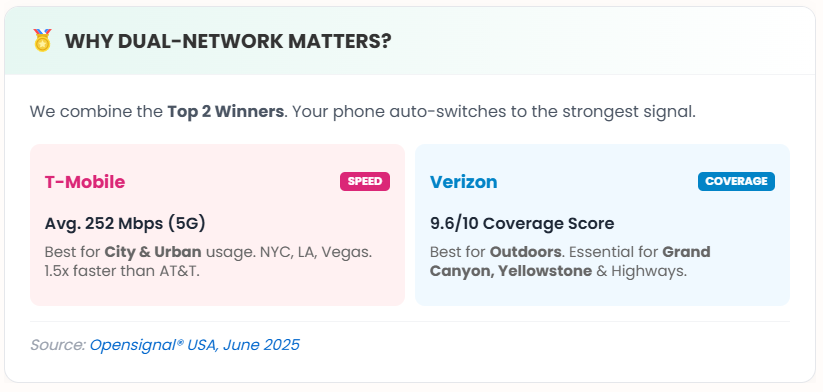
T-Mobile과 Verizon의 이중 네트워크 커버리지는 귀하의 위치에서 신호가 더 강한 통신사에 연결된다는 것을 의미합니다. 도시 지역에서는,두 네트워크 모두 성능이 좋습니다. 일부 교외 또는 교통 지역에서는 하나가 다른 것보다 더 나은 성능을 발휘할 수 있습니다. 당신의 전화는 자동으로 전환을 처리합니다.
QR 코드를 통해 또는 그들의 앱을 통해 활성화가 가능합니다. 코드를 스캔하고, 안내에 따라 진행하며, 전화 설정에서 eSIM을 활성화하세요. 전체 과정은 몇 분 정도 소요됩니다. 비행기 탑승 전에 집에서 하세요, 공항에서 WiFi를 찾느라 허둥대지 마세요.
월드컵 개최 도시 11곳 모두에서 제공되는 정보
미국의 모든 장소에 대한 간단한 요약과 기대할 수 있는 사항:
뉴욕/뉴욕 Jersey — 메트라이프 스타디움 최종 장소. ByteSIM는 NYC 메트로 지역 전역에 강력한 커버리지를 제공합니다. 맨해튼, Jersey 시, 이스트 러더포드의 경기장 지역. 5G 전역에서 제공.
로스앤젤레스 - 소피 스타디움 LA 전역에서 훌륭한 5G 커버리지. 할리우드, 다운타운, 스타디움이 있는 잉글우드. 문제 없음.
댈러스 — AT&T 스타디움 준결승을 개최합니다. 알링턴의 보장은 확실합니다. 달라스-포트워스 메트로는 두 네트워크 모두 잘 서비스됩니다.
애틀랜타 - 메르세데스-벤츠 스타디움 다른 준결승전을 개최합니다. 애틀랜타 다운타운은 훌륭한 커버리지를 제공합니다. 특히 경기장 지역은 잘 연결되어 있습니다.
마이애미 - 하드록 스타디움 남부 플로리다 지역의 보장이 강력합니다. 마이애미, 마이애미 가든스, 포트 로더데일 회랑 모두 포함됩니다.
보스턴 - 질레트 스타디움 스타디움은 실제로 보스턴 남쪽의 폭스버러에 있습니다. 커버리지는 이 지역 전역에 걸쳐 있습니다. 보스턴 본토는 훌륭한 도시 5G를 제공합니다.
필라델피아 - 링컨 파이낸셜 필드 사우스 필리의 경기장 지역이 포함되어 있습니다. 필라델피아 센터 시티에는 밀집된 5G 인프라가 있습니다.
휴스턴 - NRG 스타디움 휴스턴 메트로는 전역에 걸쳐 좋은 커버리지를 제공합니다. 경기장 근처의 메디컬 센터 지역은 잘 작동합니다.
캔자스시티 - 애로우헤드 스타디움 일부 호스트 도시보다 작은 지하철이지만 커버리지는 유지됩니다. 두 네트워크가 모두 존재합니다.
샌프란시스코 - 리바이스 스타디움 스타디움은 샌타클라라에 있으며, SF의 남쪽에 위치해 있습니다. 베이 지역의 커버리지는 전반적으로 우수합니다. 샌프란시스코는 미국에서 가장 좋은 도시 커버리지 중 하나를 자랑합니다.
시애틀 — 루멘 필드 시애틀 도심 위치. 도시 및 주변 지역에서 강력한 커버리지.
도시 5G 커버리지는 11개 도시 모두에서 신뢰할 수 있습니다. ByteSIM의 이중 네트워크 접근 방식 덕분에 한 통신사가 약한 지역에서도 커버됩니다.
월드컵 여행을 위한 기타 최고의 옵션 eSIM
ByteSIM는 유일한 선택이 아닙니다. 다른 옵션들과 비교하는 방법은 다음과 같습니다.
세일리 유연한 고정 데이터 버킷(예: 10GB 또는 20GB)을 제공합니다. NordVPN 팀이 지원하므로, 사용할 데이터 양을 정확히 알고 있다면 안전한 선택입니다.
Airalo 지역 계획이 확고합니다. 그들은 전화번호가 있는 특정 글로벌 계획을 가지고 있지만, 그들의 표준 미국 패키지는 데이터 전용입니다. 좋은 앱 인터페이스를 가지고 있지만, 많은 사용자를 위해서는 더 비쌀 수 있습니다.
Holafly 무제한 데이터 중심. 여행 eSIM 분야에서 강력한 마케팅 존재감. 많은 사용자에게 잘 작동합니다. 일부 지역에서는 ByteSIM보다 네트워크 옵션이 적습니다.
유목민 10GB에서 50GB까지의 단계별 요금제를 제공합니다. 사용량을 정확히 알고 그에 따라 지불하고 싶다면 좋습니다. 무제한 옵션보다 유연성이 떨어집니다.
대부분의 월드컵 여행자들이 여러 주 동안 여러 도시를 방문할 때, ByteSIM의 무제한 이중 네트워크 접근 방식이 가장 적은 마찰을 제공합니다.
월드컵을 위해 얼마나 많은 데이터가 필요할까요?
일상적인 사용은 하루에 1-3GB를 소모합니다. 지도 및 내비게이션. 메시징 앱. 소셜 미디어 브라우징. 가벼운 웹 사용. 이메일. 기본적인 연결을 위해 전화기를 사용하는 경우, 이것이 충분합니다.
과도한 사용은 매일 5-10GB를 소모합니다. 놓친 경기 하이라이트나 전체 경기를 스트리밍합니다. 집으로 영상 통화를 합니다. 소셜 미디어에 많은 콘텐츠를 업로드합니다. 다른 사람들을 위해 핫스팟으로 휴대폰을 사용합니다. 경험을 브이로그로 기록하는 경우 콘텐츠를 생성합니다.
여러 주에 걸친 토너먼트에서 도시 간 이동, 경기 참석, 그리고 지속적으로 연결 상태를 유지해야 한다면? 주저하지 말고 무제한 요금제를 추천합니다. 평생 잊지 못할 여행 중에 데이터 예산에 대해 걱정하고 싶지 않을 것입니다.
데이터를 절약하는 정신적 부담은 그만한 가치가 없습니다. 집에서의 일반적인 고사용일에 대한 휴대폰의 데이터 사용량을 확인하세요. 그런 다음 월드컵 여행이 그 두 배 또는 세 배가 될 것이라고 가정하세요. 그에 맞게 계획하세요.
💡 꿀팁:내 여행에 정확히 몇 기가바이트가 필요한지 알고 싶나요? 다양한 앱별 데이터 사용량을 자세히 확인하려면 저희의 종합적인 월드컵 데이터 사용 가이드를 참고하세요.
여행 전 eSIM을 활성화하는 방법
떠나기 전에 이것을 하세요. 공항에서 하지 마세요. 착륙 후에도 하지 마세요.
1단계:온라인에서 요금제를 구매하세요. ByteSIM, 또는 선택한 제공업체. 기간과 데이터 용량을 선택하세요.
2단계:이메일에서 QR 코드를 확인하세요. 보통 몇 분 이내에 도착합니다. 가끔 즉시 도착하기도 합니다.
3단계:집에서 WiFi에 연결된 상태에서 eSIM을 설치하세요. 휴대폰의 셀룰러 설정으로 가세요. eSIM을 추가하세요. QR 코드를 스캔하세요. 안내에 따라 진행하세요.
4단계:eSIM을(를) 명확하게 라벨링하세요. 전화기가 이름을 입력하라고 요청할 것입니다. "USA Travel" 또는 "World Cup"이 적합합니다. 나중에 식별하는 데 도움이 됩니다.
5단계:즉시 여행하지 않는다면 아직 활성화하지 마세요. 그냥 설치해 두고 준비하세요.
6단계:출발 전에 설정으로 들어가서 eSIM 회선의 데이터 로밍을 활성화하세요. 이 단계에서 사람들이 혼란스러워합니다. 데이터 로밍이 활성화되지 않으면 eSIM이 연결되지 않습니다.
7단계:미국에 도착하면, 귀하의 eSIM이 자동으로 연결되어야 합니다. 그렇지 않은 경우, 셀룰러 설정에서 수동으로 데이터 라인으로 선택하십시오.
핵심은 집에서 신뢰할 수 있는 WiFi와 시간 압박 없이 모든 복잡한 설정 작업을 하는 것입니다. 공항 WiFi는 신뢰할 수 없습니다. 긴 비행 후 지친 상태에서 설정을 시도하는 것은 실망스럽습니다. 미리 처리하세요.
월드컵 여행 팁: 연락 유지하기
모바일 티켓은 FIFA 경기장에서 디지털 전용입니다. 전화 배터리가 없으면 입장이 불가능합니다. 티켓을 로드할 데이터 연결이 없으면 큰 문제가 발생합니다. 전화기를 충전 상태로 유지하세요. 휴대용 배터리를 준비하세요.
스타디움 와이파이는 수천 명의 사람들이 동시에 게시하려고 합니다. 중요한 일에는 장소의 WiFi에 의존하지 마세요. 당신의 eSIM 데이터는 당신의 생명선입니다.
라이드쉐어 앱은 장소 간 이동에 필수적입니다. 우버와 리프트는 모든 미국 호스트 도시에서 작동합니다. 당신은 그것들을 지속적으로 사용할 것입니다. 그들은 기능을 수행하기 위해 데이터가 필요합니다.
오프라인 지도를 백업으로 다운로드하세요. Google Maps와 Apple Maps 모두 오프라인 다운로드를 제공합니다. 방문하는 각 도시의 지도를 받으세요. 데이터 연결이 불안정할 경우에도 여전히 탐색할 수 있습니다.
당신의 집 SIM을 활성 상태로 유지하세요. 데이터용이 아닙니다—그건 eSIM이 처리합니다. 하지만 이중 인증 코드용입니다. SMS를 통해 확인하는 은행 앱. 당신의 기본 전화번호와 연결된 모든 것. 대부분의 전화는 한 회선에서 SMS를 수신하면서 다른 회선에서 데이터를 사용할 수 있게 해줍니다.
동행과 함께 여행하는 경우, 핫스팟 공유는 비용을 절약할 수 있습니다. 무제한 eSIM를 가진 한 사람이 기본 사용을 위해 2-3명을 커버할 수 있습니다. 모든 사람이 동시에 스트리밍하는 데는 이상적이지 않지만, 메시징과 지도에는 효과적입니다.
주州 간 여행 계획. 매치에 따라 마이애미에서 시애틀, 다시 달라스로 일주일 내에 비행할 수 있습니다. 긴 여행일. 공항에서 보내는 시간이 많습니다. 공항 WiFi의 품질은 매우 다양합니다. 당신의 eSIM은 항상 연결 상태를 유지해 줍니다.
미국 월드컵 개최 도시에 가장 적합한 네트워크
티모바일은 도시 5G 배치에서 선두. 밀집한 도심에서 빠른 속도. 모든 주요 호스트 도시에는 강력한 T-Mobile 존재감이 있습니다. 특히 NYC, LA, Miami.
버라이즌은 오픈시그널® 미국, 2025년 6월에서 9.6/10의 커버리지 점수를 받았습니다.야외에 최적화되어 있습니다. 그랜드 캐년, 옐로우스톤 및 고속도로에 필수적입니다.
두 네트워크에 접근할 수 있는 것은 중요합니다. 일부 경기장 위치는 지역 타워 배치에 따라 한 통신사를 다른 통신사보다 선호합니다. 메트라이프 스타디움은 서로 다른 통신사 파트너십을 가진 두 개의 NFL 팀에 서비스를 제공합니다.
ByteSIM의 듀얼 네트워크 접근 방식은 T-Mobile과 Verizon을 모두 사용하여, 신호가 더 강한 네트워크에 자동으로 연결됩니다. 당신은 그것에 대해 생각할 필요가 없습니다.
자주 묻는 질문
2026년 미국 월드컵을 위해 eSIM이 필요합니까?
네, 국제 여행을 하는 경우 그렇습니다. 귀국 통신사의 로밍 요금은 여러 주에 걸친 토너먼트 동안 매우 비쌀 것입니다. 그리고 지속적인 연결이 필요합니다.
모바일 티켓은 표시하기 위해 데이터가 필요합니다. 경기장 앱은 기능을 수행하기 위해 데이터가 필요합니다. 낯선 도시 간의 탐색은 데이터가 필요합니다. 라이드쉐어 앱은 데이터가 필요합니다.
이론적으로 WiFi를 찾아서 사용할 수 있지만, 이는 스트레스가 많고 신뢰할 수 없습니다. eSIM은 로밍 요금의 일부만으로도 사용할 수 있으며, 어디서나 작동합니다.
다중 도시 토너먼트 참석을 위해 eSIM는 선택 사항이 아닙니다. 여행을 위한 필수 인프라입니다.
모든 월드컵 개최 도시에서 eSIM을 사용할 수 있나요?
네. 미국 eSIM은 전국적으로 작동합니다. 하나의 요금제를 구매하면 11개 호스트 도시를 모두 커버합니다. LA에서 NYC까지. 마이애미에서 시애틀까지. 캔자스시티에서 보스턴까지.
다른 주나 도시를 위한 별도의 계획이 필요하지 않습니다. 보장은 전국적입니다. 당신의 eSIM은 당신이 어떤 도시에 있는지 신경 쓰지 않습니다.
이것은 실제로 미국이 호스트 국가로서의 큰 장점 중 하나입니다. 하나의 국가, 하나의 eSIM. 그룹 스테이지 경기 사이에 새로운 계획이 필요한 국경 crossings가 없습니다.
어떤 eSIM이 월드컵 경기장에 대한 최고의 보장을 제공하나요?
ByteSIM는 T-Mobile과 Verizon의 이중 네트워크 커버리지를 사용합니다. 두 주요 통신사에 모두 접근할 수 있어 어떤 장소에서도 강한 신호를 받을 확률이 가장 높습니다.
모든 11개의 경기장은 좋은 인프라를 갖춘 주요 대도시 지역에 있습니다. 두 네트워크 모두 도시 커버리지는 일반적으로 우수합니다.
특정 경기장: 메트라이프 (뉴욕시 지역, 우수한 커버리지), 소피 (로스앤젤레스, 우수함),AT&T 스타디움 (댈러스, 분명히 강력한 AT&T 존재), 메르세데스-벤츠 (애틀랜타, 두 네트워크 모두 좋음). 품질 좋은 eSIM이 있는 어떤 장소에서도 커버리지 문제는 없을 것입니다.
eSIM 계획은 월드컵을 위해 얼마나 오래 지속되어야 하나요?
토너먼트에 얼마나 참석하는지에 따라 다릅니다.
그룹 스테이지만? 6월 11-27일. 15일 또는 30일 플랜을 선택하세요.
16강까지요? 한 주 더 추가해야겠네요.
전체 토너먼트가 결승전을 포함하나요? 6월 11일부터 7월 19일까지는 39일입니다. 최소 30일 계획이 필요합니다.
더 필요하다고 생각하는 것보다 더 긴 계획을 세우는 것을 추천합니다. 팀이 계속 발전할 때 여행을 연장하는 것은 일반적입니다. 조별 리그만 계획했기 때문에 8강에서 데이터가 부족해지는 것은 실망스러울 것입니다.
eSIM이 캐나다/멕시코에서 국경 간 경기에서 작동할까요?
표준 미국 전용 eSIM은 토론토, 밴쿠버 또는 멕시코시티에서 작동하지 않습니다. 만약 귀하의 유일한 일치가 11개의 미국 도시에서만 이루어진다면, 미국 요금제가 괜찮습니다.
하지만 세 개의 개최국에서 경기를 관람하고 있다면? 북아메리카 계획이 필요합니다. ByteSIM은 이를 제공합니다.
2026년 월드컵은 미국, 캐나다, 멕시코가 공동으로 개최합니다. 모든 세 나라에서 경기가 진행됩니다. 귀하의 일정에 대해 알고 그에 맞게 계획하세요.
국가 간 eSIM 전환은 가능하지만 번거롭습니다. 단일 지역 요금제가 더 깔끔합니다.
여행 동반자와 eSIM 데이터를 공유할 수 있나요?
네, 귀하의 eSIM 요금제가 핫스팟 테더링을 지원하는 경우 가능합니다. 대부분 지원합니다.
ByteSIM는 무제한 핫스팟 공유를 허용합니다. 대부분의 주요 제공업체는 이 기능을 포함합니다.
구매하기 전에 확인하세요. 몇 가지 옵션은 테더링을 제한합니다. 세부 사항을 읽어보세요.
소규모 그룹에서는 공유가 잘 작동합니다. 하나의 무제한 요금제가 메시징 및 지도와 같은 기본 사용을 위해 2-3명을 커버할 수 있습니다. 모든 사람이 동시에 비디오를 스트리밍하려고 하면 부담이 됩니다.
월드컵 여행 eSIM을 언제 활성화해야 하나요?
출발 1-2일 전에 eSIM을 설치하세요. 집에서 하세요. 정기 WiFi에서. 스트레스를 받거나 급하지 않을 때.
미국에 도착할 때까지 데이터 라인을 활성화하지 마세요. 그냥 설치하고 준비해 두세요.
사람들이 저지르는 실수: 도착할 때까지 기다렸다가 긴 비행으로 지친 상태에서 불안정한 공항 WiFi를 통해 모든 것을 설정하려고 하는 것입니다. 피곤할 때는 모든 것이 더 오래 걸립니다. 공항 도착 구역의 WiFi는 종종 형편없습니다.
사전 기술 설정을 처리하세요. 도착은 간단해야 합니다: eSIM을 활성화하고 자동으로 연결한 후, 당신의 차량을 잡으세요.
관심 있으실 만한 플랜
논평