How to Stay Connected Across USA, Canada and Mexico (2026 World Cup Travel Guide)
May 18,2026 | Milo
💡 Key Takeaways
- 2026 World Cup spans the USA, Canada, and Mexico — frequent cross-border travel will be the new normal for many fans.
- Constantly swapping physical SIM cards or relying on expensive carrier roaming can quickly become frustrating.
- Installing a 3-in-1 North America eSIM before your trip makes it much easier to stay connected across all three countries.
When 2026 FIFA World Cup announced it would be hosted across the USA, Canada, and Mexico, my first reaction was: “This is going to be amazing.”
My second reaction? “Wait…how am I supposed to survive the logistics?”
This isn’t like flying into one country, watching a few matches, and heading home.
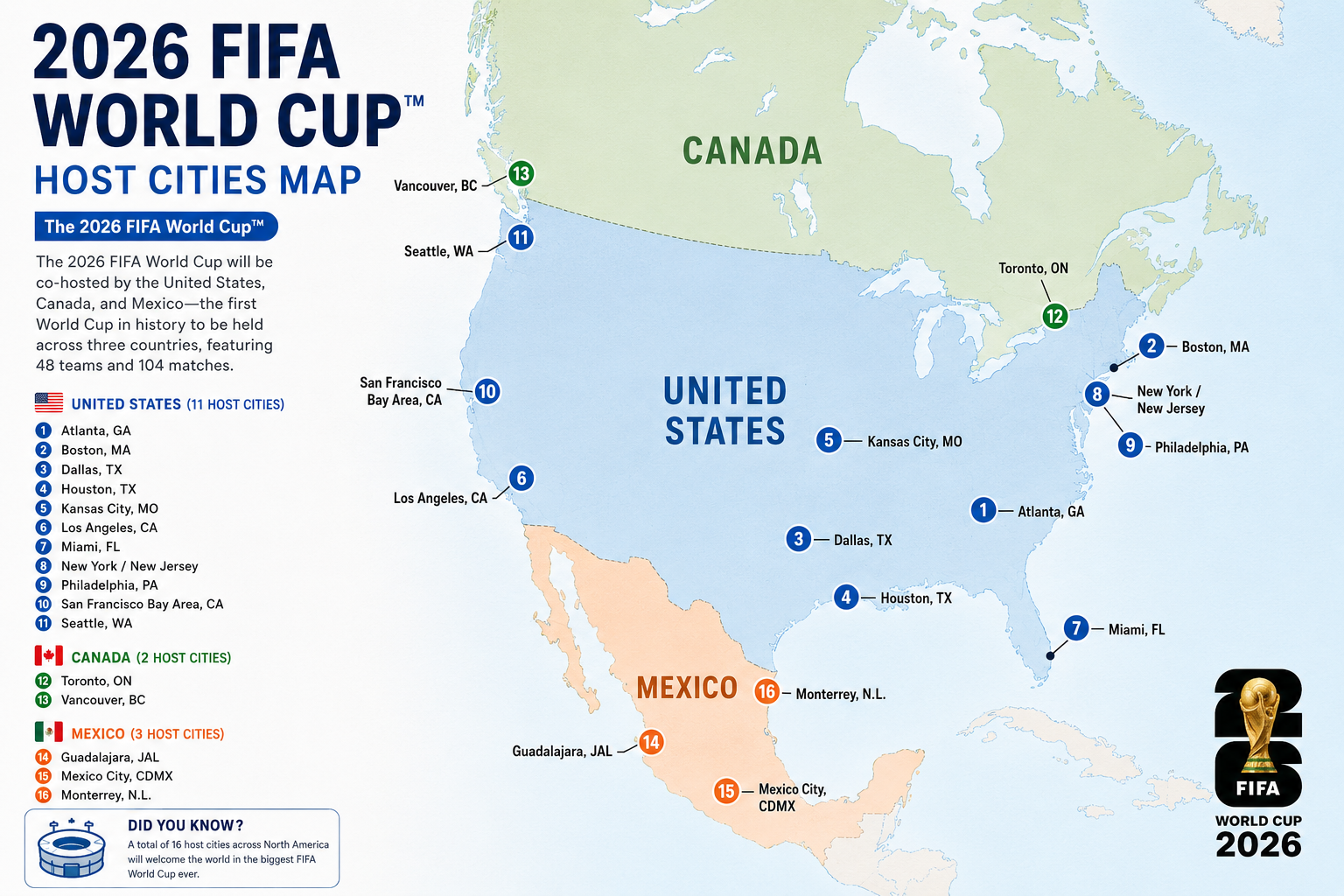
You could realistically watch a match in Los Angeles, fly to Mexico City three days later, then head to Toronto for the knockout rounds.
That means dealing with:
- multiple flights
- border crossings
- stadium ticket apps
- hotel check-ins
- ride-sharing apps
- constant navigation
- and somehow keeping your phone connected the entire time
And honestly? The biggest hidden problem isn’t flights. It’s mobile data.
Why This World Cup Will Be a Travel Nightmare
As we all know, this is the first time in World Cup history that three nations are co-hosting. The geographic footprint is absolutely massive! This isn't your standard "stay in one city and take a train" tournament; it is a logistical marathon.

Unless your team gets incredibly lucky with scheduling, chances are you’ll be hopping between countries. And flights aren’t exactly short either.
NYC → Toronto → ~1.5 hours
LA → Mexico City → ~4 hours
Vancouver → Dallas → ~4+ hours
Picture your crazy group stage itinerary: On Tuesday, you're grabbing coffee near Times Square in New York before a match. By Friday, you're flying up to Toronto to soak in the Canadian football fever. Come Monday, you could be in Mexico City crushing authentic street tacos before a do-or-die elimination game. This kind of high-frequency border hopping will test your stamina, your budget, and—most crucially—your mobile connectivity.
How to Travel Between USA, Canada, and Mexico for Matches
One thing many fans underestimate about the 2026 World Cup is just how far apart the host cities are. You might watch a match in New York, then fly to Toronto, then head to Mexico City days later. That means dealing with flights, trains, buses, and border crossings.
Flights: Fastest for Long Distances
Flying will be the most practical option for most routes.
- Dallas → Monterrey: 1.5–2 hrs ($80–$220)
- Los Angeles → Mexico City: 4 hrs ($150–$400)
- New York → Toronto: 1.5 hrs ($120–$350)
- Vancouver → Dallas: 4–5 hrs ($250–$600)
Trains & Buses: Best for Short Border Routes
Not every route needs a flight.
Border Crossings: Don’t Ignore This
Many travelers underestimate border logistics.
- Check passport validity
- Confirm visa requirements
- Expect longer queues during match season
- Land crossings may take 1–3+ hours
📍 Sample Match Route + Estimated Costs
New York → Toronto → Mexico City
| Route | Transport | Estimated Cost |
|---|---|---|
| NYC → Toronto | Flight | $120–$350 |
| Toronto → Mexico City | Flight | $300–$700 |
| Airport Transfers | Uber / Train | $50–$150 |
| Total | $470–$1,200+ | |
Why Your Regular SIM Card Might Ruin Your Trip
This is the part most people underestimate when planning a multi-country 2026 FIFA World Cup trip.
You spend weeks comparing flights, hotels, and match tickets… but completely forget what happens when you cross from United States to Canada or Mexico and your phone suddenly stops working.
And yes—it happens more often than people think.
Border Crossing Blackout
You're taking a bus from San Diego to Tijuana. The moment you cross the border, your phone shows "No Service."
- No WhatsApp messages
- No Google Maps
- No Airbnb check-in details
- No ride booking apps
Stadium QR Ticket Panic
You arrive at a packed World Cup stadium, but your digital ticket won’t load.
- QR code won't refresh
- Stadium Wi-Fi is overloaded
- Thousands of fans waiting
- You risk missing kickoff
Bypass the stadium network collapse with ByteSIM premium AT&T and Rogers 5G.
Airport Transit Nightmare
You land in Mexico City or Toronto exhausted and need internet immediately.
- Can't book Uber
- Can't contact hotel
- Can't check directions
- Airport Wi-Fi fails
Be careful of the airport SIM cards scams.
Roaming Fees vs. Local SIM vs. eSIM
Since data is a matter of survival, which option should you choose? I've put together a quick comparison:
| Option | Cost | Convenience | Coverage |
| Carrier Roaming | High ($10-$15/Day) | Great (Auto-connects) | Medium (Often throttled overseas) |
| Local Physical SIM | Medium | Poor (Needs swapping in every country) | Single Country Only |
| ByteSIM eSIM | Best (High Value) | Great (QR Code Install) | Multi-Country (3-in-1) |
The table makes it clear: for a multi-country trip, roaming is a rip-off, swapping physical SIM cards at every border is a headache, and eSIM is the ultimate winner.
Why I’m Using One eSIM for All Three Countries
One eSIM for Three Countries
Crossing borders shouldn't mean losing your connection. Skip the hassle of swapping physical SIMs or paying insane roaming fees. Equip your phone with a single USA Mexico Canada eSIM to keep online seamlessly from New York to Mexico City.
Get Your 3-in-1 eSIM Now
This is exactly why I am urging everyone to get a usa mexico canada esim before they fly out. Products like the ByteSIM multi-country eSIM are literal lifesavers for football fans.
Instead of buying:
one US SIM
one Canada SIM
one Mexico SIM
I’d rather install one eSIM before flying and forget about it.
That means:
✅ one QR activation
✅ no swapping physical SIM cards
✅ works across borders
✅ keep your primary number active
✅ no airport kiosk stress
My Essential World Cup Travel Apps
Your phone basically becomes your survival kit during the 2026 World Cup—from loading match tickets to booking rides after the game. These are the apps I’d download before flying.
FIFA Official App
For digital tickets, match updates, and stadium info.
Google Maps
Essential for navigating unfamiliar cities and public transit.
Uber / DiDi
Uber works well in the U.S. & Canada, while DiDi is often cheaper in Mexico.
Want the full breakdown of ticket apps, ride apps, food delivery apps, and hidden travel tools?
Read the full World Cup app guide →Final Checklist Before You Fly
Before chasing matches across the USA, Canada, and Mexico, make sure you’ve handled the essentials. Trust me—forgetting one of these can ruin your trip faster than a delayed flight.