• English
  • Español
  • Français
  • 日本語
  • 한국인
  • 中文(简体)
  • 中文(繁體)
  • 中國(USD $)
  • 丹麥(USD $)
  • 日本(USD $)
  • 比利時(USD $)
  • 加拿大(USD $)
  • 台灣(USD $)
  • 白俄羅斯(USD $)
  • 立陶宛(USD $)
  • 冰島(USD $)
  • 列支敦士登(USD $)
  • 匈牙利(USD $)
  • 安道爾(USD $)
  • 西班牙(USD $)
  • 克羅地亞(USD $)
  • 希臘(USD $)
  • 拉脫維亞(USD $)
  • 法國(USD $)
  • 法羅群島(USD $)
  • 波斯尼亞和黑塞哥維那(USD $)
  • 波蘭(USD $)
  • 直布羅陀(USD $)
  • 芬蘭(USD $)
  • 阿爾巴尼亞(USD $)
  • 俄羅斯(USD $)
  • 保加利亞(USD $)
  • 美國(USD $)
  • 英國(USD $)
  • 香港特別行政區(USD $)
  • 挪威(USD $)
  • 格恩西島(USD $)
  • 烏克蘭(USD $)
  • 馬耳他(USD $)
  • 馬其頓(USD $)
  • 捷克共和國(USD $)
  • 曼島(USD $)
  • 梵蒂岡(USD $)
  • 荷蘭(USD $)
  • 斯瓦爾巴和揚馬廷(USD $)
  • 斯洛文尼亞(USD $)
  • 斯洛伐克(USD $)
  • 黑山(USD $)
  • 塞浦路斯(USD $)
  • 塞爾維亞(USD $)
  • 奧地利(USD $)
  • 奧蘭群島(USD $)
  • 意大利(USD $)
  • 愛沙尼亞(USD $)
  • 愛爾蘭(USD $)
  • 新加坡(USD $)
  • 瑞士(USD $)
  • 瑞典(USD $)
  • 聖馬力諾(USD $)
  • 葡萄牙(USD $)
  • 德國(USD $)
  • 摩納哥(USD $)
  • 摩爾多瓦(USD $)
  • 澤西島(USD $)
  • 澳大利亞(USD $)
  • 澳門特別行政區(USD $)
  • 盧森堡(USD $)
  • 羅馬尼亞(USD $)

未找到相關貨幣

關閉

/ /

How to Get an eSIM for iPhone Before the FIFA World Cup: Setup, Activation & Travel Tips

Jun 09,2026 | Nico

If you're traveling to the FIFA World Cup and wondering how to get an eSIM for your iPhone, the process is straightforward. First, make sure your iPhone supports eSIM. Then choose a provider, purchase a plan, scan the QR code, and activate it before or after arrival.

For many fans, the biggest challenge isn't setting up the eSIM—it's choosing the right option for a trip that may include multiple host cities or even multiple countries. With matches taking place across the United States, Canada, and Mexico, having reliable mobile data is essential for accessing tickets, navigation, transportation apps, and match updates.

This guide walks you through everything you need to know, including how to check iPhone compatibility, where to get an eSIM, how to activate it, and what to look for in a travel eSIM for the FIFA World Cup.

Does Your iPhone Support eSIM?

Before purchasing an eSIM for the FIFA World Cup, the first thing you should check is whether your iPhone supports eSIM technology. Fortunately, most iPhone models released in recent years are eSIM-compatible.

iPhone Models That Support eSIM
You can use an eSIM if you have one of the following devices:

  • iPhone XR
  • iPhone XS and XS Max
  • iPhone 11 series
  • iPhone 12 series
  • iPhone 13 series
  • iPhone 14 series
  • iPhone 15 series
  • iPhone 16 series
  • iPhone 17 series

If you're traveling with a newer iPhone, there's a good chance your device already supports multiple eSIM profiles and dual SIM functionality.

How to Check if eSIM Is Available on Your iPhone
Not sure whether eSIM is enabled on your device? Follow these steps:

  • Open Settings.
  • Tap Cellular or Mobile Data.
  • Look for Add eSIM or Add Cellular Plan.

If you see either option, your iPhone supports eSIM and is ready for activation.

Make Sure Your iPhone Is Unlocked
Even if your iPhone supports eSIM, carrier restrictions can prevent you from using a travel eSIM. Before purchasing a plan, check the following:

  • Your device is carrier-unlocked.
  • Your current provider allows eSIM usage.
  • Your iPhone is running the latest version of iOS.

To verify your device status:

  • Go to Settings > General > About.
  • Scroll to Carrier Lock.
  • Look for No SIM Restrictions.

If your device is locked, contact your carrier before your trip.

Why This Matters for FIFA World Cup Travel
Many fans will travel between host cities in the United States, Canada, and Mexico during the tournament. Checking compatibility before departure can help you:

  • Avoid activation issues at the airport.
  • Install your eSIM before your flight.
  • Stay connected as soon as you arrive.
  • Use maps, tickets, and transportation apps without delays.

Pro Tip: Check your iPhone's eSIM compatibility a few days before departure, not at the airport. This gives you enough time to resolve any carrier lock or software issues before your trip.


How to Get an eSIM for Your iPhone

Once you've confirmed that your iPhone supports eSIM, the next step is getting an eSIM plan for your trip. There are two main ways to get an eSIM for an iPhone. While both options work, one is usually more convenient for international travel and major events like the FIFA World Cup.

Option 1: Get an eSIM From Your Mobile Carrier

Many mobile carriers allow customers to convert a physical SIM into an eSIM or activate a new eSIM directly through their network.

This option may work well if:

  • You want to keep your current phone number active.
  • Your carrier offers international roaming packages.
  • You're only visiting one destination.

Drawbacks to consider:

  • International roaming can be expensive.
  • Data allowances may be limited.
  • Coverage and pricing vary by carrier.
  • Plans may not work seamlessly across multiple countries.

If you're planning to attend matches in different FIFA World Cup host countries, roaming costs can add up quickly.

Option 2: Buy a Travel eSIM Online

For most World Cup travelers, purchasing a travel eSIM online is the simplest option.

After purchasing a plan, you'll typically receive:

  • A QR code for activation.
  • Installation instructions.
  • Instant access to mobile data after activation.

The entire process usually takes only a few minutes and can be completed before departure.

Benefits of a travel eSIM include:

  • No need to visit a mobile store.
  • Fast online activation.
  • Flexible data plans.
  • Coverage across multiple destinations.
  • No need to remove your physical SIM card.

Which Option Is Better for FIFA World Cup Travel?
If your trip involves more than one host city—or even multiple host countries—a travel eSIM is usually the more practical choice. Look for a provider that offers:

  • Coverage in the United States, Canada, and Mexico.
  • Reliable high-speed data.
  • Easy QR code installation.
  • Flexible data packages.
  • Customer support while traveling.

This can help you stay connected throughout the tournament without switching SIM cards or purchasing separate plans in each country.

When Should You Buy Your eSIM?
To avoid last-minute issues, it's best to purchase your eSIM before your flight. Most travelers choose to:

  • Buy the eSIM a few days before departure.
  • Install it while still connected to Wi-Fi at home.
  • Activate it upon arrival at their destination.

This approach gives you time to verify that everything is working correctly before your trip begins.


How to Install and Activate an eSIM on iPhone

After purchasing an eSIM, you can install and activate it directly on your iPhone in just a few minutes. While the exact process may vary slightly between providers, the steps below work for most travel eSIMs.

Step 1: Connect to Wi-Fi
Before starting the installation, make sure your iPhone is connected to a stable Wi-Fi network. You'll need an internet connection to download and activate your eSIM profile.

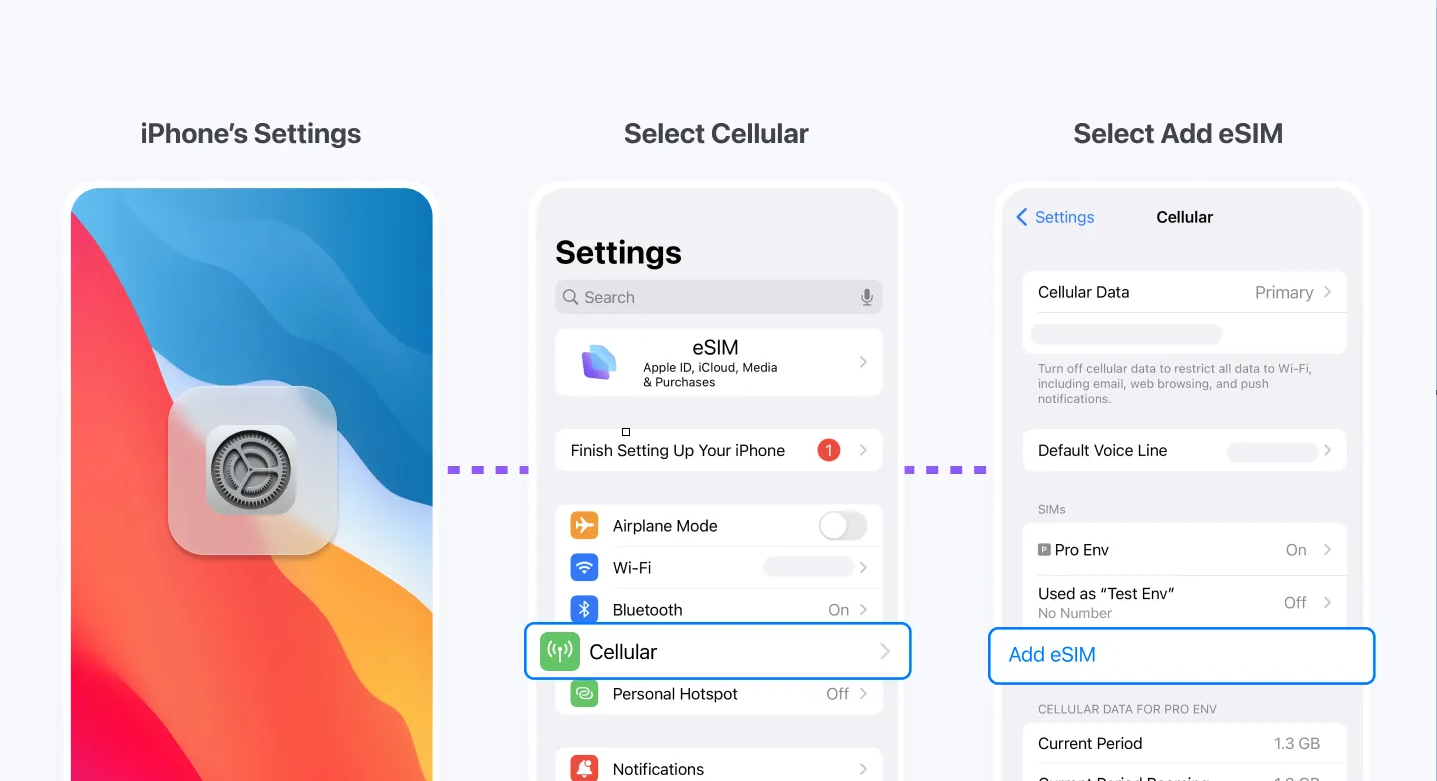
Step 2: Open Cellular Settings
On your iPhone:

  • Open Settings.
  • Tap Cellular or Mobile Data.
  • Select Add eSIM.

Your iPhone will then prompt you to add a new cellular plan.

Step 3: Scan the eSIM QR Code
Most travel eSIM providers will send a QR code after purchase. To install your eSIM:

  • Select Use QR Code.
  • Scan the code provided by your eSIM provider.
  • Follow the on-screen instructions.

Your iPhone will automatically download the eSIM profile.

Step 4: Label Your SIMs
If you're keeping your home SIM active, assign clear labels to each line. For example:

  • Primary SIM = Home Number
  • Secondary SIM = World Cup eSIM

This makes it easier to manage calls, messages, and mobile data during your trip.

Step 5: Select the eSIM for Mobile Data
After installation:

  • Go to Settings > Cellular.
  • Select your travel eSIM.
  • Set it as your mobile data line.

This ensures your iPhone uses the travel plan instead of your home carrier's roaming service.

Step 6: Enable Data Roaming
Many travel eSIM providers require data roaming to be turned on. To check:

  • Open Settings > Cellular.
  • Select your travel eSIM.
  • Turn on Data Roaming.

This does not usually result in extra charges when using a travel eSIM, but you should always verify this with your provider.

Common eSIM Activation Issues
If your eSIM isn't working, check the following:

  • The QR code was scanned successfully.
  • The eSIM profile is enabled.
  • Mobile data is assigned to the correct line.
  • Data roaming is turned on.
  • Your iPhone is connected to a supported network.

In most cases, activation problems can be resolved within a few minutes by reviewing these settings.

Should You Install Your eSIM Before or After Arrival?
For FIFA World Cup travel, installing your eSIM before departure is usually the safest option. Many travelers choose to:

  • Purchase the eSIM before their trip.
  • Install it at home using Wi-Fi.
  • Activate the plan when they land.

This reduces stress at the airport and ensures you're connected as soon as you arrive.


What to Consider Before Choosing a World Cup Travel eSIM

Before buying a travel eSIM for the FIFA World Cup, it’s important to match your plan with how you’ll actually travel. The tournament spans multiple cities and countries, so not all eSIMs will perform the same. This section helps you avoid common mistakes like buying the wrong coverage or running out of data during match days.

Coverage: Will You Travel Across Multiple Countries?
The 2026 FIFA World Cup is hosted across the United States, Canada, and Mexico. When choosing an eSIM, check whether it supports:

  • Single-country coverage (only USA, only Canada, etc.)
  • Multi-country coverage (North America package)

If your itinerary includes more than one country, a regional eSIM is usually more convenient.

Data Allowance: How Much Do You Actually Need?
Your data usage will likely increase during the tournament because of live match streaming clips, navigation apps, ride-hailing apps, and social media uploads.

Typical usage guide:

  • Light usage: 5–10GB
  • Moderate usage: 10–20GB
  • Heavy usage: 20GB+ or unlimited plan

Tip: Match days often lead to unexpected data spikes, especially when uploading videos or using live navigation in crowded stadium areas.

Network Quality: Local vs Roaming Performance
Not all eSIMs perform equally in every region. Look for:

  • Access to major local carriers (not just roaming partners)
  • 4G/5G support where available
  • Stable coverage in stadium-heavy urban areas

This is especially important in high-traffic cities during World Cup events.

Hotspot Support (Important for Travelers)
If you plan to share your connection with other devices:

  • Check if hotspot/tethering is allowed
  • Confirm if there are speed limitations
  • Verify if hotspot uses the same data allowance

This is useful for group travel or sharing internet with tablets and laptops.

Activation Flexibility
Some eSIMs activate immediately after installation, while others only start counting days after first network connection. Choose based on your travel plan:

  • Install before departure if activation is flexible
  • Avoid plans that start immediately if you're not traveling right away

Why This Matters for FIFA World Cup Travelers
During the tournament, you may move between cities quickly, cross international borders, use high-data apps constantly, and rely heavily on mobile connectivity in crowded stadiums. Choosing the right eSIM helps you avoid:

  • Sudden data loss during match days
  • Expensive roaming charges
  • Switching SIMs in different countries
  • Weak or unstable connections

Key Insight: For most World Cup travelers, the best option is a multi-country North America eSIM with sufficient or unlimited data, rather than separate country-specific plans.


Best eSIM Option for FIFA World Cup Travelers

If you’re traveling for the FIFA World Cup, the most important thing is choosing an eSIM that works seamlessly across the United States, Canada, and Mexico without switching plans or worrying about roaming.

For most international fans, a regional travel eSIM is the simplest solution because it allows you to stay connected throughout the entire tournament with one setup.

Recommended Choice: ByteSIM North America eSIM
For World Cup travelers, the ByteSIM North America eSIM is a practical option designed specifically for multi-country travel. It helps you stay connected across all three host countries with a single plan.

Key advantages include:

  • Coverage across the United States, Canada, and Mexico
  • Instant QR code delivery for quick installation
  • Easy setup directly on iPhone in minutes
  • No need to change SIM cards when crossing borders
  • Works immediately after activation

This makes it especially useful for fans traveling between multiple host cities during the tournament.

Why It Works Well for FIFA World Cup Travel
Unlike single-country SIM cards, ByteSIM is designed for regional mobility. This is useful because World Cup schedules often require:

  • Traveling between different cities within days
  • Crossing borders for back-to-back matches
  • Relying heavily on mobile data for navigation and tickets
  • Staying online in crowded stadium environments

With one eSIM, you avoid the hassle of managing multiple local SIM cards or dealing with inconsistent roaming plans.

Simple Setup Before You Travel
To get started:

  • Purchase your ByteSIM eSIM online
  • Receive your QR code instantly via email
  • Install it on your iPhone using Wi-Fi
  • Activate it when you arrive in North America

That’s it—no physical SIM cards, no store visits, and no complicated setup.

ByteSIM North America eSIM
Unlimited data in USA/Mexico, 25GB Canada, hotspot support
Get North America eSIM →
 

Quick Checklist Before You Fly

© 2026 iPhone World Cup Guide — eSIM setup for seamless connectivity across North America.

發表評論

姓名
郵件
評論