摩洛哥的阿特拉斯獅子:沒有美國信號?一個北美 eSIM 修復
Jun 04,2026 | Wang
Why Morocco Fans Need a Different World Cup Connectivity Plan
Morocco’s World Cup story carries emotional weight.
After the Atlas Lions became the first African and Arab team to reach a World Cup semi-final, Moroccan fans began traveling with a different kind of expectation.
The next tournament is not just another football trip. For many fans, it feels like another chance to witness history.
That excitement creates pressure on every part of the journey.
You need to scan digital tickets at the stadium. You need to find your hotel after a long flight. You need to coordinate with friends in crowded fan zones. You also want to send videos, voice notes, and live reactions to family in Morocco.
A weak data connection can break the whole rhythm of match day.
Many fans think international roaming will be enough. But roaming from Maroc Telecom, Orange Morocco, or Inwi can become expensive and unpredictable in North America.
Others plan to buy a SIM card after landing. That can work, but it adds stress at the worst possible time.
Airport SIM counters can be crowded. Staff may ask for local documents. Some stores may not have the right plan.
And if your Moroccan bank card fails at checkout, you may not even be able to complete the purchase.
A travel eSIM changes the sequence.
Instead of solving the internet problem after landing, you solve it before departure. You buy the plan online, install the eSIM, and set it as your mobile data line when you arrive.
An eSIM replaces the need to insert a physical SIM card.
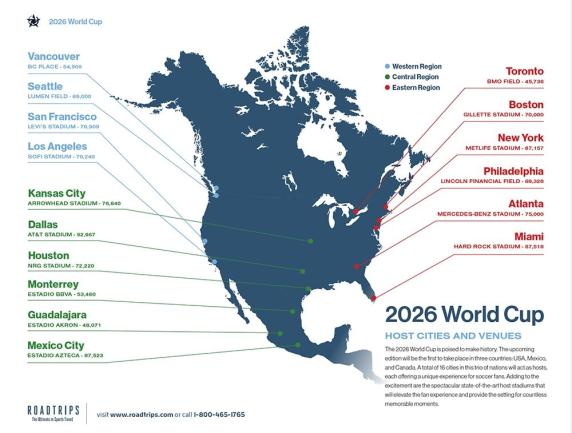
This matters even more because the World Cup will take place across multiple host cities. FIFA’s official tournament information on FIFA.com shows how spread out major match locations can be.
For Morocco fans, that means one trip may include domestic flights, border crossings, and several local networks.

The Hidden Network Issue: Moroccan Phones in North America
The most overlooked problem for Morocco fans is phone compatibility.
Most Moroccan users are familiar with Maroc Telecom, Orange Morocco, and Inwi. Their phones usually work well at home.
But North America uses a different network environment. In the United States, carriers often depend on low-frequency bands such as 600 MHz and 700 MHz for wide-area and indoor coverage.
These bands help signals pass through concrete, stadium structures, underground areas, and large buildings.
Some Moroccan or European-market phones may not support all of those bands.
This is especially important for certain Samsung Galaxy A models, Xiaomi Redmi models, and second-hand imported phones.
That creates a frustrating situation. Your phone may show LTE or 5G, but apps still fail to load.
You may stand outside a stadium with a signal icon on your screen, while your ticket app, WhatsApp, or map refuses to refresh.
This does not always mean the eSIM is broken. It may mean your phone lacks the right band support for that exact carrier, city, or stadium environment.
Before buying any World Cup eSIM, check three things:
1. Your phone supports eSIM.
Many iPhones from the iPhone XS onward support eSIM. Newer Samsung Galaxy and Google Pixel models often support it too. But some regional versions do not.
2. Your phone is unlocked.
If your phone is locked to a carrier, it may reject another eSIM profile.
3. Your phone supports key North American bands.
This is especially important if you bought the device in Morocco, Europe, or the second-hand market.
If you are not sure, our complete eSIM-compatible phone list can help you check common iPhone, Samsung, Xiaomi, and Pixel models before you travel.
The best setup for many Moroccan travelers is simple: keep your Moroccan physical SIM inside the phone for SMS and banking messages, then use the eSIM as your data line in North America.
That way, you stay reachable on your original number while avoiding roaming data charges.
CMI Payments, WhatsApp, and the Real Match-Day Pain Points
Morocco fans do not just need “more data.” They need reliable access in very specific moments.
Those moments often happen when stress is already high: at airport arrivals, outside stadium gates, in rideshare pickup zones, during late-night hotel check-ins, or when a bank transaction requires a verification code.
Avoid These Match-Day Disasters
CMI and Moroccan Bank Cards Can Fail Abroad
Many Moroccan users rely on local payment systems and cards connected to Moroccan banks. CMI, the Centre Monétique Interbancaire, plays an important role in Morocco’s domestic card payment ecosystem.
The problem is that international checkout pages do not always handle Moroccan cards smoothly.
A payment may be declined. A bank may block the transaction as suspicious. A verification SMS may go to your Moroccan number, but you may not receive it if roaming is off or your SIM has no service.
This creates a bad chain reaction.
You land without data. You try to buy data. Your card fails. You need SMS to unlock the card. But you need data or roaming to receive help.
The easiest way to avoid that loop is to buy and install your eSIM before you leave Morocco or Europe. You can still keep your Maroc Telecom, Orange Morocco, or Inwi SIM active for SMS, but you should not depend on it for roaming data.
If this is your first eSIM, our guide on how to install and activate an eSIM before travel walks through QR code activation, eSIM profiles, and APN settings.
APN means Access Point Name. It tells your phone how to connect to a mobile data network, and most travel eSIMs configure it automatically.
WhatsApp Is the Lifeline for Morocco Fans
For many Moroccan travelers, WhatsApp is not just a messaging app. It is the main communication channel for family, friends, fan groups, airport pickups, and match-day coordination.
That makes latency important. Latency is the delay between your phone and the network server.
If an eSIM routes traffic through a faraway region before reaching North America, WhatsApp calls may stutter. Videos may take too long to upload. Voice notes may fail. Location sharing may lag.
This becomes painful during football moments.
When Morocco scores, fans want to send videos immediately. When a group splits up outside a stadium, they need live locations to work. When a driver calls, they need the number and data connection to stay active.
A cheap data plan can look attractive, but if it performs poorly under crowd pressure, it may cost you more in stress than it saves in money.
If your phone already supports eSIM, you can review ByteSIM’s World Cup eSIM plans before departure and install your data line in advance. That gives you one less problem to solve when you land.
Language Support Also Matters
Many Moroccan travelers speak some English, especially younger fans and frequent travelers. But technical problems are different.
When an eSIM will not activate, a QR code will not scan, or mobile data does not connect, most users prefer clear support in a language they trust.
For Moroccan fans, French support can be especially reassuring. Arabic-friendly instructions also reduce anxiety for first-time eSIM users.
Before traveling, save screenshots of your order number, QR code, activation instructions, customer support contact, and APN details. Do not rely on your email loading at the airport.
How to Prepare Your eSIM Before You Fly
A good eSIM setup starts before the airport. Do not wait until match day.
Use this checklist before leaving Morocco, France, Spain, the Netherlands, Belgium, or any other departure point:
-
Check that your phone is unlocked.
Carrier-locked devices may not accept another eSIM. -
Confirm eSIM support on your exact phone version.
The same model name can have different regional features. -
Keep your Moroccan SIM for SMS.
You may still need bank codes, family calls, or emergency messages. -
Install the eSIM before departure.
Do this while you still have home Wi-Fi. It reduces stress if anything needs troubleshooting. -
Do not activate roaming data on your Moroccan SIM.
In your phone settings, choose the eSIM for mobile data once you arrive. -
Download important items offline.
Save tickets, hotel addresses, maps, passport copies, match schedules, and support contacts. -
Test your key apps.
Check WhatsApp, maps, ticket apps, email, and ride-hailing apps before match day.
One detail matters a lot: do not learn your phone’s SIM settings at the stadium gate.
iPhone and Android settings differ. Practice switching mobile data lines before the trip, while you have time to fix mistakes.
Why ByteSIM Fits Morocco Fans Traveling for the World Cup
ByteSIM’s World Cup plan fits Morocco fans because it addresses the real travel pattern, not just the idea of “buying data.”
First, it is built for North America.
That matters because Morocco fans may not stay in one country. A single-country SIM can become inconvenient fast.
Second, it includes unlimited data for USA and Mexico, with a strong data allowance for Canada.
For fans who rely on WhatsApp, maps, ride-hailing, social media, and digital tickets, this is more practical than constantly checking every megabyte.
Third, it includes calling and SMS features with a US number.
That can help when contacting hotels, restaurants, drivers, local services, or other fans. Pure data plans can work well for apps, but a local number adds flexibility during travel.
Fourth, hotspot support is useful for group trips.
Moroccan fans often travel with family, friends, or supporter groups. If someone cannot load a ticket or find a ride, sharing data for a few minutes can solve the problem.
Fifth, ByteSIM allows users to prepare through the app before travel.
For Morocco fans worried about CMI card failures, international bank blocks, or airport Wi-Fi problems, this is a major advantage. You can complete the setup before the pressure starts.
If your World Cup route includes the United States, Canada, or Mexico, ByteSIM’s World Cup eSIM can work as your main data line while your Moroccan SIM stays available for SMS.
This setup helps reduce roaming risk without cutting you off from your home number.
Still, every traveler should be realistic. No eSIM can fully fix an old or incompatible phone. If your device lacks important North American bands, some stadiums or indoor areas may still have weaker performance.
For the best experience, use a newer iPhone, Samsung Galaxy, Google Pixel, or globally compatible Android device.
You should also complete a quick test before match day:
- Open the eSIM data line.
- Send a WhatsApp message.
- Test a WhatsApp voice note or call.
- Search the stadium route in maps.
- Open your ticketing app.
- Check whether hotspot sharing works.
- Save ByteSIM support details offline.
These steps take only a few minutes, but they can prevent the worst match-day scenario: standing outside the stadium with no ticket access, no group messages, and no working map.
Network conditions can vary by city, carrier, and crowd density.
OpenSignal’s mobile network experience reports show how coverage and capacity differ across markets. During the World Cup, stadium areas will experience heavier traffic than usual, so preparation matters more than luck.
Final Advice for Morocco Fans
For Morocco fans, the best World Cup connectivity strategy is simple: do not leave mobile data until the last minute.
Whether you fly from Casablanca, Rabat, Marrakesh, Tangier, Paris, Madrid, Amsterdam, or Brussels, check your phone, payment method, and eSIM plan before departure.
The earlier you solve the connectivity problem, the easier the rest of the trip becomes.
ByteSIM’s World Cup eSIM is a strong fit because it combines North America coverage, high-speed data, calling and SMS features, hotspot support, and pre-trip activation.
That combination matches the way Morocco fans actually travel and communicate.
Before you follow the Atlas Lions across North America, take a few minutes to prepare your eSIM. It is much easier to solve mobile data at home than at a crowded stadium gate.
Your North America Match
Land ready. Stay online across stadiums, hotels, airports, and borders with one eSIM for the USA, Mexico, and Canada.