How to Get a Mongolia eSIM with Phone Number
Nov 28,2025 | Milo
Table of contents
What to Know Before Getting a Mongolian eSIM
How to Get and Activate Your Mongolia eSIM with Phone Number
How to Make Calls with Your Mongolian Number
FAQs about Mongolian eSIM with Number
Traveling to the Land of the Blue Sky? Whether you are trekking through the Gobi Desert or exploring the streets of Ulaanbaatar, staying connected is essential. While physical SIM cards used to be the standard, the eSIM for Mongolia has revolutionized travel connectivity.
However, not all eSIMs are created equal. Most global travel eSIMs are "data-only," leaving you unable to call a driver or book a restaurant. To navigate Mongolia smoothly, you need a plan that includes a functional Mongolian Phone Number.
This guide will walk you through how to get a high-speed, voice-enabled eSIM instantly—without the hassle of paperwork.
Travel Smart, Talk Local
Land in Mongolia, Talk Like a Local — eSIM with Phone Number Ready. Your Local Connection in Mongolia Starts with a ByteSIM eSIM.
Get Your Mongolia eSIM Here
What to Know Before Getting a Mongolian eSIM
Before you purchase a plan, there are a few technical requirements and coverage realities you need to understand.
1. Check Device Compatibility
First, please make sure your phone is eSIM-compatible and carrier-unlocked.
- Compatible Devices: Most modern smartphones—including the latest iPhones and top-tier Android models—offer eSIM support, but this feature isn't available on all devices.
- Unlock Status: If you purchased your phone through a specific carrier on a contract, it might be "locked" to that network. You must contact your home carrier to unlock it before installing an international eSIM.
2. The "eKYC" Hurdle (And How to Skip It)
Usually, getting a Mongolian Phone Number requires strict Identity Verification (eKYC). If you buy directly from local carriers upon arrival, you often have to stand in line, show your passport, and wait for registration.
- The Better Option: Specialized providers like ByteSIM now offer plans that do not require eKYC. This means you can buy your eSIM online and activate it immediately without uploading sensitive passport photos.
3. Network Quality Matters
Mongolia is vast. While Ulaanbaatar has excellent 4G and growing 5G coverage, remote areas (like the deep Gobi or Northern Taiga) may have spotty service. However, local carriers like Unitel generally offer the widest coverage footprint for tourists.
How to Get and Activate Your Mongolia eSIM with Phone Number
If having a local number is non-negotiable for your trip, follow these steps to secure one.
Step 1: Purchase online
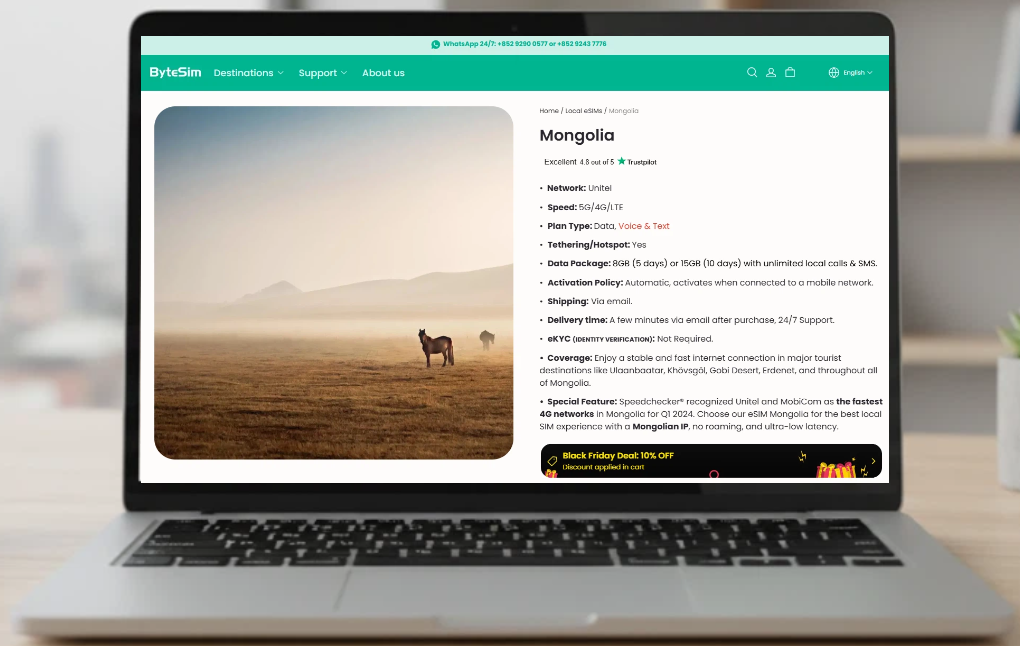
Visit the ByteSIM website. Since shipping is via email, you can do this from your couch at home or at the airport gate. There is no eKYC required, making the process instant.
Step 2: Scan the QR Code
Within minutes of purchase, you will receive an email with a QR code. We strongly recommend scanning the QR code for installation when you are about to use the eSIM (Before flight departure/arrival at the destination), to avoid activation by incorrect operations.
For iPhone:
- Go to Settings > Cellular > Add eSIM.
- Select Use QR Code and scan the code provided.
- Label the plan (e.g., "Mongolia").
For Android:
- Go to Settings > Network & Internet > SIMs.
- Tap Download a SIM instead (or "Add eSIM").
- Scan the QR code.
Pro Tip: Install your eSIM for Mongolia while you are still at home connected to strong Wi-Fi. However, keep your home line as "Primary" until you land in Mongolia.
Travel Smart, Talk Local
Land in Mongolia, Talk Like a Local — eSIM with Phone Number Ready. Your Local Connection in Mongolia Starts with a ByteSIM eSIM.
Get Your Mongolia eSIM HereStep 3: Land and Activate
The activation is automatic. Upon arriving at your destination, please select our eSIM as Mobile/Cellular Data in your phone settings. Turn on the roaming for this eSIM. It will activate automatically when connected to the local network. The validity period only begins once you land in Mongolia and your phone connects to the Unitel network. You don't need to worry about wasting days before your trip starts.
How to Make Calls with Your Mongolian Number
Once you land and your eSIM for Mongolia activates, you will be assigned a local number. Here is how to use it:
1. Unlimited Local Calls
Because the ByteSIM plan comes with unlimited local voice and text, you can call freely within the country. If you can't find the number or have any questions, feel free to contact our 24/7 customer service via service@bytesim.com or WhatsApp +852 9290 0577 or +852 9243 7776. We'll be ready to help you.
- Booking Drivers/Hotels: Simply dial the 8-digit local number.
- Coordinating with Friends: Text or call fellow travelers who also have local numbers without worrying about costs.
2. Using Data and Hotspot
Need to work on your laptop or share data with a friend?
- Tethering is supported: You can use your phone as a hotspot.
- Coverage: You will enjoy stable internet in major hubs like Ulaanbaatar, Khövsgöl, the Gobi Desert, and Erdenet.
FAQs about Mongolian eSIM with Number
Do I need to upload my passport (eKYC) to get the number?
No. If you choose the ByteSIM option mentioned above, Identity Verification is NOT required. You can skip the paperwork and get connected instantly.
Will I have a Mongolian IP address?
Yes. Unlike roaming SIMs that route traffic through other countries (causing lag), this eSIM for Mongolia gives you a local Mongolian IP. This ensures ultra-low latency and faster loading times for local apps.
Can I make international calls?
The plan focuses on unlimited local calls and SMS. For international calls to family back home, it is best to use your data allowance (8GB or 15GB) to call via WhatsApp, FaceTime, or Telegram.
What happens if I run out of data?
The plans are generous (8GB for 5 days is plenty for most tourists!). However, since delivery is via email and support is available 24/7, you can simply purchase a new eSIM if you decide to extend your stay.
Plans that may interest you
Comment