Can you use AI translation apps without internet access? Yes, but it depends on the app, language pair, and features you need. Apps like Google Translate and Apple Translate support offline translation when the required language packs are downloaded in advance. However, offline translation has limitations. Some voice, camera, and AI-powered features may require an internet connection. If you're traveling abroad, preparing offline languages and having a reliable mobile data connection can help you communicate more confidently.

Can AI Translation Apps Work Offline?
Yes. Some AI translation apps can translate text without an internet connection by using language packs downloaded to your device. However, offline capabilities vary by app, language pair, and feature.
1. Offline translation generally works in two ways:
- On-device translation: The app processes text using language data stored on your phone, so mobile data and Wi-Fi aren't required.
- Cloud-based translation: The app sends text or audio to an online service for processing, which requires an internet connection.
2. Before traveling, keep these limitations in mind:
- Language support varies: Not every language is available for offline use.
- Accuracy may differ: Offline translations may be less accurate for complex sentences, idioms, or context-dependent expressions.
- Some features require internet access: Live translation, certain voice functions, and advanced AI tools may not work offline.
- Language packs must be downloaded in advance: You generally can't download a missing language pack once you're completely offline.
Tip: For the most reliable results, download the languages you need before departure and test the specific translation features you plan to use.
Which Translation Apps Work Without Internet?
Several translation apps offer offline features, but the available functions depend on the language pair and device. For most international travelers, Google Translate and Apple Translate are practical starting points.
| App | Offline capabilities | What to check |
|---|---|---|
| Google Translate | Text translation and camera translation for supported downloaded languages | Download the required language packs; camera features vary by language |
| Apple Translate | Text translation and supported conversation features using downloaded languages | Download both languages and enable On-Device Mode where available |
Google Translate
Google Translate supports offline translation after you download the relevant language packs.
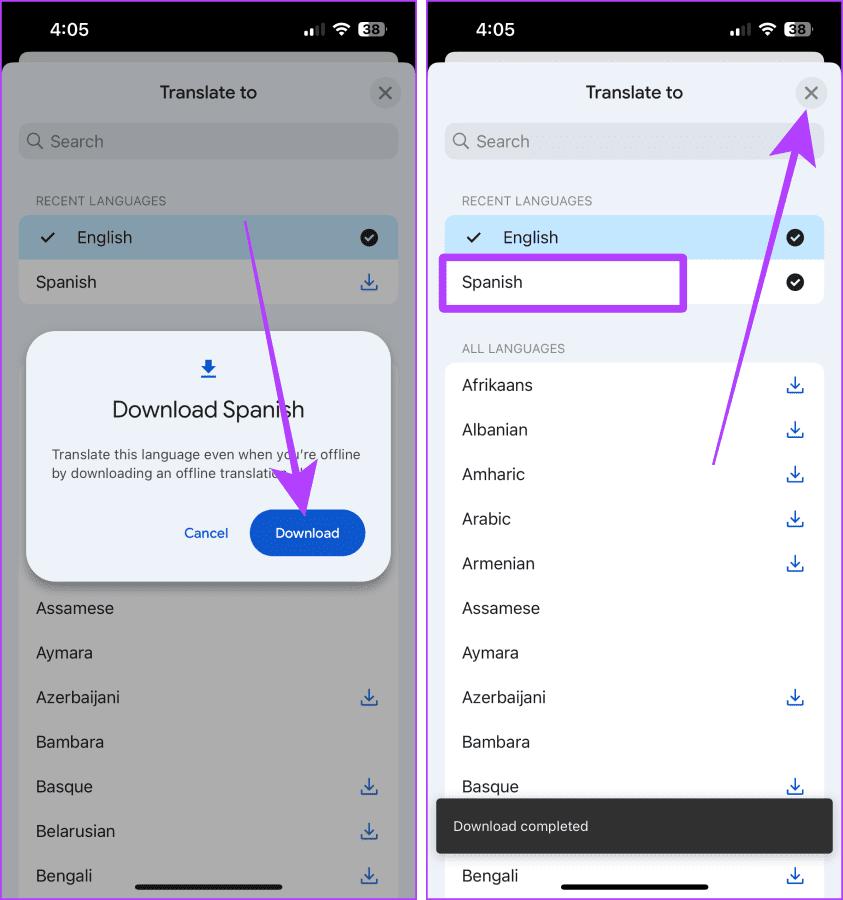
To prepare it for a trip:
- Open Google Translate while connected to the internet.
- Select the language you want to translate.
- Open the language list and download the language pack if available.
- Repeat for other languages you expect to need.
- Test text translation and any camera features you plan to use while offline.
Best for: Travelers who need to translate signs, menus, and everyday text across different destinations.
Apple Translate
Apple Translate supports offline translation for supported languages when the necessary language data is downloaded to your iPhone.
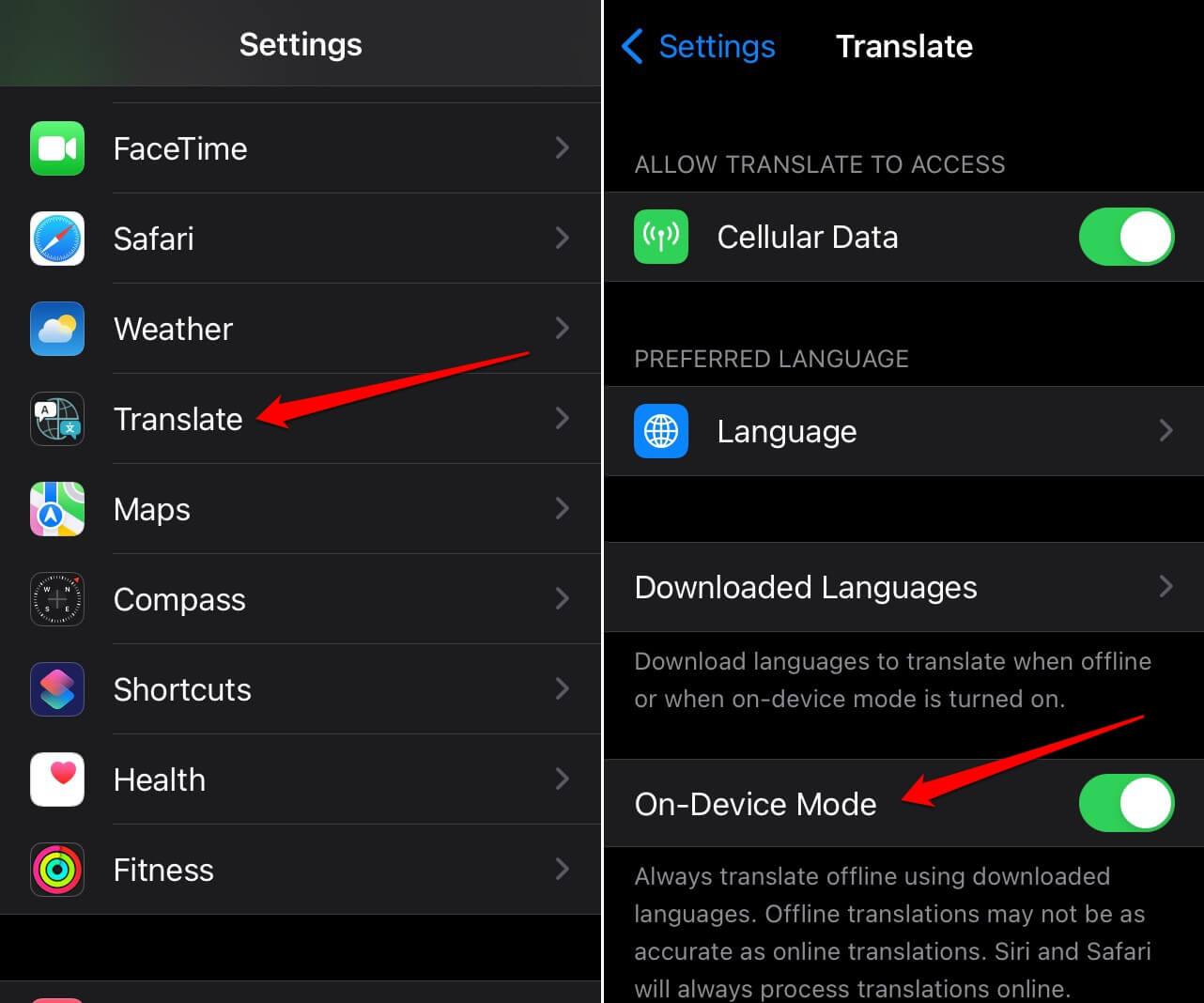
To prepare it:
- Open the Translate app.
- Select the source and target languages.
- Download the available languages from the language menu.
- Open Settings and check the Translate app's options for On-Device Mode, if available.
- Test translation with your internet connection disabled.
Best for: iPhone users who want a built-in translation tool without installing an additional app.
Important: Offline support is not universal. Before relying on either app, check the current language availability and feature requirements on the Google Translate Help or Apple Support.
How to Test Your Offline Translation App Before Traveling
Downloading a language pack doesn't guarantee that every translation feature will work offline. Test your app before departure to identify limitations while you still have an internet connection.
- Test both translation directions: Translate from your native language into your destination's language, then switch directions to check whether both language packs are available.
- Check camera translation: Point your camera at a menu or printed sign. Confirm whether the app can recognize and translate text without internet access.
- Test voice features: Try speaking a short sentence and playing the translated audio. Voice input and spoken output may have different offline requirements.
- Check language availability: Make sure the language packs have finished downloading and are available within the app.
- Keep essential phrases accessible: Save common questions, hotel addresses, emergency phrases, and transport details as screenshots or notes in case your translation app fails.
Tip: Test the app with Airplane Mode enabled and Wi-Fi turned off. If a feature stops working, check whether it requires an internet connection rather than assuming the entire app is unavailable offline.
What Can and Can't You Do With an Offline Translator?
Offline translation is useful for basic communication, but not every feature works without an internet connection. Availability depends on the app, downloaded languages, and device.

| Feature | Works Offline? | Key Limitation |
|---|---|---|
| Text translation | Often yes | Requires downloaded language packs |
| Camera translation | Sometimes | Offline support varies by app and language |
| Voice input | Depends | Speech recognition may require internet access |
| Spoken translation | Depends | Offline speech output and language support vary |
| Live conversation translation | Limited or app-dependent | Some conversation features require online processing |
| AI-powered explanations | Often no | Cloud-based AI features generally need internet access |
When Is Offline Translation Enough?
- Reading menus and signs: Offline text or camera translation can help you understand basic information, provided the relevant feature supports your downloaded languages.
- Asking simple questions: Pre-downloaded language packs may handle common phrases, directions, and everyday requests.
- Traveling through areas with poor reception: Offline translation remains useful on trains, in underground stations, or in remote areas where mobile coverage is limited.
When Do You Need an Internet Connection?
- Translating complex conversations: Online processing may provide better context handling or support features unavailable offline.
- Using advanced AI tools: Features such as contextual explanations or AI-assisted rewriting may rely on cloud services.
- Getting real-time travel information: Translating a phrase is different from checking live transport updates, finding a nearby restaurant, or contacting your hotel. These tasks typically require internet access.
The practical approach is to treat offline translation as a backup, not a complete replacement for connectivity. Downloaded language packs can help when you lose signal, while mobile data gives you access to online translation features and other travel services when coverage is available.
Why You May Still Need a Travel eSIM
Offline translation apps can help you communicate without a signal, but they can't replace every online service you may need while traveling. A travel eSIM provides mobile data access in supported destinations, helping you use internet-dependent tools when local coverage is available.

Here are three situations where a travel eSIM can be useful:
- Access online translation features: Use cloud-based translation, supported AI tools, or online language services that require an internet connection.
- Navigate unfamiliar destinations: Look up directions, check transport updates, and find nearby restaurants without relying solely on information saved in advance.
- Stay in touch while traveling: Access messaging apps, contact your accommodation, and retrieve booking details when you need them.
How to Prepare Your eSIM Before Departure
- Check device compatibility: Make sure your phone supports eSIM and is unlocked for use with other carriers.
- Choose a plan for your destination: Review network coverage, data allowances, validity, and supported countries.
- Install and activate correctly: Follow the provider's instructions, paying attention to when the plan activates and whether data roaming must be enabled.
- Keep offline translation ready: Download your language packs before departure so you have a backup in areas without mobile coverage.
With a travel eSIM, you can prepare mobile data access for your destination and use supported online translation and travel services when connected. For the best experience, combine it with offline language packs rather than relying on either option alone.

Traveling abroad? Stay connected.
A ByteSIM travel eSIM lets you use online translation features and travel services when you need them. Combine it with offline language packs for the best experience.
Explore ByteSIM eSIM →FAQ
Are Offline Translation Apps Free to Use?
Many translation apps, including Google Translate and Apple Translate, offer offline translation without a separate subscription. However, some third-party apps may charge for offline features or advanced AI tools. Check the app's pricing and feature restrictions before downloading.
How Much Storage Space Do Offline Language Packs Need?
For planning purposes, allow roughly 50–100 MB per language pack, although some downloads may be smaller or larger depending on the app, language, and model version. For two languages, reserve around 100–200 MB as a starting estimate.
Can Translation Apps Translate Handwriting Without Internet Access?
Some translation apps support handwriting input, but offline use depends on whether handwriting recognition and the selected language are supported on-device. For example, Google Translate offers handwriting input for supported languages, but you should not assume this feature works offline for every language pair. If you need to translate handwritten signs, notes, or addresses, test the feature in Airplane Mode before traveling.
Is Offline Translation as Accurate as Online Translation?
Not always. Accuracy depends on the app, language pair, and complexity of the text. Offline translation is useful for everyday phrases, but online processing may handle context and complex expressions better.
Can I Use a Translation App Without Wi-Fi If I Have an eSIM?
Yes. A travel eSIM can provide mobile data without Wi-Fi, allowing you to use online translation features when your plan has coverage and data available. Offline translation also works without either connection, provided the required language data is downloaded.
© 2026 Offline Translation Guide — Communicate confidently wherever you travel.