• English
  • Español
  • Français
  • 日本語
  • 한국인
  • 中文(简体)
  • 中文(繁體)
  • 中國(USD $)
  • 丹麥(USD $)
  • 日本(USD $)
  • 比利時(USD $)
  • 加拿大(USD $)
  • 台灣(USD $)
  • 白俄羅斯(USD $)
  • 立陶宛(USD $)
  • 冰島(USD $)
  • 列支敦士登(USD $)
  • 匈牙利(USD $)
  • 安道爾(USD $)
  • 西班牙(USD $)
  • 克羅地亞(USD $)
  • 希臘(USD $)
  • 拉脫維亞(USD $)
  • 法國(USD $)
  • 法羅群島(USD $)
  • 波斯尼亞和黑塞哥維那(USD $)
  • 波蘭(USD $)
  • 直布羅陀(USD $)
  • 芬蘭(USD $)
  • 阿爾巴尼亞(USD $)
  • 俄羅斯(USD $)
  • 保加利亞(USD $)
  • 美國(USD $)
  • 英國(USD $)
  • 香港特別行政區(USD $)
  • 挪威(USD $)
  • 格恩西島(USD $)
  • 烏克蘭(USD $)
  • 馬耳他(USD $)
  • 馬其頓(USD $)
  • 捷克共和國(USD $)
  • 曼島(USD $)
  • 梵蒂岡(USD $)
  • 荷蘭(USD $)
  • 斯瓦爾巴和揚馬廷(USD $)
  • 斯洛文尼亞(USD $)
  • 斯洛伐克(USD $)
  • 黑山(USD $)
  • 塞浦路斯(USD $)
  • 塞爾維亞(USD $)
  • 奧地利(USD $)
  • 奧蘭群島(USD $)
  • 意大利(USD $)
  • 愛沙尼亞(USD $)
  • 愛爾蘭(USD $)
  • 新加坡(USD $)
  • 瑞士(USD $)
  • 瑞典(USD $)
  • 聖馬力諾(USD $)
  • 葡萄牙(USD $)
  • 德國(USD $)
  • 摩納哥(USD $)
  • 摩爾多瓦(USD $)
  • 澤西島(USD $)
  • 澳大利亞(USD $)
  • 澳門特別行政區(USD $)
  • 盧森堡(USD $)
  • 羅馬尼亞(USD $)

未找到相關貨幣

關閉

/ /

How to Check if Your Samsung Phone is eSIM Compatible

Apr 10,2026 | Wang

Table of Contents

How to Check

Why is Your Model on the List but Incompatible?

Samsung Galaxy eSIM Compatibility Red/Black List

Check ByteSIM's Official Samsung List for Total Peace of Mind

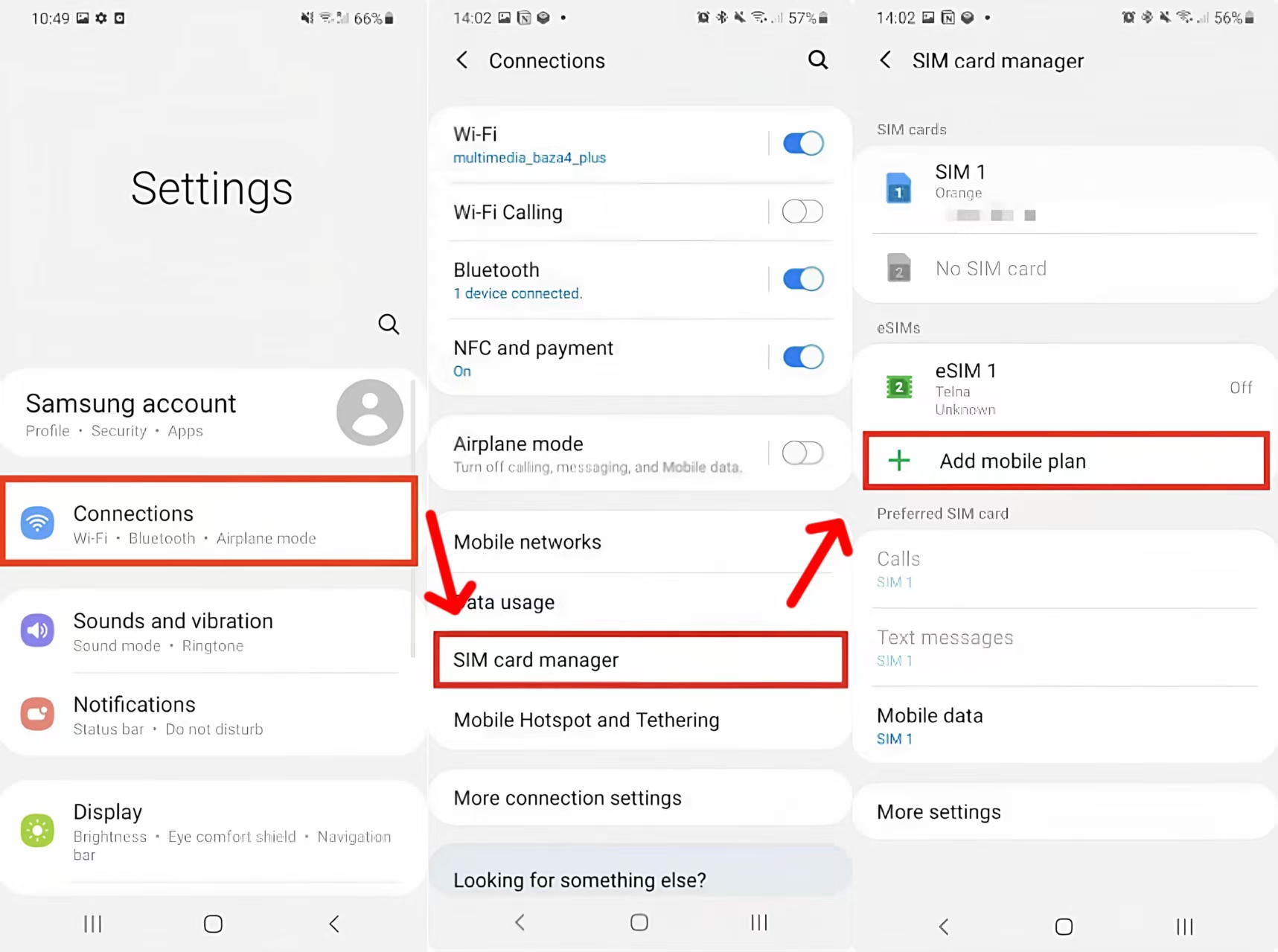
The most intuitive way to check if your Samsung phone supports eSIM is: go to Settings > Connections > SIM Manager.

If you can see the "Add eSIM" or "Add mobile plan" option, your phone is perfectly compatible.

How to Check

Confirm Directly via Samsung One UI

Unlike Apple's iOS, Samsung has its own deeply customized One UI system. For most Samsung users, checking directly in the system settings is the most intuitive approach.

1. Open the Settings app on your Samsung phone.

2. Tap Connections at the top.

3. Find and enter SIM  Card Manager (it might be called "SIM card status" on older One UI versions).

4. Look for the "Add eSIM/Add Mobile Plan" button with a green plus icon.

If this button is present and not grayed out, congratulations.

Your device can directly download and use international data plans.

Final Verification Using the EID Dial Method

If you cannot find the above option in your settings, or if your One UI version is older, please use the industry-standard physical hardware detection method.

Open Samsung's "Phone" app and dial *#06# on the keypad.

If the pop-up device information contains a 32-digit EID number, your hardware supports it.

For the underlying logic of the EID dial method and comparisons with other phone brands, we have an extremely detailed visual breakdown in our Ultimate Guide to General eSIM Device Compatibility

Why is Your Model on the List but Incompatible?

Many Samsung users check a generic "eSIM compatible phones list" online, see "Galaxy S20 series" or "Galaxy A54" listed, and confidently buy a travel eSIM plan.

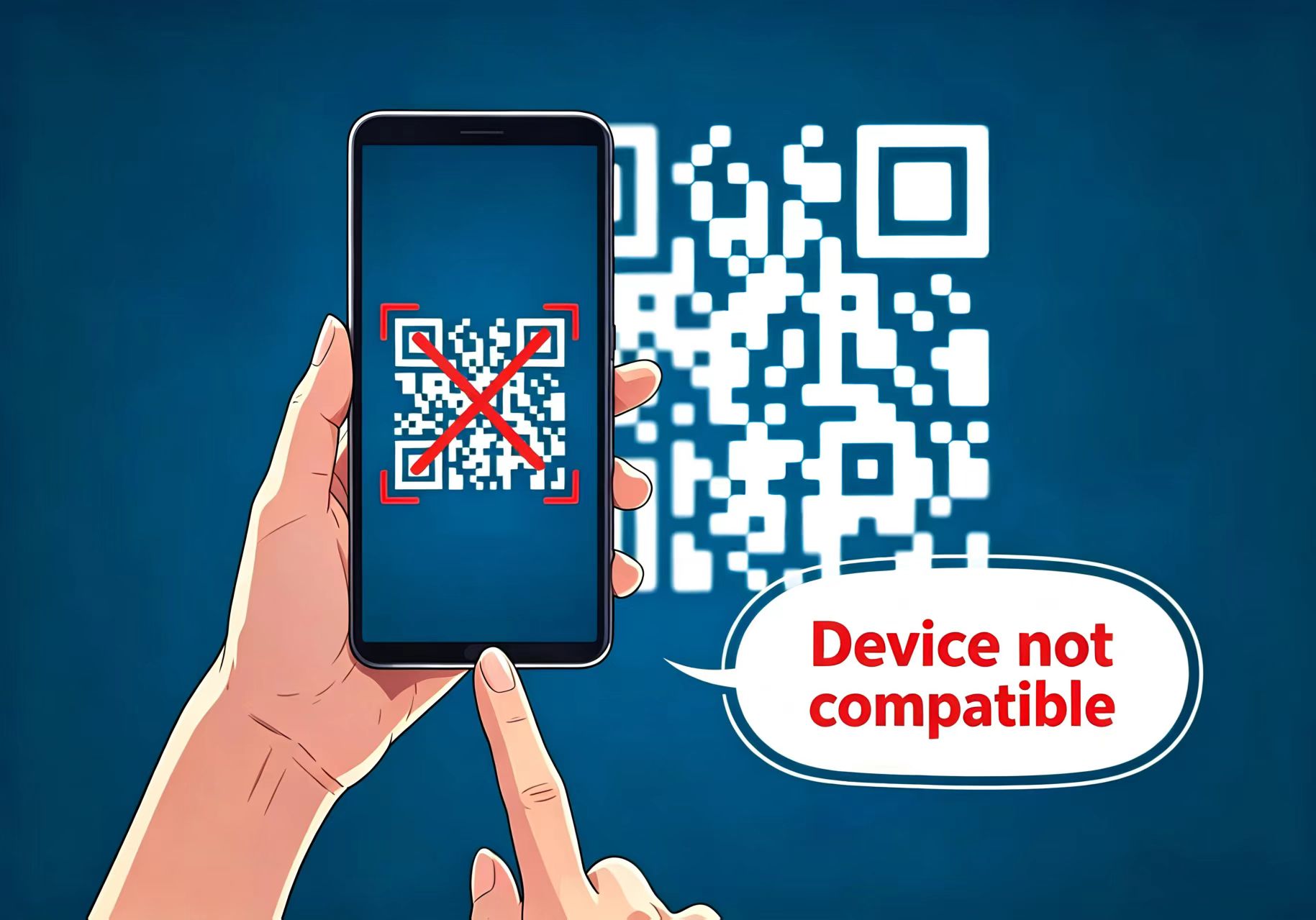
However, upon arriving abroad, they scan the QR code only to get a "Device not compatible" error, leaving them completely disconnected.

The culprit behind this terrible experience is Samsung's highly complex Product Line Segmentation Strategy.

To avoid wasting money, Samsung users must avoid the following three major misunderstandings before purchasing:

1.Beware of the "FE (Fan Edition)"

This is a disaster zone.

Samsung's digital flagships (like S20, S21) natively support eSIM, but the S20 FE and S21 FE, launched to reduce costs, have had their eSIM modules physically removed in most global markets. Never buy a plan blindly just because they have the "S series" prefix.

2.The Confusing A-Series Mid-Range Phones

The compatibility of the Samsung Galaxy A series (like A54 5G, A55) depends entirely on where you bought it.

For example, the A54 sold in Europe and North America supports eSIM, but the exact same model sold in parts of Asia only supports dual physical SIMs.

3.Gray Market Phones Chasing "Exynos/Snapdragon" Processors

Many tech geeks specifically buy Hong Kong or Taiwan versions of Samsung flagships (like the HK version S23 Ultra) to get the Qualcomm Snapdragon processor.

These versions released for the Greater China region are stripped of eSIM functionality at the factory.

Samsung Galaxy eSIM Compatibility Red/Black List

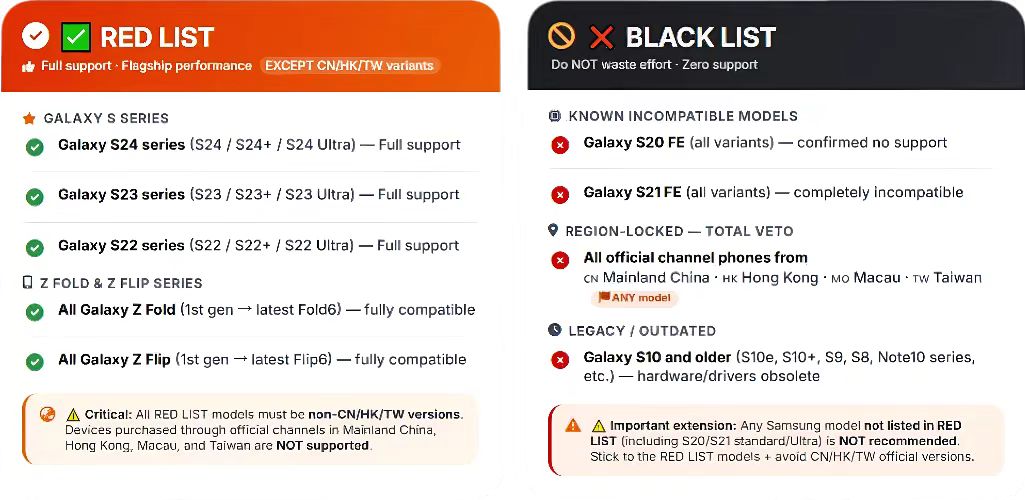
To make it clear at a glance, we have compiled a "Red/Black List" specifically for Samsung models (assuming your phone is not carrier-locked):

Buy with Confidence (Basically all series supported, except CN/HK/TW versions):

  • All Galaxy S24, S23, S22 series
  • All Galaxy Z Fold and Z Flip series (from the 1st gen to the latest)

Absolutely NOT Supported (Don't waste your effort):

  • Galaxy S20 FE, S21 FE
  • All Samsung phones purchased through official channels in Mainland China, Hong Kong, Macau, and Taiwan
  • Galaxy S10 and older models

Check ByteSIM's Official Samsung List for Total Peace of Mind

Even after passing the system checks above, many first-time Samsung eSIM users still feel a bit anxious before placing an order: "What if the plan I buy just happens to not support my specific model?"

To completely eliminate your worries, our team at ByteSIM continuously tests and maintains the most detailed and accurate device compatibility database. 

Before purchasing our global high-speed data plans, you can directly cross-reference our Samsung Galaxy Compatibility List. As long as your phone is on the list, we guarantee a 100% seamless connection experience.

Once you confirm your device is on the list, you can confidently choose a ByteSIM data plan for your upcoming trip. 

If this is your first time using an eSIM on a Samsung phone, don't worry about the setup process.

 Grab our Step-by-Step eSIM Installation Guide for Samsung Galaxy, and set up your data plan at home. Then land, and you’re instantly connected — for a fraction of the cost.

Ready to travel smarter? Get your eSIM now!

發表評論

姓名
郵件
評論