• English
  • Español
  • Français
  • 日本語
  • 한국인
  • 中文(简体)
  • 中文(繁體)
  • 中國(USD $)
  • 丹麥(USD $)
  • 日本(USD $)
  • 比利時(USD $)
  • 加拿大(USD $)
  • 台灣(USD $)
  • 白俄羅斯(USD $)
  • 立陶宛(USD $)
  • 冰島(USD $)
  • 列支敦士登(USD $)
  • 匈牙利(USD $)
  • 安道爾(USD $)
  • 西班牙(USD $)
  • 克羅地亞(USD $)
  • 希臘(USD $)
  • 拉脫維亞(USD $)
  • 法國(USD $)
  • 法羅群島(USD $)
  • 波斯尼亞和黑塞哥維那(USD $)
  • 波蘭(USD $)
  • 直布羅陀(USD $)
  • 芬蘭(USD $)
  • 阿爾巴尼亞(USD $)
  • 俄羅斯(USD $)
  • 保加利亞(USD $)
  • 美國(USD $)
  • 英國(USD $)
  • 香港特別行政區(USD $)
  • 挪威(USD $)
  • 格恩西島(USD $)
  • 烏克蘭(USD $)
  • 馬耳他(USD $)
  • 馬其頓(USD $)
  • 捷克共和國(USD $)
  • 曼島(USD $)
  • 梵蒂岡(USD $)
  • 荷蘭(USD $)
  • 斯瓦爾巴和揚馬廷(USD $)
  • 斯洛文尼亞(USD $)
  • 斯洛伐克(USD $)
  • 黑山(USD $)
  • 塞浦路斯(USD $)
  • 塞爾維亞(USD $)
  • 奧地利(USD $)
  • 奧蘭群島(USD $)
  • 意大利(USD $)
  • 愛沙尼亞(USD $)
  • 愛爾蘭(USD $)
  • 新加坡(USD $)
  • 瑞士(USD $)
  • 瑞典(USD $)
  • 聖馬力諾(USD $)
  • 葡萄牙(USD $)
  • 德國(USD $)
  • 摩納哥(USD $)
  • 摩爾多瓦(USD $)
  • 澤西島(USD $)
  • 澳大利亞(USD $)
  • 澳門特別行政區(USD $)
  • 盧森堡(USD $)
  • 羅馬尼亞(USD $)

未找到相關貨幣

關閉

/ /

Ultimate Guide: 3 Steps to Accurately Check if Your Phone Supports eSIM

Apr 10,2026 | Wang

Table of Contents

How to Check

Two Hidden Prerequisites for eSIM

Confirmed Support? Start Your ByteSIM Global Network Experience

When buying a travel data plan, the worst experience is spending money only to find out your phone doesn't support it upon arrival. 

Buying blindly can easily lead to losing connection.

Taking one minute to confirm device compatibility before purchasing is the only way to ensure a smooth trip. 

How to Check

1.Dial for EID

Simply put, the key is to check for something called an EID.

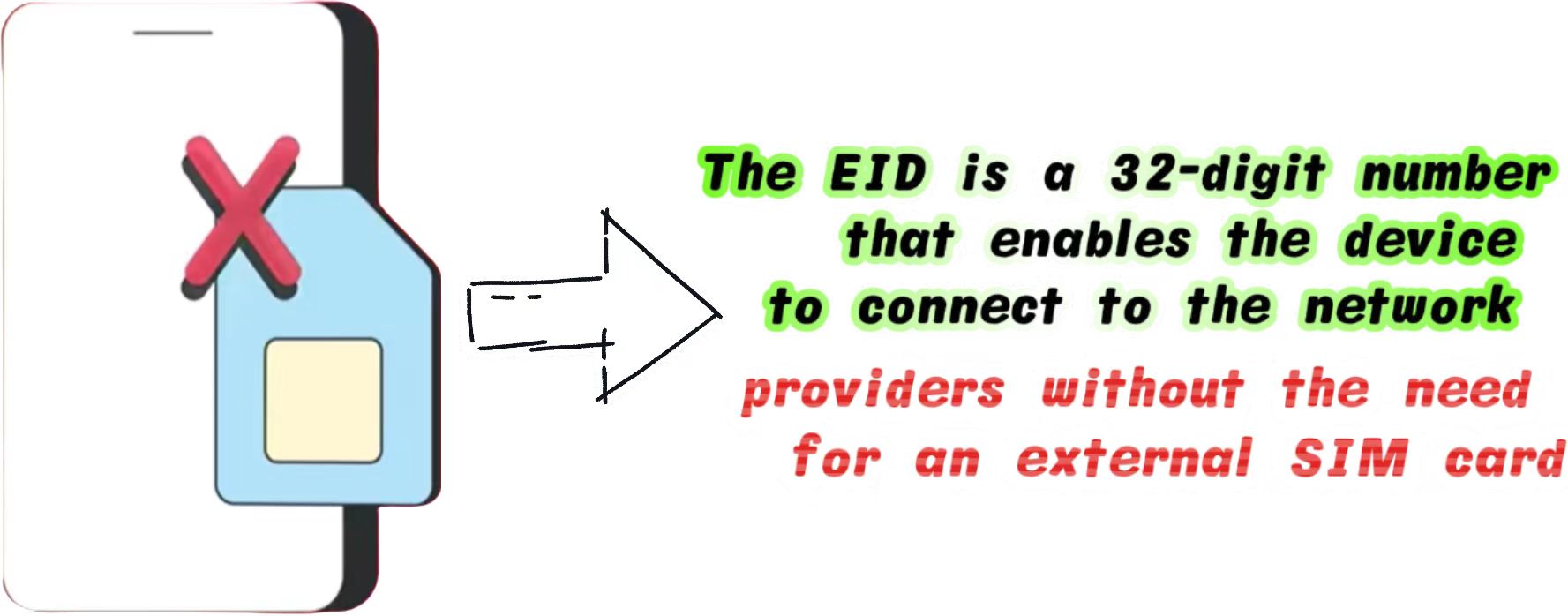
EID (Embedded Identity Document) is the unique hardware identifier for an eSIM.

Whether you use an Apple or Android device, this is currently the most accurate physical hardware detection method recognized in the industry.

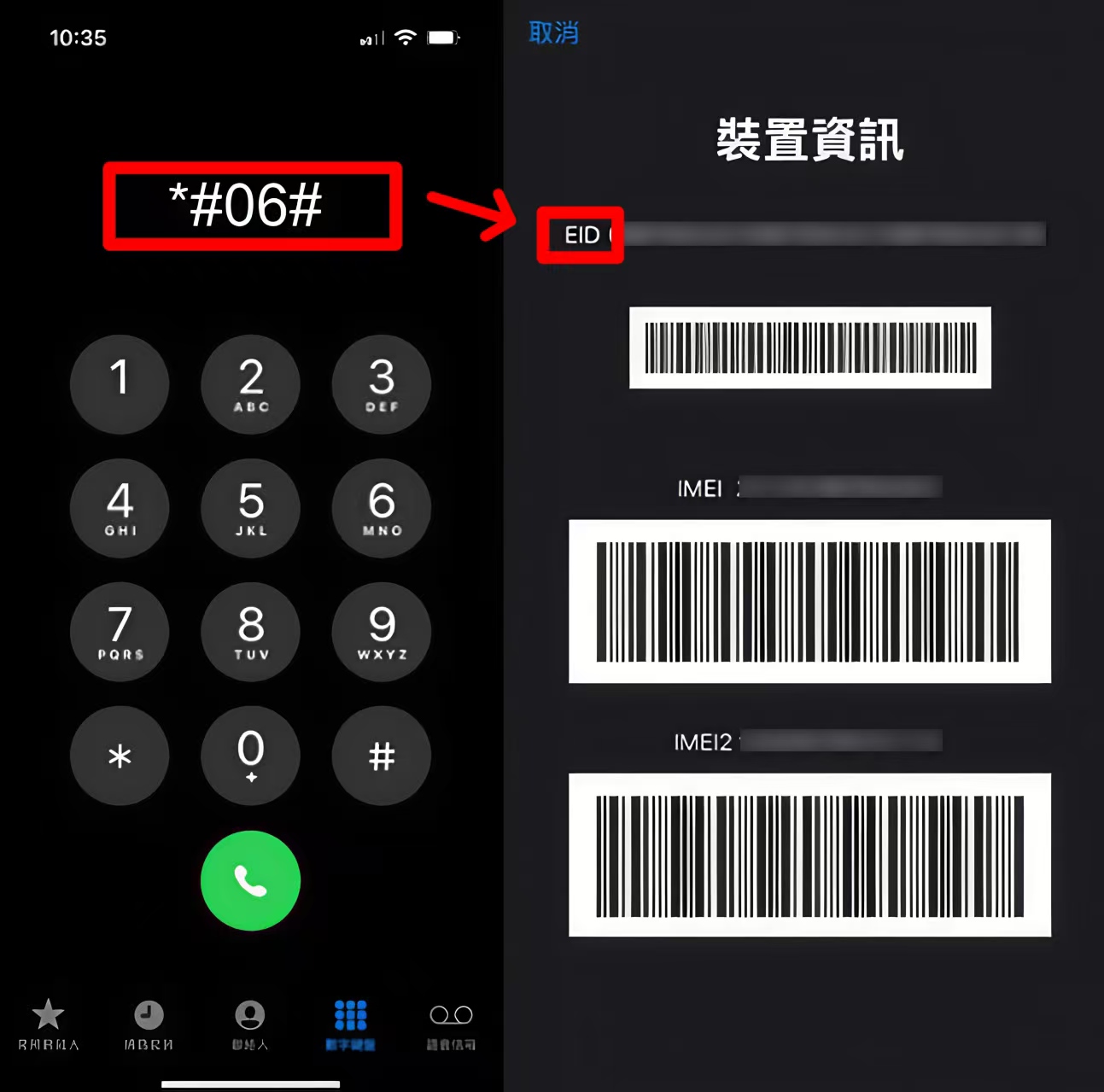
  • Open the "Phone" or "Dialer" app on your device
  • Type *#06# on the keypad
  • A screen containing your device information will automatically pop up

If it includes a 32-digit number, it means your phone has built-in.

If no EID is displayed, and you only see IMEI and MEID, your device does not support it.

2.iOS / iPhone

If you prefer not to use the dial method, you can visually confirm through the iOS system settings.

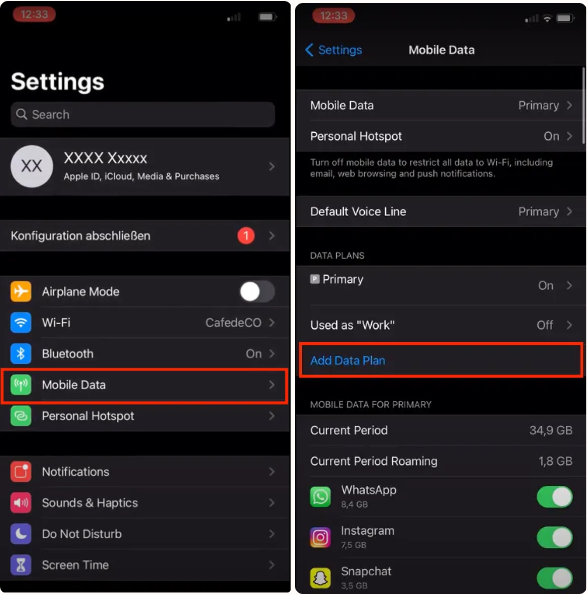
Apple's system hierarchy is highly unified. The verification steps are as follows:

1. Go to Settings> Cellular(or Mobile Data).
2. Scroll down and look for a blue button that says Add eSIM or Add Cellular Plan.

If this button is present, your hardware supports it.

However, please note that Apple has strict regional sales policies. You can refer to the Apple Official eSIM Support Document for more technical details.

3.Android

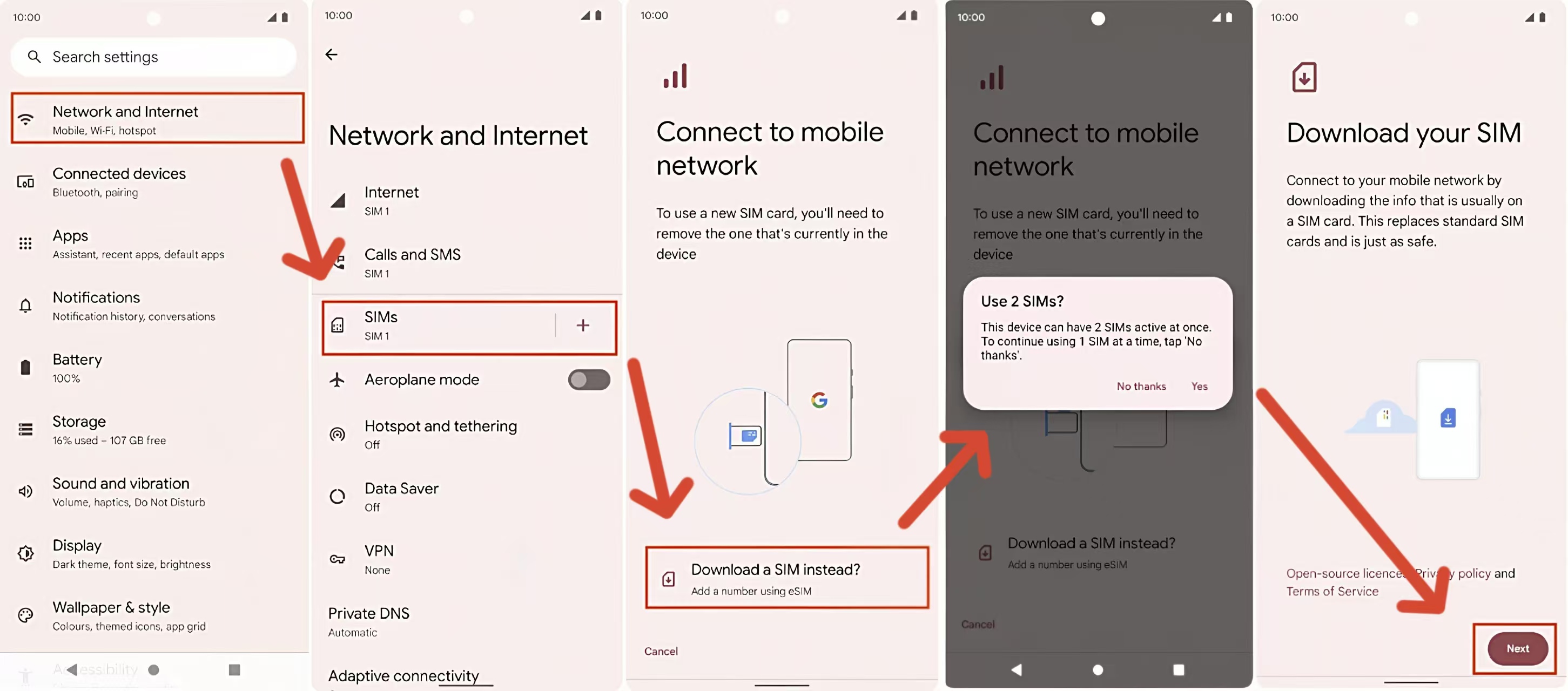
The Android ecosystem is more fragmented, and menu paths vary slightly between brands. Here are the check paths for mainstream Android brands:

Samsung: Settings > Connections > SIM Manager > Check for "Add mobile plan" or "Add eSIM".

If you still have questions about Samsung phone compatibility, you can click How to Check if Your Samsung Phone is eSIM Compatible (2026 Updated) for more details.

Google Pixel: Settings > Network & internet > SIMs > Tap the "+" icon > Check for a "Download a new eSIM" option.

Android menu names vary by system version.

If you cannot find the corresponding option in the paths above, please use the dial *#06# for final confirmation.

Two Hidden Prerequisites for eSIM

Even if your phone displays an EID, it must simultaneously meet the following two conditions to use a travel eSIM normally.

This is a blind spot that many beginners easily overlook.

1. Must Be "Carrier-Unlocked"

If your phone is tied to a specific carrier (like AT&T, T-Mobile, or SoftBank) through a contract, it will have a Carrier Lock. Even with eSIM functionality, this type of device cannot add data plans from other network providers.

  • How to check on iPhone: Settings > General > About > Find "Carrier Lock". If it says "No SIM restrictions", you are safe.

2. Avoid Hardware Restrictions in Specific Regions

Due to local regulations, phones sold in certain regions have the eSIM module physically removed at the factory:

  • Mainland China: All iPhones manufactured for Mainland China do not support eSIM (they only support dual physical nano-SIMs).
  • Hong Kong/Macau: iPhone 13 and newer Pro/Pro Max models do not support it, but some iPhone SE and mini models do.

If you are using a phone from these restricted regions, we recommend preparing a backup plan before traveling. You can refer to the methods discussed in Alternatives for Chinese Phones Traveling Abroad

Confirmed Support? Start Your ByteSIM Global Network Experience

If your device perfectly supports eSIM and has no network lock after the tests above, congratulations. You now have the hardware foundation to enjoy seamless global connectivity.

As a professional global communication service provider, ByteSIM is dedicated to providing a minimalist and stable internet experience for cross-border travelers and business professionals.

You now know exactly how to check eSIM compatibility. If your device is ready, so are you — time to enjoy the flexible, seamless connection eSIM makes possible!

Configuring your network in advance before departure is the first step to efficient travel.

If you don't know how to import the plan into your phone after purchasing, don't worry!

Please read Detailed eSIM Installation and Activation Guide for iOS and Android which includes step-by-step visual breakdowns.

發表評論

姓名
郵件
評論