Seamos honestos. La razón principal por la que estás investigando la función Huawei Watch eSIM no es por algún concepto abstracto de "futuro de la tecnología". Es porque llevar un bloque de vidrio de medio kilo en tu bolsillo durante una carrera de 5K es increíblemente molesto. O tal vez solo quieres caminar por la calle para tomar un café sin sentirte atado a tu teléfono.
Hoy, vamos a omitir los manuales genéricos. Hablemos sobre qué relojes Huawei realmente soportan esto, las trampas ocultas durante la configuración y qué deberías hacer realmente con tu smartwatch cuando viajas internacionalmente.
Verifica antes: ¿Qué modo realmente necesitas?
En los relojes Huawei, eSIM generalmente funciona de dos maneras diferentes. Muchas personas se quedan atascadas en la primera pantalla del proceso de activación: ¿debería elegir "Un número, dos dispositivos" o "Número independiente"? Elegir el incorrecto arruinará tu experiencia.
Un número, dos dispositivos (lo que el 99% de las personas quiere):
Piensa en esto como clonar tu SIM principal. Tu teléfono y tu reloj comparten el mismo número de teléfono, pool de datos y plan de voz. Si alguien te llama, ambos dispositivos suenan.
Esta configuración es ideal para:
- Actividades de running y fitness
- Desplazamientos diarios
- Viajes rápidos sin llevar un teléfono
- Mantenerse conectado durante los entrenamientos
Número independiente (la disponibilidad varía según el operador y la región):
Tu reloj obtiene un número de teléfono completamente nuevo y separado. Puede hacer llamadas o recibir mensajes independientemente de tu smartphone. Esto le permite funcionar como un dispositivo de comunicación independiente o de respaldo.
Esta configuración es útil para:
- Niños que aún no poseen un smartphone
- Miembros mayores de la familia
- Dispositivos de comunicación de respaldo
- Separar contactos laborales y personales
¿Su Huawei Watch realmente soporta eSIM?
No asumas que porque es nuevo, tiene celular. Huawei generalmente reserva el hardware eSIM para su serie insignia numerada y líneas ultra premium. La serie "GT" (que está diseñada para una duración de batería de 2 semanas) generalmente no lo soporta. Los siguientes modelos actualmente soportan la funcionalidad eSIM en mercados seleccionados. Si también estás buscando smartphones Huawei u otros dispositivos compatibles que soporten eSIM, consulta nuestra lista de dispositivos compatibles con eSIM para los últimos modelos soportados.
| Modelo | Soporte eSIM |
|---|---|
| Huawei Watch 2 | Sí |
| Huawei Watch 2 Pro | Sí |
| Huawei Watch 3 | Sí |
| Huawei Watch 3 Active 4G | Sí |
| Huawei Watch 3 Pro | Sí |
| Huawei Watch 4 | Sí |
| Huawei Watch 4 Pro | Sí |
| Huawei Watch 5 | Sí (solo modelo celular) |
| Huawei Watch Ultimate Design | Sí (solo versiones seleccionadas) |
¿Cómo activar eSIM en Huawei Watch?
Deja de buscar un escáner de código QR en el menú de tu reloj. Las eSIM de smartwatch no funcionan como las eSIM de teléfono. Tienes que hacer una provisión "over-the-air" usando tu teléfono como intermediario.
El camino directo:
- Asegúrate de que tu reloj tenga al menos un 30% de batería y esté conectado a tu teléfono a través de Bluetooth.
- Abre la aplicación Huawei Health en tu teléfono.
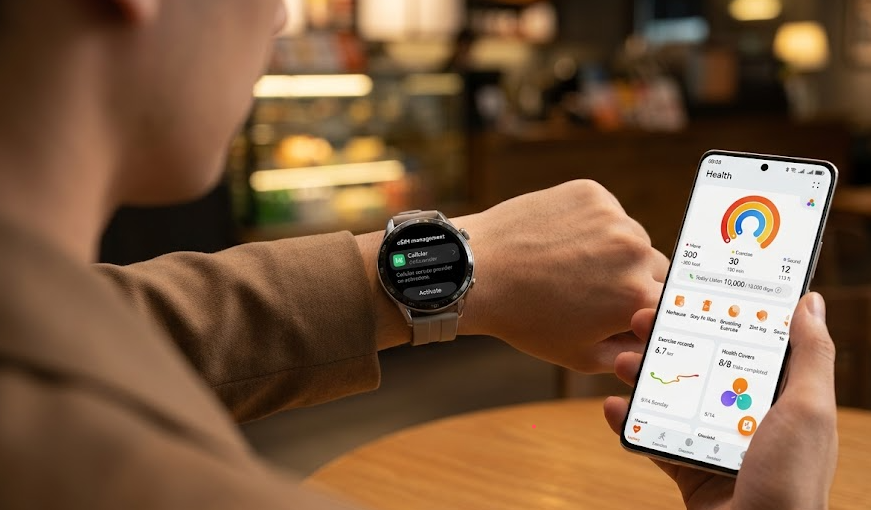
- Toca Dispositivos en la parte inferior -> selecciona tu reloj -> encuentra gestión de eSIM.
- Toca "Habilitar" (o Activar). La aplicación ahora te redirigirá a una página web dentro de la aplicación alojada por tu operador específico.
- Inicia sesión con tus credenciales de operador, sigue las instrucciones y completa la verificación de identidad.
- Una vez enviado, espera 1-2 minutos. Tu reloj dirá "Descargando perfil" y luego reiniciará su red.
Nota: Si tu operador local utiliza un método de activación diferente (como escanear un código QR específico del operador a través de la aplicación), puedes consultar los pasos exactos de la interfaz en la Página de Soporte Oficial de Huawei eSIM.
¿Te quedaste atascado? Aquí hay un consejo de profesional real. Si llegas al paso 4 y la página del operador simplemente gira sin fin o no se carga, generalmente es tu Wi-Fi el que causa el problema. Los firewalls estrictos del router, VPNs o bloqueadores de anuncios a menudo matan el enlace de redirección del operador. La solución: Apaga el Wi-Fi de tu teléfono, cambia a tus datos celulares 4G/5G y vuelve a intentarlo. Casi siempre se conecta al instante.
Si cambio mi teléfono, ¿se verá afectado mi Huawei Watch eSIM?
Sí, en muchos casos.
Porque el servicio eSIM del reloj generalmente está vinculado a la aplicación Huawei Health y a tu smartphone emparejado, cambiar de teléfono puede requerir reconfiguración.
El proceso exacto depende de tu operador, pero generalmente incluye:
- Desvincular el reloj del antiguo teléfono
- Hacer una copia de seguridad de los datos importantes del reloj
- Eliminar o suspender el servicio de smartwatch eSIM si es necesario
- Emparejar el reloj con el nuevo teléfono
- Reingresar a la gestión de eSIM
- Volver a descargar o reactivar el perfil del operador
Algunos operadores permiten migración sin problemas, mientras que otros requieren una nueva activación.
Si planeas actualizar tu teléfono, es una buena idea verificar la política de migración de smartwatch eSIM de tu operador de antemano.
¿Puedes instalar un viaje eSIM directamente en un Huawei Watch?
Ahorra el dolor de cabeza: la respuesta corta es no.
Muchas personas compran un plan de datos digital en línea, reciben el código QR en su bandeja de entrada y luego pasan horas buscando en los menús de Huawei tratando de averiguar cómo escanearlo. No va a funcionar.
A diferencia de tu smartphone desbloqueado—que acepta felizmente casi cualquier perfil de datos digitales de cualquier parte del mundo—el ecosistema portátil de Huawei es altamente restrictivo. El reloj está diseñado específicamente para conectarse con tu operador celular local a través de la aplicación Huawei Health. No funciona como un teléfono de viaje independiente, y simplemente no está construido para aceptar perfiles de viaje de terceros.
No puedes eludir a tu operador local inyectando un paquete de datos de viaje barato directamente en tu muñeca.
Combinación para viajeros: Huawei Watch + viaje eSIM
Solo porque tu reloj no puede contener un perfil de viaje no significa que se vuelva inútil en el momento en que cruzas una frontera. Solo tienes que usar la herramienta adecuada para el trabajo.
Piensa en tu smartwatch y tu smartphone como un equipo. Cuando estás en tu ciudad natal, el operador eSIM de tu Huawei Watch es la estrella del espectáculo. Te da el lujo definitivo de dejar tu teléfono en la encimera de la cocina mientras sales a correr, vas al gimnasio o haces diligencias sin perder una llamada de emergencia.
Pero en el momento en que pones un pie en un avión en un país extranjero? Los roles se invierten. Es entonces cuando necesitas poner un viaje eSIM en tu smartphone. Al usar un servicio como ByteSIM en tu teléfono, evitas instantáneamente esos cargos de roaming de pesadilla y aseguras un gran y confiable acceso a datos locales 4G/5G.
Una vez que tu teléfono esté en línea, tu Huawei Watch simplemente vuelve a lo básico y se conecta a él a través de Bluetooth. Tu teléfono hace todo el trabajo pesado—recopilando datos de mapas, actualizaciones de transporte y mensajes de WhatsApp a través de la red ByteSIM—mientras tu reloj refleja toda esa información vital directamente en tu muñeca.
No necesitas que el reloj tenga roaming. Solo necesitas que tu teléfono tenga una conexión de viaje sólida, y el reloj seguirá su ejemplo sin problemas.