

スタジアムでFIFAアプリが読み込めない?ワールドカップ2026前に知っておきたい5つの対策
May 08,2026 | Wang
2026 FIFAワールドカップでは、チケットの完全デジタル化が導入されます。
すべてのチケットはFIFAアプリ内のQRコードとして発行され、そのQRコードを表示するにはインターネット接続が必要です。
想像してみてください。あなたは試合観戦のために地球の反対側まで飛行機でやって来ました。1枚のチケットに1,000ドル以上を支払い、1時間以上列に並びました。ようやく入場ゲートが目の前に見えてきます。そこでFIFAアプリを開くと――表示されたのは、読み込み中のスピニングアイコンだけでした。
アンテナ表示は十分に立っているのに、何も読み込めません。、
スタジアムWi-Fiに接続しようとしても、ログイン画面はタイムアウト。後ろには長い列ができ始め、警備スタッフも状況を見ています。
これは決して仮定の話ではありません。2022年カタールワールドカップでも、多くの観客が同様の問題を報告しました。そして2026年大会は、アメリカ、メキシコ、カナダの16都市で開催され、最大8万人規模の観客を収容するスタジアムが使用されます。通信ネットワークへの負荷はさらに大きくなることが予想されます。
幸いなことに、この問題はホテルを出発する前に実行できる5つの準備で大きく回避できます。その中でも最も重要なのが、通信優先度が低下する可能性のあるローミング回線ではなく、Tier-1通信事業者へ直接接続できる現地eSIMを事前に有効化しておくことです。

スタジアムでFIFAアプリが読み込まれない理由
チケットが表示されない原因は、アプリの不具合ではありません。主な原因は、基地局へのアクセス集中によるネットワークのボトルネックです。さらに、海外旅行者が利用するローミング通信では優先度が低くなる可能性があり、問題がより深刻になることがあります。
基地局の過負荷:8万人のスマートフォンが同じ基地局に集中する
ワールドカップの開催スタジアムには、6万人から8万人の観客が集まります。キックオフ前の90分間には、そのほぼ全員がスタジアム周辺数百メートル以内に集中します。
観客は同じ基地局群の通信容量を共有しながら、動画視聴、写真投稿、ナビゲーション、メッセージの送受信、そしてFIFAアプリの利用を行います。携帯電話の基地局が同時に処理できる通信量には限界があります。
通信事業者は大規模イベント向けにCOW(Cells on Wheels:移動式基地局)などの臨時設備を投入することがありますが、それでも膨大な数の同時接続によって通信帯域が飽和する可能性があります。
そのため、スマートフォンのアンテナ表示が最大になっていても、FIFAアプリが読み込めないという状況が発生するのです。
海外旅行者が直面する「ローミング利用者の不利」
母国の通信事業者による国際ローミングを利用している場合、この問題はさらに深刻になる可能性があります。
ネットワークが混雑すると、通信データは現地ユーザーの通信処理の後ろに回される場合があります。
ローミング通信では、データが現地の基地局を経由した後、契約している通信事業者のコアネットワークへ送られ、再び現地ネットワークへ戻るという経路をたどります。場合によっては、別の大陸を経由することもあります。
その結果、通信遅延(レイテンシー)が発生します。
さらに重要なのは、ネットワークが混雑した際、多くの通信事業者ではQoS(Quality of Service)ポリシーに基づき、ローカル契約者の通信を優先する場合があることです。
重要な背景情報:ただし、この優先制御の仕組みは通信事業者間の契約内容やネットワーク運用方針によって異なります。すべての通信事業者が、あらゆる状況でローミング通信の優先度を下げるわけではありません。
しかし、ワールドカップのような極端な通信混雑が発生するイベントでは、ローミング通信のパフォーマンスが低下する可能性は高くなります。
スタジアムWi-Fiは「最後の保険」にはならない
多くのファンの最初の本能はWi-Fiを探すことです。しかし、スタジアムの公共Wi-Fiは同じ混雑の問題に直面しており、しばしばそれが悪化します。
無料のWi-Fiネットワークは通常、帯域幅が制限されており、タイムアウトする可能性のあるキャプティブポータル認証を必要とし、数万の同時接続に耐えられません。
8万人収容のスタジアムで「無料Wi-Fiがあるから安心」と考えるのは、実際にはあまり現実的ではありません。
デジタルチケットを確実に表示するための試合前の5つの準備
以下の5つの対策は、オフラインキャッシュ、現地eSIM、緊急用スクリーンショットなどを組み合わせた多重防御です。どれか1つが機能しなくても、別の手段でゲートを通過できる可能性を高められます。
ステップ1:ホテルのWi-Fiでチケットを事前表示しておく(試合前日推奨)
試合の前夜に、ホテルの安定したWi-Fiに接続し、次のことを行ってください:
- FIFA公式チケットアプリを開く
- 観戦する試合のチケット画面へ移動する
- QRコードが完全に表示されるまで待つ
- アプリを終了せず、バックグラウンドで起動したままにしておく
FIFAのデジタルチケットは、2022年カタールワールドカップと同様の仕組みを採用する場合、動的QRコードを使用する可能性があります。そのため、一定時間ごとにネットワーク通信が必要になることがあります。事前にチケットを表示しておくことで、アプリ内にキャッシュされたデータを利用しやすくなります。
2026年大会の最新チケット運用ルールについては、FIFAワールドカップ2026の公式情報をご確認ください。大会が近づくにつれて最新情報が公開される予定です。
2026年大会に関する補足:現時点では、FIFAは2026年大会におけるQRコード更新方式やチケット更新プロトコルの詳細を公表していません。上記の対策は、2022年カタールワールドカップで採用された仕組みを参考にしています。今後変更が発表される可能性があるため、必ずFIFAの公式発表を定期的に確認してください。
ステップ2:ホテルを出る前に、電話を「チケット専用」モードに切り替えます。
FIFAのデジタルチケットは、スクリーンショットから読み込むことができない動的QRコードに依存しているため、コードは毎回アプリを通じてリアルタイムで生成される必要があります。そのため、スタジアムに到着した際には、FIFAアプリの帯域幅のすべてのバイトを保護することが優先事項となります。
試合日のホテルを出る前に、次のことを行ってください:
- アプリの自動更新をオフにする
- FIFA Ticketsアプリ以外のバックグラウンド更新を無効化する
- クラウド写真同期を一時停止する
- SNS、動画配信サービス、メールアプリなど、不要なアプリをすべて終了する
考え方はシンプルです。通信が混雑している環境では、利用できる帯域は非常に限られています。
その限られた帯域を複数のアプリが同時に使用してしまうと、FIFAアプリが動的QRコードを更新するための通信容量を確保できない可能性があります。
不要なアプリを停止しておけば、利用可能な通信帯域を入場に必要なアプリへ優先的に割り当てることができます。
通信が飽和した基地局環境では、スマートフォンが利用できる帯域は細いストローのようなものです。バックグラウンドアプリにその帯域を消費させないようにしましょう。
ステップ3:現地eSIMを有効化する — 最も重要な対策
このステップが、チケットを正常に表示できる可能性を最も大きく左右します。
あなたは、ホスト国のTier-1キャリアを通じて接続するローカルeSIMが必要です。基地局の混雑が発生した場合、データはローミングの帰路ではなく、ローカルチャネルを通じて移動します。
これは、レイテンシの低下、より高いQoSスケジューリングポジション(キャリアが優先順位ポリシーを強制する場合)、および使用可能な接続を維持するための大幅に良いチャンスを意味します。
なぜ「ローカル eSIM」であって「国際ローミング」ではないのですか?
現地eSIMを利用すると、端末は通信事業者のネットワーク上で現地契約者に近い形で接続されます。一方、国際ローミングでは訪問利用者として扱われます。6万人規模の観客が利用する基地局で通信処理の優先順位が必要になった場合、多くのケースでは現地契約者が優先されます。
ステップ4:2時間前に到着する — 通信混雑のピークを避ける
ほとんどのファンはキックオフの60〜90分前に到着します。もし2時間前に到着した場合:
- 基地局の負荷はまだピークに達していない。
- FIFAアプリを開き、比較的混雑していない環境でQRコードを更新できます。
- アプリが動作している間は、開いたまま前面に表示させておいてください。
早めに到着することは、単に雰囲気のためだけではなく、他の誰よりも先に帯域を確保することです。
ステップ5:機内モードのオン・オフ — 現地で最も手軽な対処法
スタジアムにすでにいる場合、データが停止しているなら、すぐにこれを試してください:
- 機内モードをオンにしてください。3秒お待ちください。
- 機内モードをオフにしてください。
- あなたの電話は、最も強い利用可能なセルタワーに再登録されます。
- 複数のSIM/eSIMラインがある場合は、手動でデータラインをローカルのeSIMに切り替えてください。
これはアプリを繰り返し強制的に更新するよりも効果的です。問題はアプリケーション層ではなく、ネットワーク層にあります。
ByteSIMがゲートでのチケット表示をサポートする仕組み
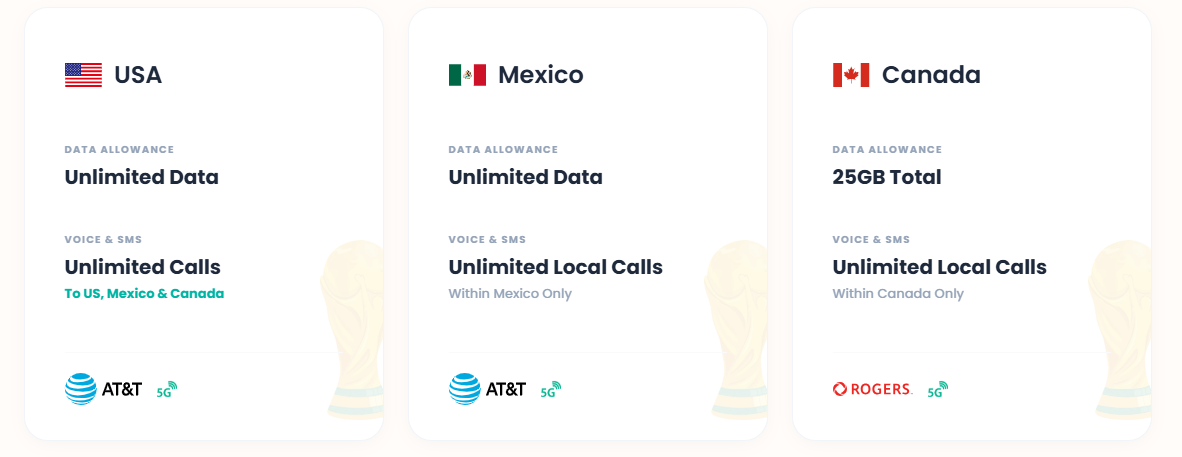
ByteSIMのワールドカップ2026北アメリカ3-in-1 eSIMは、AT&TとRogersのTier-1ネットワークを通じて接続され、5Gアクセスで無制限のデータを提供し、スタジアムの混雑時にデジタルチケットを読み込むための重要な技術的利点であるローカル加入者として電話を登録できます。
なぜByteSIMのeSIMがスタジアムネットワークの問題を解決するのか
すべてのeSIMが同じ品質というわけではありません。ByteSIMは、2026 FIFAワールドカップのように複数の国を移動しながら観戦する旅行者向けに、北米3か国対応のeSIMプランを提供しています。ここでは、その仕様がチケット表示時の通信トラブル対策とどのように関係するのかを見ていきましょう。
1) Tier-1通信事業者ネットワークを利用:AT&T(アメリカ・メキシコ)+ Rogers(カナダ)
AT&Tは、Opensignalの米国モバイル通信評価レポートにおいて「Reliability Experience(通信信頼性)」部門で高い評価を受けています。また、ワールドカップ開催都市を含む主要都市圏で広範な5Gネットワークを展開しています。
一方、Rogersはカナダにおける「Coverage Experience(エリアカバレッジ体験)」部門で高い評価を獲得しています。
これらはMVNO(仮想移動体通信事業者)が提供する再販回線ではありません。
自社で基地局や周波数帯を保有するTier-1通信事業者です。
これはスタジアムにおいてどのような意味を持つのでしょうか?
混雑が発生した場合、Tier-1キャリアの加入者は通常、MVNOユーザーやローミング訪問者よりも高いQoSティアにスケジュールされます。
ByteSIMはAT&TおよびRogersのネットワークを利用しているため、端末はローミング利用者としてではなく、現地ネットワークへ直接接続する形で通信を行います。
AT&TネットワークをT-MobileやVerizonより選ぶ理由は何ですか?
アメリカのロードトリップのためのより良いカバレッジ。アメリカの最も象徴的なルートを探索しながら接続を維持してください:
・ラスベガス → グランドキャニオン
・カリフォルニア州道1号線(Pacific Coast Highway)
・イエローストーン国立公園
2) アメリカ・メキシコは完全無制限、カナダは25GB高速通信— 日ごとの制限なし、スロットリングなし
多くの旅行向けeSIMでは、1日500MBや1GBといったデータ通信上限が設定されています。
試合の日、あなたはFIFAアプリを更新し、地図を読み込み、ライドシェアをリクエストし、グループにメッセージを送っています。上限に達し、制限され、最悪のタイミングで接続を失います。
ByteSIMのプランでは、アメリカとメキシコでデータ通信が完全無制限で利用でき、1日あたりの利用上限や速度制限はありません。カナダでは25GBの高速データ通信を利用でき、複数試合を観戦する旅程でも十分な容量を確保できます。
3) プレミアム5G対応
5Gのメリットは単純な通信速度だけではありません。
高密度環境では、Massive MIMOやビームフォーミングといった技術によって、4G LTEよりも多くの端末を同時に処理できる可能性があります。
お使いのスマートフォンが5G対応であり、利用するスタジアム周辺が5Gエリア内であれば、4Gのみを利用する場合よりも安定した通信環境を確保しやすくなります。アメリカ国内の主要ワールドカップ開催都市は、AT&Tの5Gサービスエリア内に含まれています。
4)北米3か国対応:シームレスな国境越え通信
FIFAワールドカップ2026の試合は、3つの国の16の都市に分散しています。
ByteSIMなら、1枚のeSIMで3か国すべてに対応できます―米国、メキシコ、カナダ。
ニューヨークからメキシコシティまで、次の試合のためにカードを交換したり、設定を再構成したり、新しいプランを購入したりすることなく、国境を越えると、対応ネットワークへ自動的に切り替わります。
DSDS: 元の番号を有効に保ちましょう
一般的な懸念: "eSIMを使用した場合、通常の電話番号は失われますか?"
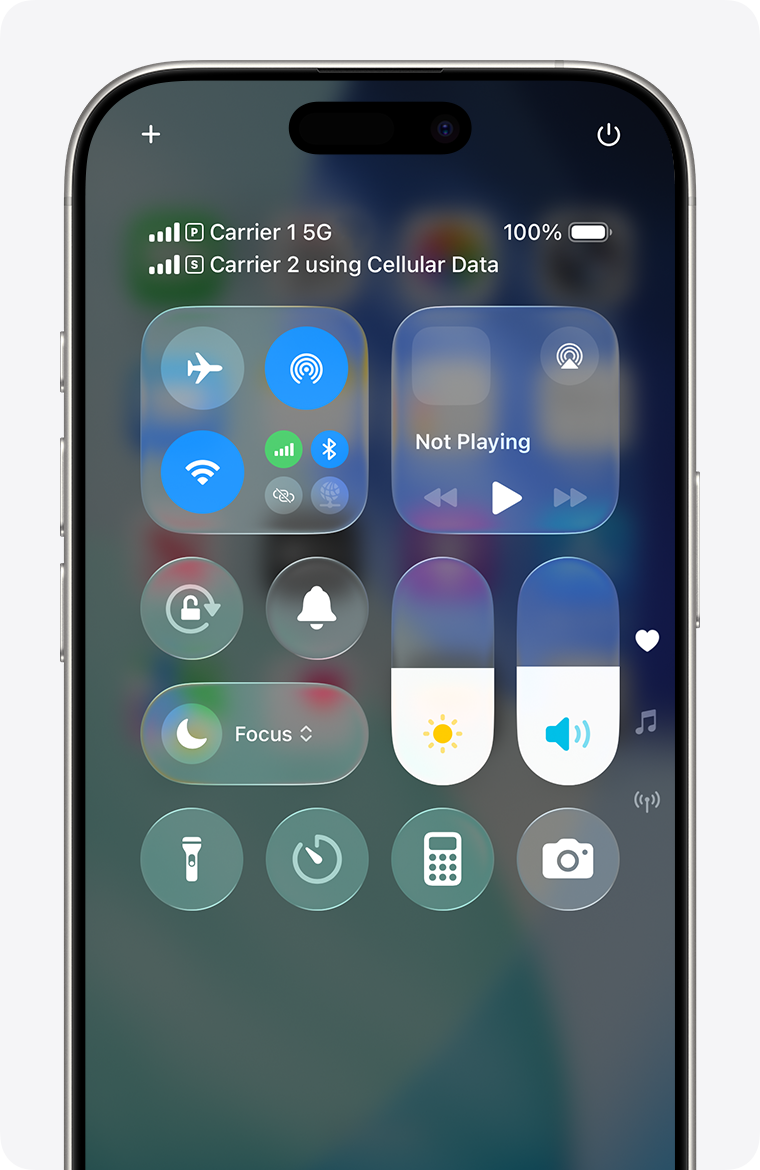
最新のスマートフォンのほとんど—XS以降のすべてのiPhoneと主要なAndroidフラッグシップを含む—はDSDS(デュアルデュアルスタンバイ)をサポートしています。
DSDSが有効になっている場合:
- eSIM ライン → ByteSIMのローカルデータ(チケット、地図、ライドシェアの読み込み用)
- 物理 SIM ラインあなたの自宅番号(通話、テキスト、二要素認証用)
両方のラインは同時に動作します。切り替えはありません。中断もありません。
ByteSIMのワールドカップ2026 eSIMは「今すぐ購入、後でアクティブ化」をサポートしています — 今日プランを購入し、到着した際にByteSIMアプリを通じてアクティブ化してください。
「今すぐ購入、後から有効化」―無駄な時間は一切なし
ByteSIMのアクティベーションモデルは、計画的に旅行をするイベント参加者向けに設計されています。トーナメントの数週間前にeSIMを購入してください。そのまま休止状態にしておいてください。
最初の試合の前日にByteSIMアプリを通じてそれをアクティブにしてください。プランのタイマーはアクティブ化の瞬間から始まります — 購入の瞬間からではありません。
これにより「到着して慌てる」シナリオが排除されます:
- 空港でSIMのベンダーを探してはいけません
- 物理的な配送を待つ必要はありませんSIM
- 試合の朝にアクティベーションの失敗のリスクはありません。
ByteSIM は、WhatsApp とメールを通じて 24 時間 7 日間のライブサポートを提供しており、通常の応答時間は 5 分未満です。試合当日に eSIM のアクティベーションや接続の問題が発生した場合、リアルタイムのサポートが利用可能です。
試合当日のタイムライン:いつ何をするべきか
特定の時間枠にすべての準備行動を結びつけます — T-24h、T-2h、T-0 — これにより、何も見落とされることはありません。
| 時間枠 | 行動 | 目的 |
|---|---|---|
|
T-24時間 (前日) |
① eSIMが有効化され、データ通信が利用できることを確認する ② FIFAアプリを開き、チケットのQRコードを完全に表示させる ③ FIFAアプリに対する過度なバッテリー最適化やメモリ管理を無効にする |
オフライン時のバックアップ手段をすべて準備しておく |
|
T-2時間 (試合前) |
① スマートフォンが十分に充電されていることを確認する ② モバイルバッテリーを持参する ③ 会場到着後、FIFAアプリを開いてチケットを更新する ④ eSIMの回線がモバイルデータ通信の利用回線として設定されていることを確認する |
通信混雑がピークに達する前にチケットを読み込み・更新する |
|
T-0 |
① アプリが正常に動作する場合 → QRコードを提示する ② 読み込みが続く場合 → 機内モードのオン・オフ → eSIM回線へ切り替え → 再試行する ③ それでも表示できない場合 → 身分証明書と予約確認書を持参してチケット対応窓口(Ticket Resolution Point)へ向かう |
多層的なバックアップ体制を確保する ― 各段階に対応策を用意する |
すべてがうまくいかなかった場合のプランB
すべての技術的手段が失敗しても、FIFAはすべての会場でチケット解決ポイントを運営していますが、行列が長くなる可能性があります。だからこそ、上記の5つの予防措置は15分の投資に値するのです。
チケット解決ポイント
FIFAは、すべてのワールドカップスタジアムに専用のチケット解決ポイントを設置し、アプリの故障、紛失または破損した電話、デジタルチケットのエラーなどの特殊なケースに対応します。次のものを提示する必要があります:
- チケット購入時に使用したID
- 予約確認メール(スクリーンショットまたは印刷したコピーを推奨)
警告:これらのサービスデスクは、ピーク到着時間帯に長い列に直面することが一般的です。
試合が始まる直前に、解決ポイントで待っていると、キックオフを逃すことになります—それ以上のことも。
同行者のテザリングを利用する
同行者が安定した現地モバイル通信環境を利用できる場合(例えば、有効化済みのeSIMを利用している場合)、テザリング機能を使って通信を共有してもらうことができます。
ByteSIMの北米向けeSIMには10GBのテザリング容量が含まれており、緊急時に同行者がチケットのQRコードを表示するためであれば十分な容量です。
バッテリー切れ?それは電波が届かないより悪い。
充電が切れた電話は、すべてのデジタルソリューションを無意味にします —eSIM、キャッシュされたチケット、スクリーンショット、すべてです。モバイルバッテリーを持ち歩きましょう。
これは技術的な知識を必要としませんが、あなたのスタジアムバッグの中で最も重要なアイテムかもしれません。
よくある質問
2022年カタールワールドカップに基づいて、FIFAデジタルチケットは動的QRコードを使用しており、読み込みや更新にはネットワーク接続が必要です。2026年の正確なメカニズムは公式に確認されていません。スタジアムでの信頼できるモバイルデータを確保することが最も安全な戦略です。
ネットワークの混雑時には、ローミングトラフィックは通常、地元のキャリアによって低いQoS優先度が与えられます。ローミングデータは自宅のキャリアを経由するため、遅延が追加されます。地元のeSIM — あなたのデバイスを地元の加入者として登録する — は、混雑した環境では一般的により信頼性があります。
現代のスマートフォンはDSDS(デュアルデュアルスタンバイ)をサポートしています。あなたのeSIMはモバイルデータを処理し、物理的なSIMは通話、テキスト、二要素認証コードを受信し続けます。両方の回線は同時に動作します。
キックオフの少なくとも2時間前。これにより、試合の60〜90分前に通常発生するネットワーク混雑のピーク前にFIFAアプリを開いて更新することができます。早めの到着を単なる物流の選択肢ではなく、接続戦略として考えてください。
最初に、機内モードのリセットを試み、データをローカルeSIMラインに切り替えてください。アプリがまだ失敗する場合は、QRコードのスクリーンショットを提示してください。それが受け入れられない場合は、IDと予約確認メールを持って会場のチケット解決ポイントに行ってください。
結論
ワールドカップのチケットに使った金額は、15分のネットワーク準備に値します。
コアロジックはシンプルです:スタジアムのネットワーク混雑は物理的な現実であり、アプリの不具合ではありません。タワーが飽和状態になると、ローミングデータはローカルユーザーの後ろに優先度が下がります。
AT&TやRogersのようなTier-1キャリアで動作するローカルeSIMは、試合前のチケットキャッシングとスクリーンショットバックアップと組み合わせることで、あなたとロックされたゲートの間に3つの防御層を構築します。
ByteSIMのワールドカップ2026北アメリカ3-in-1 eSIM — 無制限データ、プレミアム5G、シームレスな三国間カバレッジ — は大会旅行者のために特別に設計されています。
今日購入し、着陸したらアクティブにして、チケットが読み込まれることを知ってスタジアムに入ってください。
コメント

