

最佳雙SIM卡計劃適合頻繁旅行者(2026):8個智能設置以降低漫遊費用並保持一次性密碼短信正常運作
Apr 17,2026 | Wang
目錄
頻繁旅行者的最佳雙SIM卡設定
2026年最適合大多數頻繁旅行者的雙SIM卡設定是:
保留您的台灣原門號(或原門號eSIM)用於接聽電話/接收簡訊(驗證碼),
並添加一張境外旅遊eSIM用於行動數據上網。
原門號 = 保持聯絡 境外旅遊eSIM = 流量費用可控
您可以避免遺漏重要的銀行驗證碼簡訊,同時免受高昂漫遊費的意外驚嚇。
「雙SIM卡方案」究竟代表什麼
- 雙SIM卡 (Dual SIM):在同一台手機上同時使用兩條行動線路(常見的是實體SIM卡 + eSIM或eSIM + eSIM)。
- 雙卡雙待 (DSDS):兩張卡同時處於待機狀態,但通常一次只能有一條線路進行通話。
- eSIM設定檔 (eSIM profile):安裝在手機中的電信業者網路設定數據。
- 掃碼啟用 (QR-code activation):透過掃描行動條碼(QR Code)來安裝並啟用eSIM設定檔。
- APN(存取點名稱):網路接入點設定。如果安裝後無法自動連網,通常需要手動配置此項。
- 個人熱點/網路分享 (Hotspot / tethering):將手機網路分享給筆記型電腦或平板電腦。部分旅遊方案對此有所限制。
- Wi‑Fi Calling(Wi-Fi通話):透過Wi-Fi(或另一張卡的漫遊流量)來撥打電話或收發簡訊。支援情況取決於您的國內電信業者與手機型號。
您不是在購買某一個神奇的單一方案,而是在選擇一個出國上網系統:
(1) 原門號策略 + (2) 行動數據策略 + (3) 備用網路策略。
2026年8大最佳雙SIM卡組合方案
如何參考此表:頻繁出國的旅行者應優先考慮驗證碼接收穩定度、熱點/辦公用途以及成本可控度。
| 組合配置 | 最適合人群 | 覆蓋範圍 | 驗證碼/簡訊 | 個人熱點 | 成本可控度 | 主要風險 |
|---|---|---|---|---|---|---|
| 國內SIM卡 + 全球通用旅遊eSIM 全能推薦 | 多國連玩、高頻率飛行常客 | 全球 | 極佳 | 視方案而定 | 高 | 選錯覆蓋國家或網路優先級不佳 |
| 國內SIM卡 + 區域旅遊eSIM 適合歐洲/亞洲 | 在單一區域內進行多國旅行 | 區域 | 極佳 | 通常支援 | 高 | 離開該區域後需要額外購買疊加包 |
| 國內SIM卡 + 單國旅遊eSIM | 單國深度遊(7-30天) | 單國 | 極佳 | 通常支援 | 高 | 跨越邊境時不夠彈性 |
| 國內eSIM + 數據eSIM (eSIM+eSIM) | 擅長管理手機線路的3C達人 | 視情況而定 | 極佳 | 極佳 | 中等 | 容易不小心選錯預設行動數據線路 |
| 國內SIM卡 + 原生漫遊日租包 ⚠️ 價格昂貴 | 短期商務出差、懶得做任何設定 | 多國 | 極佳 | 通常支援 | 低 | 出行天數較長時,漫遊費用開銷激增 |
| 國內SIM卡 + 當地實體SIM卡(純數據) | 長期停留、預算極其有限的旅客 | 單國 | 視情況而定 | 極佳 | 高 | 線下找店、排隊、身分實名註冊較繁瑣 |
| 國內SIM卡 + 「無限流量」旅遊eSIM ⚠️ 需看清FUP | 重度影音愛好者、內容創作者 | 視情況而定 | 極佳 | 可能受限 | 中等 | 觸及公平使用原則後會限速及限制熱點分享 |
| 國內SIM卡 + 旅遊eSIM + 備用eSIM 雙保險 | 至關重要的商務旅行、核心會議 | 多國 | 極佳 | 極佳 | 中等 | 管理多張卡較繁瑣,但為了網路穩定很值得 |
對於方案 #1、#2、#3 和 #7,您的核心決策在於選擇:全球通用、區域還是單國方案。購買後,只需將手機的預設行動數據線路鎖定為eSIM即可。
60秒快速選擇(依旅行類型)
如果您單次行程造訪2個以上國家
選擇 全球通用 (Global) 或 區域 (Regional) eSIM流量方案 + 保留國內門號用於接收驗證碼。這能減少頻繁換卡的麻煩,並確保在跨越國境時網路無縫切換。
如果您是因公出差/商務旅行
推薦使用組合 #1 或 #2,並在面對極其重要的行程時,準備一張 備用eSIM(組合 #8)。
備用線路並不是浪費,而是給網路買了一份保險——尤其是當您需要用手機個人熱點帶筆記型電腦辦公時。
如果您擔心接收不到驗證碼(OTP)
原門號的策略是第一位的:保持國內門號處於可接收簡訊狀態,關閉國內門號的行動數據漫遊,並把所有上網流量都指定給境外旅遊eSIM。
iPhone與Android設定:5分鐘核對清單
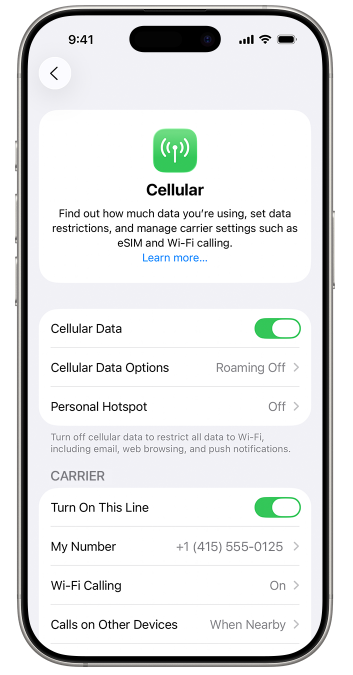
- iPhone 設定指南(最常見:實體SIM卡 + eSIM)
- 透過 掃描行動條碼 (QR Code) 安裝eSIM設定檔。
- 前往 設定 → 行動服務,將 行動數據 更改為新安裝的旅遊eSIM。
- 將 預設語音線路 保持為您原有的國內門號。
- 在您的原門號設定中,確保 數據漫遊 關閉 (OFF)。
- 為線路貼上清晰的標籤(例如,「台灣-驗證碼」和「eSIM-流量-歐洲」),防止用錯。
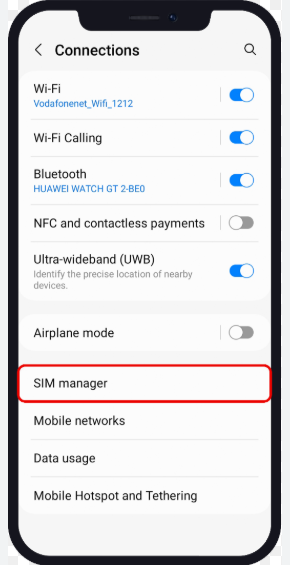
- Android 設定指南(各品牌選單名稱略有不同)
- 新增eSIM設定檔(掃描行動條碼或手動安裝)。
- 在 SIM卡管理員 中:將 行動數據 切換到新購買的旅遊eSIM。
- 將 通話與簡訊 依然保留在您的原SIM卡上。
- 如果安裝後無法上網:請檢查 APN設定,然後嘗試重啟手機並重新搜尋網路。
- 登機起飛前:請保存這份小清單
- 原門號: 行動數據漫遊務必關閉;如果電信業者需要,確保基礎的簡訊漫遊已開通。
- 旅遊eSIM: 已成功安裝;重命名以防混淆;已被設定為預設上網流量線路。
- 辦公用途: 購買前再次確認了熱點分享/網路分享政策。
- 安全應用程式: 在國內提前登入好各類App,避免在落地時頻繁觸發額外的簡訊驗證碼提示。
常見陷阱:「無限」流量、熱點、驗證碼(OTP)、天價帳單
1) 「無限流量」往往伴隨著公平使用原則 (FUP)
許多打著「無限」旗號的方案在消耗完特定額度後會進行大幅限速(公平使用原則)。有些還會限制個人熱點分享。購買時請認準具體規則,而非只看吸引人眼球的標題。
2) 手機顯示5G/4G網路,但網速感覺很慢
這可能是由於當地基站擁擠、漫遊網路路由延遲或觸及了限速閾值所致。可以嘗試在手機中手動選擇其他合作電信業者網路,或者在關鍵的辦公日準備一張備用eSIM。
3) 手機在不同線路間偷跑流量引發天價帳單
最常見的原因是國內門號的數據漫遊沒有徹底關閉,或者手機開啟了「行動數據切換/自動數據切換」功能。頻繁出行的旅行者應當徹底關閉自動數據切換,將上網流量牢牢鎖定在eSIM上。
4) 怎麼也收不到驗證碼簡訊
先從基礎排查起:確保原門號有訊號並開通了國際漫遊,網路數據則全部走旅遊eSIM,並向國內電信業者確認該目的地的簡訊漫遊規則。如果手機和電信業者支援,開通「Wi-Fi通話」功能會大有幫助。
如果某個eSIM方案在詳情頁沒有明確寫明支援熱點分享(或者在條款小字中含糊其辭),請預設它可能限制或禁止個人熱點——千萬不要指望用它來進行高強度的電腦辦公。
常見問題(頻繁旅行者必問的7個問題)
我需要購買帶通話分鐘數的境外旅遊eSIM嗎?
通常不需要。對於頻繁出國的旅客來說,最穩妥的做法是保留原門號接收重要電話和簡訊,而購買純數據的旅遊eSIM來滿足所有上網需求。
啟用雙SIM卡會加速手機耗電嗎?
稍微會一點。因為兩條線路都在同時搜尋和維持訊號。如果您在某個地方長時間逗留,可以臨時在設定中關閉不需要的那條線路以節省電量。
我能讓兩張SIM卡同時用來跑行動數據上網嗎?
絕大多數手機同一時間只允許指定一張卡為「預設行動數據」。這就是為什麼必須將數據鎖定在旅遊eSIM上的原因。
我可以在出發前就提前安裝好eSIM,等到落地再啟用嗎?
大多數情況下是可以的。不過,方案的效期是從安裝當天還是從首次連接境外網路開始計算,取決於各個方案的具體條款,購買時需留意說明。
境外旅遊eSIM都可以開熱點分享嗎?
並不是。部分方案會限制網路分享或在開啟熱點時執行更嚴格的限速規則。請在下單前仔細核實熱點政策。
如果我的eSIM無法啟用或者落地顯示無服務怎麼辦?
請依序檢查:eSIM是否成功啟用、嘗試重啟手機、在行動網路設定中切換成手動選擇網路,並確認APN是否需要設定。如果您的行程不容有失,建議購買一張不同網路電信業者的備用eSIM以防萬一。
什麼樣的人適合全eSIM(eSIM+eSIM)組合?
適合非常熟悉3C操作的高頻率商務出行者,他們能熟練切換不同的線路標籤和數據預設設定。對於絕大數普通用戶來說,實體SIM卡 + eSIM的搭配更簡單、更不容易出錯。
最終總結與下一步
對於頻繁出境的旅行者而言,最省心、最不容易出錯的「雙卡方案」是一個確定性極高、分工明確的系統:原門號負責保持聯絡 + 旅遊eSIM負責行動數據流量 + (自由選配的)備用線路。
下一步:依行程鎖定您的網路覆蓋(全球、區域或單國)
首先挑選與您的旅遊路線完美匹配的數據覆蓋範圍,在出境登機前將其下載安裝到手機裡,並在落地時將其設定為預設的行動數據卡。
瀏覽 ByteSIM eSIM 流量方案實用建議:在手機裡給線路重命名(如「台灣-驗證碼」 / 「eSIM-上網流量」),能有效防止因誤操作導致漫遊費被扣。
想要一份包含啟用故障、APN異常或落地「無服務」等問題的排查指南嗎?
如果您仍在糾結該選擇全球通用還是區域方案,不妨把您的目的地國家列表和出行天數告訴我們,聯繫線上客服為您快速推薦最划算的方案。
發表評論

