

Meilleurs forfaits double SIM pour les voyageurs fréquents (2026) : 8 configurations intelligentes pour réduire les frais d'itinérance et garder les SMS OTP fonctionnels
Apr 17,2026 | Wang
Table des matières
- Le meilleur double SIM pour les voyageurs fréquents
- Que signifient réellement les « Plans doubles SIM » ?
- Les 8 meilleures configurations Dual SIM en 2026
- Comment choisir en 60 secondes (par type de trajet)
- Configuration iPhone et Android : La liste de vérification en 5 minutes
- Pièges courants : données « illimitées », point d'accès, OTP, choc de facturation
- FAQ (7 questions fréquemment posées par les voyageurs)
- Conclusion et prochaines étapes
Le meilleur double SIM pour les voyageurs fréquents
Le meilleur ensemble dual SIM pour la plupart des voyageurs fréquents en 2026 est :
gardez votre domicile SIM (ou domicile eSIM) pour les appels/textos (codes OTP),
et ajoutez un forfait de voyage eSIM pour les données mobiles.
Ligne d'origine =accessibilité Voyage eSIM =coûts de données prévisibles
Vous évitez de perdre des SMS OTP et réduisez les surprises d'itinérance.
Que signifient réellement les « Plans doubles SIM » ?
- Double SIMUtiliser deux lignes mobiles sur un seul téléphone (couramment)Physique SIM + eSIM ou eSIM + eSIM).
- DSDS (Double veille SIM): Les deux lignes peuvent rester en attente, mais les appels utilisent généralement une ligne à la fois.
- eSIM profil: La configuration du transporteur installée sur votre téléphone.
- Activation par code QR: Scanner un code QR pour installer un profil eSIM.
- APNParamètres du nom du point d'accès. Parfois nécessaire si les données ne se configurent pas automatiquement.
- Point d'accès / partage de connexion: Partager les données du téléphone avec un ordinateur portable/tablette. Certains plans de voyage le restreignent.
- Appels Wi-Fi: Appels/SMS via Wi‑Fi (ou données). Le support dépend de votre opérateur et de votre appareil.
Vous n'achetez pas un plan magique. Vous choisissez unsystème:
(1) stratégie du numéro de base+(2) stratégie de données+(3) stratégie de sauvegarde.
Les 8 meilleures configurations Dual SIM en 2026
Comment lire ce tableau : les voyageurs fréquents devraient donner la prioritéfiabilité OTP, Utilisation du point d'accès Wi-Fi/travail, et contrôle des coûts.
| Installation | Idéal pour | Couverture | Code OTP / SMS | Point chaud | Contrôle des coûts | Risque principal |
|---|---|---|---|---|---|---|
| Accueil SIM + Voyages internationaux eSIM meilleur joueur polyvalent | Voyages à travers plusieurs pays, grands voyageurs | Mondial | Fort | Cela dépend | Haut | Choisir une mauvaise couverture / priorité réseau |
| Accueil SIM + Régional eSIM Idéal pour l'UE/l'Asie | Voyages répétés au sein d'une même région | Régional | Fort | Généralement | Haut | Nécessite un module complémentaire lorsque vous quittez la région |
| Accueil SIM + Pays unique eSIM | Voyages dans un seul pays (7 à 30 jours) | Célibataire | Fort | Généralement | Haut | Moins flexible pour les passages de frontière |
| Home eSIM + Données eSIM (eSIM+eSIM) | Utilisateurs expérimentés à l'aise avec la gestion des lignes | Variable | Fort | Fort | Moyen | Ligne de données par défaut facile à configurer par erreur |
| Accueil SIM + Forfait journée roaming opérateur ⚠️ cher | Voyages d'affaires courts, tolérance zéro pour la mise en place | Multi | Fort | Généralement | Faible | Les coûts s'accumulent rapidement sur plusieurs jours. |
| Accueil SIM + Local Physique SIM (Données) | Séjours longs, voyageurs à petit budget | Célibataire | Cela dépend | Fort | Haut | Frictions liées au magasin, à l'identification et à l'enregistrement |
| Accueil SIM + Voyages « illimités » eSIM ⚠️ Lire la page d'utilisation équitable | Streaming intensif, créateurs de contenu | Variable | Fort | Peut être limité | Moyen | Limitation du débit et restrictions des points d'accès Wi-Fi en cas d'utilisation équitable |
| Accueil SIM + Voyage eSIM + Sauvegarde eSIM résilience | Voyages d'affaires à enjeux élevés, réunions cruciales | Multi | Fort | Fort | Moyen | Un management plus poussé – un investissement rentable pour la résilience |
Pour les configurations #1, #2, #3 et #7, votre principale décision devient :Mondial vs régional vs nationalVerrouillez ensuite votre téléphone.ligne de données par défautau eSIM.
Comment choisir en 60 secondes (par type de trajet)
Si vous visitez plus de 2 pays par voyage
Choisir Mondial ou Régional eSIM données + gardez votre ligne fixe pour l'OTP. Cela minimise l'achat de nouvelles cartes SIM et réduit les temps d'arrêt aux frontières.
Si vous voyagez pour le travail
Utiliser la configurationn° 1 ou n° 2, et considérons unsauvegarde eSIM(configuration n° 8) pour les voyages critiques.
Une ligne de secours n'est pas un gaspillage. C'est une assurance — surtout quand vous avez besoin d'un point d'accès pour un ordinateur portable.
Si le partage de connexion est non négociable
Ne vous fiez pas uniquement au prix. Confirmez que le plan permetpoint d'accès/partage de connexionet comprendre les limites d'utilisation équitable.
Si vous craignez les échecs OTP
Votre stratégie de numéro de domicile passe en premier : gardez votre ligne fixe accessible, désactivez l'itinérance des données à domicile et mettez toutes les données sur le voyage eSIM.
Configuration iPhone et Android : La liste de vérification en 5 minutes
- iPhone (Le plus courant : Physique SIM + eSIM)
- Installez le eSIM viacode QR(Activation par code QR).
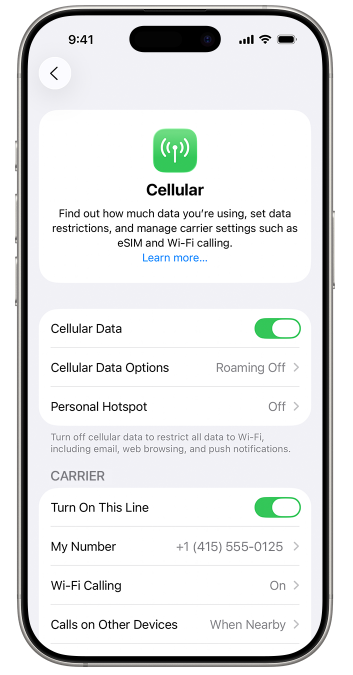
- Allez àParamètres → Données cellulaires, ensemble Données cellulairesau voyage eSIM.
- Ensemble Ligne vocale par défautà votre numéro de téléphone fixe.
- Tourner Itinérance des données désactivéepour votre ligne fixe.
- Renommer les lignes (par exemple, “Accueil—OTP” et “eSIM—Données—Europe”) pour éviter les erreurs.
- Android (Les noms des menus varient selon la marque)
- Ajoutez le profil eSIM (code QR ou installation manuelle).
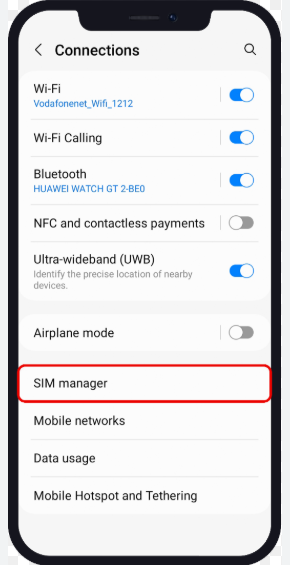
- Dans SIM Gérant: ensemble Données mobilesau voyage eSIM.
- Garder Appels et SMSsur votre ligne fixe.
- En cas d'échec des données : vérifierAPN, puis redémarrez et réenregistrez le réseau.
- Avant de prendre l'avion : conservez cette mini-liste de vérification
- Ligne d'accueil :Données en itinérance désactivées ; SMS en itinérance activés si requis par votre opérateur.
- Voyage eSIM:Installé ; nommé clairement ; défini comme ligne de données par défaut.
- Utilisation professionnelle :Veuillez vérifier la politique relative au partage de connexion avant l'achat.
- Applications de sécurité :Connectez-vous chez vous pour éviter des demandes supplémentaires de code OTP à l'étranger.
Pièges courants : données « illimitées », point d'accès, OTP, choc de facturation
1) Les offres « données illimitées » sont souvent soumises à une politique d’utilisation équitable.
De nombreux plans « illimités » limitent après un seuil (politique d'utilisation équitable). Certains limitent également le point d'accès.Lisez le texte de politique générale, pas seulement le titre.
2) Vous voyez la 5G/4G, mais la connexion semble lente.
Cela peut être une congestion, un routage ou un throttling. Essayez la sélection manuelle du réseau, ou gardez une sauvegarde eSIM pour les jours critiques.
3) Le choc de la facture se produit lorsque le téléphone change de lignes de données
La cause la plus courante est le roaming de données à domicile SIM laissé activé, ou la fonction « commutation automatique des données » activée. Les voyageurs fréquents devraient garder la commutation des données désactivée etVerrouiller les données sur le eSIM.
4) Les SMS contenant le code OTP n'arrivent pas.
Commencez par les bases : gardez votre ligne fixe accessible, conservez les données sur le voyage eSIM, et confirmez le comportement des SMS internationaux de votre opérateur. Si cela est pris en charge, l'appel Wi-Fi peut aider.
Si un plan ne mentionne pas clairement le support des points d'accès (ou mentionne des restrictions en petits caractères), supposez que le point d'accès peut être limité—et ne comptez pas dessus pour le travail.
FAQ (7 questions fréquemment posées par les voyageurs)
Ai-je besoin d'un voyage eSIM avec des minutes d'appel ?
En général, non. Pour les voyageurs fréquents, il est plus fiable de garder votre numéro de domicile pour les appels/SMS et d'utiliser le voyage eSIM pour les données.
Est-ce que le Dual SIM consomme la batterie plus rapidement ?
Légèrement, oui. Deux lignes restent en veille. Si vous êtes stationnaire pendant un certain temps, vous pouvez désactiver temporairement une ligne pour économiser de l'énergie.
Puis-je utiliser deux cartes SIM pour les données en même temps ?
La plupart des téléphones n'en autorisent qu'un seul.ligne de données par défautÀ la fois. C'est pourquoi le verrouillage des données pour le voyage eSIM est important.
Puis-je installer un eSIM avant le départ et l'activer plus tard ?
Souvent oui. Que la validité commence à l'installation ou à la première utilisation dépend des termes spécifiques du plan.
La fonction de partage de connexion est-elle toujours disponible sur les eSIM de voyage ?
Pas toujours. Certains forfaits restreignent le partage de connexion ou appliquent des limitations d'utilisation équitable. Confirmez la politique de point d'accès avant d'acheter.
Que faire si mon eSIM ne s'active pas ou n'a pas de service ?
Vérifiez votre statut d'installation, redémarrez, essayez la sélection manuelle du réseau et vérifiez l'APN si nécessaire. Si votre voyage est à enjeux élevés, gardez une sauvegarde eSIM prête.
Qui devrait prendre en considération eSIM+eSIM ?
Utilisateurs avancés et voyageurs d'affaires fréquents qui sont à l'aise avec la gestion des étiquettes de ligne et des paramètres de données par défaut. Pour la plupart des gens, physique SIM + eSIM est plus simple.
Références :eSIM (Wikipédia), Apple eSIM Assistance, Aperçu de la GSMA eSIM.
Conclusion et prochaines étapes
Pour les voyageurs fréquents, le « meilleur plan dual SIM » est un système prévisible :ligne fixe pour la joignabilité+voyage eSIM pour les données+ (facultatif)ligne de secours.
Étape suivante : Choisissez votre couverture de données (Globale, Régionale ou Pays)
Commencez par choisir une couverture qui correspond à votre itinéraire, puis installez le eSIM avant le départ et définissez-le comme votre ligne de données par défaut.
Parcourir les forfaits ByteSIM eSIMAstuce : Renommez vos lignes (“Accueil—OTP” / “eSIM—Données”) pour éviter un échange de données accidentel.
Vous voulez une liste de contrôle des échecs étape par étape pour les problèmes d'activation, les problèmes d'APN ou le message « pas de service » après l'atterrissage ?
Si vous n'êtes pas sûr de devoir choisir une couverture mondiale ou régionale, listez vos pays de destination et la durée de votre voyage, etContactez l'assistance pour une vérification rapide de l'adéquation de votre forfait..
Commentaire

